I’d swear they used to play just fine but now - not. What am I missing?
Let’s start with some more details, e.g.
- on what platform are you running your PMS and what version do you have installed?
- with what players/clients are you experiencing this behavior (app + version)?
- anything specific about your media beyond the container? → https://support.plex.tv/articles/201998867-investigate-media-information-and-formats/
- what’s showing on the
Now Playingsection of the server’s dashboard while you’re streaming that wmv file (e.g. local vs. remote vs. indirect streaming, direct play vs. transcoding vs. hw-transcoding)?

https://support.plex.tv/articles/200871837-status-and-dashboard/
Thanks for helping me! I’ll also add that these files play fine with VLC!
I’ll start here:
Windows 10, PMS 1.29.0.6244
Plex player on same Windows 10 PC
iOS Plex app version 8.9
Plex Analysis Video 480p WMV2
The Now Playing section shows the same video that I am streaming from an iOS device.
I can’t get it/them (WMVs) to play smoothly on a PC or iOS devices. I’m positive they used to play fine!
Anything further?
When I first saw your response I was wondering if there’s some more details to come.
Mind sharing a screenshot of the now playing tile (fully expanded) and the technical details from Get Info?
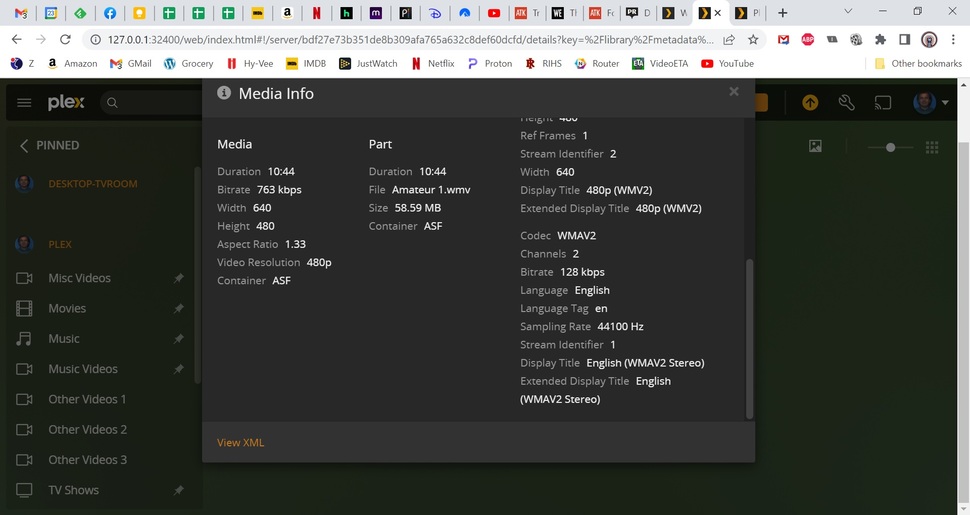


Have you checked that source file itself?
At that bitrate/resolution there’s a big chance this is just some badly encoded file.
Notice that it says there’s another version – could be you had stored a better quality version and had been watching that in the past (to a better result)?
Those are pretty small, highly compressed files. You claim the same file played in VLC shows better quality than the file played via Plex? If so, then it sounds like VLC might be attempting to do some image cleanup, while Plex just transcodes as-is.
WMV files might not be supported by Windows player (spitballing, I don’t know for sure). Is Plex direct-playing the files on your client, or does it transcode? If it’s transcoding, then at that point you technically aren’t watching the same video as in VLC. If so, then maybe something changed in how Plex transcodes WMV files and it comes out really bad?
Source file itself? This is it as far as I know. The 2nd file is the same file renamed (just to see if copying it made any difference). My memory is far from perfect but I’m sure it used to play fine kin PLEX. As I said before it plays fine in VLC and Windows Media Player.
Played fine in VLC and Windows Media Player (WMV is Windows Media Video). Where do I find the PLEX setting for direct or trans code - maybe that got changed somehow.
I don’t know if we have access to the transcode settings itself. They are quite complex, but usually any changes made to that (by the devs in server updates) ought to not break anything like what you describe. Let’s find out if it’s even transcoding the files though.
Look at tom80H’s first reply, he wants to see a screenshot of your Now Playing dashboard. That single image he exampled can tell us a bunch of info, but right now I think we only care about whether the file is being transcoded or not. See his example image? Can you get us that from your dashboard when you attempt to play the vid?
I think the reason for the pixelation is this:
(Almost) no plex client does support WMV files for direct play.
Thus, all wmv files must be transcoded in order to play them in Plex.
Since the original files are already “bitrate-starved”, they look very poor after the transcoding process.
I think this is what you are looking for. Its another WMV file that pixelates. This file plays fine in VLC and Windows Media Player but not PLEX. I tested about 20 WMV files and about 1/2 are that way. Of course I don’t recall if they used to play normally.
Also, I did find this re: Transcoding options but any changes made no difference.

I’ll try that to a few and see how it goes.
Try what?
I didn’t recommend any action to try.
THIS:
I converted to MP4 and now they work fine.
That’s good to hear. It does sound like the default Plex transcoder for low-bit-rate WMV2 files is outputting garbage-quality vids though.
I hope Plex will look into that, especially if - as the OP claims - it used to produce decent quality before recently.
