Server Version#:
Player Version#:
I have a windows 10 Desktop. I have about 6,000 Movies existing on 3 4tb external hard drives. On my DT monitor I open Plex and the 3 hard drives show up on left side of screen (See Attachments). I can go into each of the hard drives and do searches, sorting and all that. But I can only do this on 1 hard drive at a time! Is there a way I can Search, sort and find using all 3 hard drives at once? I’m 73 years old and some of this is very confusing. Hoping there is an easy solution - Any help is much appreciated, Tks David N.
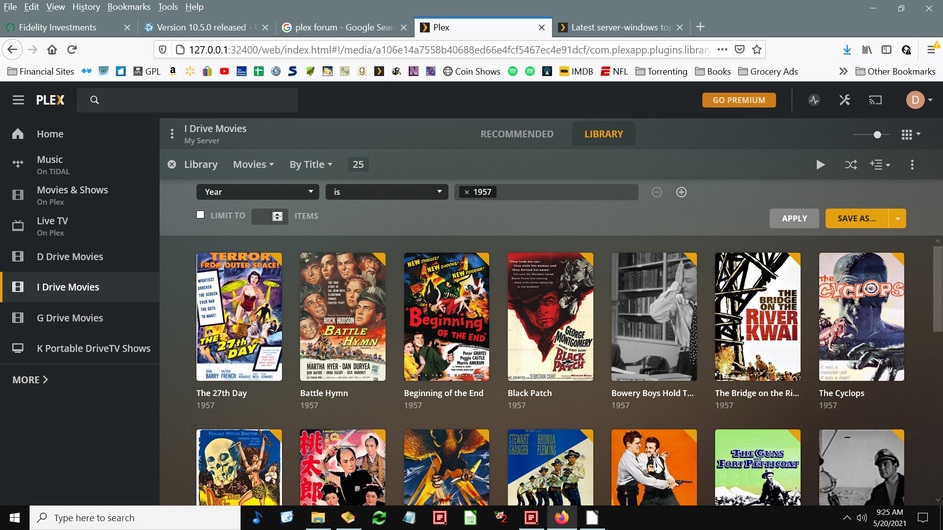
You have created 3 separate libraries, each pointing to only one of the drives.
Instead, use only one library. Use the “Add Folders” tab in the properties of this library to add all 3 of your drives to this library.
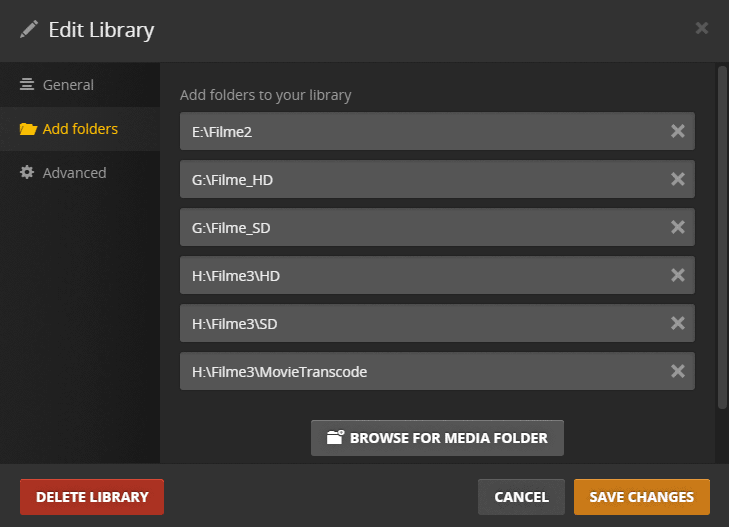
I strongly recommend you to first assign fixed drive letters to your external drives. Simply to prevent your drives from swapping their letter after you remove and re-plug them in a different order.
I feel like a total fool!! This was so nice of you. I do not use Plex to watch media, I use Plex for Organizing (JRiver MC26 drover me crazy) After I get all redone will I be able to upload the database so everyone can see what I have?. It is really starting to look good right now!
Thanks so much for your efforts, you solved my problem perfectly - David N.
You don’t upload anything. It only exists on your server, on whichever machine you installed the server software.
If you
- enabled remote access to your Plex server https://support.plex.tv/articles/200289506-remote-access/
- shared your server with other plex.tv accounts https://support.plex.tv/articles/201105738-creating-and-managing-server-shares/
these ppl can browse your library.
(And also actually play the videos, if the upload bandwidth of your internet connection is sufficient and the computing power of your server machine is sufficient to perform transcoding when necessary.)
This topic was automatically closed 90 days after the last reply. New replies are no longer allowed.
