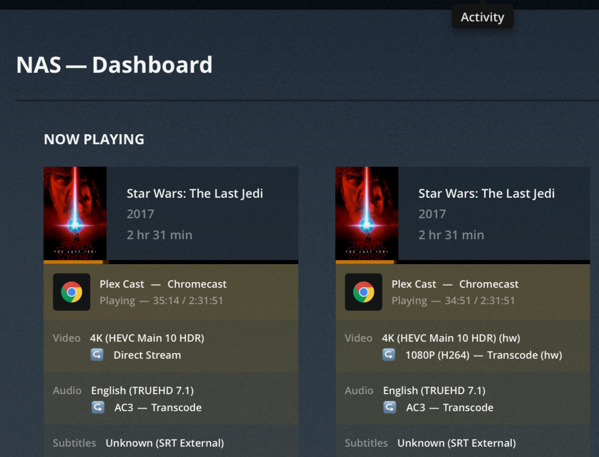
I had the same problem - Chromecast 2 and Chromecast Ultra. When I enabled the VERBOSE and DEBUG log and I can see that both these devices send the same headers except only one “X-Plex-Client-Identifier”.
Chromecast:
Jan 17, 2019 20:16:04.422 [0x7f26eec47700] VERBOSE -  * Host => 192-168-1-101.8ca83c50229c440387bffefa3990bcf4.plex.direct:32400
Jan 17, 2019 20:16:04.422 [0x7f26eec47700] VERBOSE -  * Connection => keep-alive
Jan 17, 2019 20:16:04.422 [0x7f26eec47700] VERBOSE -  * X-Plex-Version => 3.81.1
Jan 17, 2019 20:16:04.422 [0x7f26eec47700] VERBOSE -  * X-Plex-Platform-Version => 70.0
Jan 17, 2019 20:16:04.422 [0x7f26eec47700] VERBOSE -  * Origin => https://app.plex.tv
Jan 17, 2019 20:16:04.422 [0x7f26eec47700] VERBOSE -  * X-Plex-Client-Identifier => 0yom34ii0hhjajc81t1j4oh8
Jan 17, 2019 20:16:04.422 [0x7f26eec47700] VERBOSE -  * X-Plex-Device-Name => Chromecast
Jan 17, 2019 20:16:04.422 [0x7f26eec47700] VERBOSE -  * X-Plex-Platform => Chromecast
Jan 17, 2019 20:16:04.423 [0x7f26eec47700] VERBOSE -  * X-Plex-Product => Plex Cast
Jan 17, 2019 20:16:04.423 [0x7f26eec47700] VERBOSE -  * Accept => text/plain
Jan 17, 2019 20:16:04.423 [0x7f26eec47700] VERBOSE -  * X-Plex-Token => xxxxxxxxxxxxxxxxxxxx651-4289-9b88-a6ad56b0ab12
Jan 17, 2019 20:16:04.423 [0x7f26eec47700] VERBOSE -  * User-Agent => Mozilla/5.0 (X11; Linux armv7l) AppleWebKit/537.36 (KHTML, like Gecko) Chrome/70.0.3538.47 Safari/537.36 CrKey/1.36.140318
Jan 17, 2019 20:16:04.423 [0x7f26eec47700] VERBOSE -  * X-Plex-Device-Screen-Resolution => 1280x720,1280x720
Jan 17, 2019 20:16:04.423 [0x7f26eec47700] VERBOSE -  * X-Plex-Device => Linux
Jan 17, 2019 20:16:04.423 [0x7f26eec47700] VERBOSE -  * X-Plex-Text-Format => plain
Jan 17, 2019 20:16:04.423 [0x7f26eec47700] VERBOSE -  * Referer => https://app.plex.tv/
Jan 17, 2019 20:16:04.423 [0x7f26eec47700] VERBOSE -  * Accept-Encoding => gzip, deflate
Jan 17, 2019 20:16:04.423 [0x7f26eec47700] VERBOSE -  * Accept-Language => en-GB,en-US;q=0.9,en;q=0.8
Jan 17, 2019 20:16:04.423 [0x7f26eec47700] VERBOSE -  * CAST-DEVICE-CAPABILITIES => {"bluetooth_supported":true,"display_supported":true,"hi_res_audio_supported":false,"remote_control_input_supported":false,"touch_input_supported":false}
Jan 17, 2019 20:16:04.423 [0x7f26eec47700] VERBOSE -  * repeat => 0
Jan 17, 2019 20:16:04.423 [0x7f26eec47700] VERBOSE -  * own => 1
Jan 17, 2019 20:16:04.423 [0x7f26eec47700] VERBOSE -  * includeChapters => 1
Jan 17, 2019 20:16:04.423 [0x7f26eec47700] VERBOSE -  * includeGeolocation => 1
Chromecast ultra:
Jan 17, 2019 20:15:53.550 [0x7f26ee959700] DEBUG - Request: [192.168.1.52:57601 (Subnet)] GET /playQueues/101?repeat=0&own=1&includeChapters=1&includeGeolocation=1 (12 live) TLS GZIP Signed-in Token (roland.divin)
Jan 17, 2019 20:15:53.550 [0x7f26ee959700] VERBOSE -  * Host => 192-168-1-101.8ca83c50229c440387bffefa3990bcf4.plex.direct:32400
Jan 17, 2019 20:15:53.550 [0x7f26ee959700] VERBOSE -  * Connection => keep-alive
Jan 17, 2019 20:15:53.550 [0x7f26ee959700] VERBOSE -  * X-Plex-Version => 3.81.1
Jan 17, 2019 20:15:53.550 [0x7f26ee959700] VERBOSE -  * X-Plex-Platform-Version => 70.0
Jan 17, 2019 20:15:53.550 [0x7f26ee959700] VERBOSE -  * Origin => https://app.plex.tv
Jan 17, 2019 20:15:53.551 [0x7f26ee959700] VERBOSE -  * X-Plex-Client-Identifier => 9ru11vako96pactyddnwrnhq
Jan 17, 2019 20:15:53.551 [0x7f26ee959700] VERBOSE -  * X-Plex-Device-Name => Chromecast
Jan 17, 2019 20:15:53.551 [0x7f26ee959700] VERBOSE -  * X-Plex-Platform => Chromecast
Jan 17, 2019 20:15:53.551 [0x7f26ee959700] VERBOSE -  * X-Plex-Product => Plex Cast
Jan 17, 2019 20:15:53.551 [0x7f26ee959700] VERBOSE -  * Accept => text/plain
Jan 17, 2019 20:15:53.551 [0x7f26ee959700] VERBOSE -  * X-Plex-Token => xxxxxxxxxxxxxxxxxxxx25f-4b2f-b631-32b0b7170271
Jan 17, 2019 20:15:53.551 [0x7f26ee959700] VERBOSE -  * User-Agent => Mozilla/5.0 (X11; Linux aarch64) AppleWebKit/537.36 (KHTML, like Gecko) Chrome/70.0.3538.47 Safari/537.36 CrKey/1.36.141427
Jan 17, 2019 20:15:53.551 [0x7f26ee959700] VERBOSE -  * X-Plex-Device-Screen-Resolution => 1280x720,1280x720
Jan 17, 2019 20:15:53.551 [0x7f26ee959700] VERBOSE -  * X-Plex-Device => Linux
Jan 17, 2019 20:15:53.551 [0x7f26ee959700] VERBOSE -  * X-Plex-Text-Format => plain
Jan 17, 2019 20:15:53.551 [0x7f26ee959700] VERBOSE -  * Referer => https://app.plex.tv/
Jan 17, 2019 20:15:53.551 [0x7f26ee959700] VERBOSE -  * Accept-Encoding => gzip, deflate
Jan 17, 2019 20:15:53.551 [0x7f26ee959700] VERBOSE -  * Accept-Language => en-GB,en-US;q=0.9,en;q=0.8
Jan 17, 2019 20:15:53.551 [0x7f26ee959700] VERBOSE -  * CAST-DEVICE-CAPABILITIES => {"bluetooth_supported":true,"display_supported":true,"hi_res_audio_supported":false,"remote_control_input_supported":false,"touch_input_supported":false}
Jan 17, 2019 20:15:53.551 [0x7f26ee959700] VERBOSE -  * repeat => 0
Jan 17, 2019 20:15:53.551 [0x7f26ee959700] VERBOSE -  * own => 1
Jan 17, 2019 20:15:53.551 [0x7f26ee959700] VERBOSE -  * includeChapters => 1
Jan 17, 2019 20:15:53.551 [0x7f26ee959700] VERBOSE -  * includeGeolocation => 1
So I’ve put two files into Plex Media Server/Resources/Profiles folder. Profile gets used based on client identifier.
Chromecast.xml
<?xml version="1.0" encoding="utf-8"?>
<Client name="Chromecast">
    <!-- Author: Plex Inc. -->
    <Identification>
        <Header name="X-Plex-Client-Identifier" regex="0yom34ii0hhjajc81t1j4oh8"/>
    </Identification>
    <TranscodeTargets>
        <VideoProfile protocol="http" container="mkv" codec="h264" audioCodec="aac,mp3" context="streaming"/>
        <MusicProfile container="mkv" codec="opus"/>
        <PhotoProfile container="jpeg"/>
        <SubtitleProfile container="ass" codec="ass"/>
    </TranscodeTargets>
    <CodecProfiles>
        <VideoCodec name="*">
            <Limitations>
                <UpperBound name="video.width" value="1920" isRequired="true"/>
                <UpperBound name="video.height" value="1080" isRequired="true"/>
            </Limitations>
        </VideoCodec>
        <VideoCodec name="h264">
            <Limitations>
                <UpperBound name="video.bitDepth" value="8"/>
                <UpperBound name="video.level" value="42"/>
            </Limitations>
        </VideoCodec>
        <VideoAudioCodec name="aac,mp3">
            <Limitations>
                <UpperBound name="audio.channels" value="2"/>
            </Limitations>
        </VideoAudioCodec>
    </CodecProfiles>
</Client>
Chromecast-Ultra.xml
<?xml version="1.0" encoding="utf-8"?>
<Client name="Chromecast">
    <!-- Author: xtrap225 -->
    <Identification>
        <Header name="X-Plex-Client-Identifier" regex="9ru11vako96pactyddnwrnhq"/>
    </Identification>
    <TranscodeTargets>
        <VideoProfile protocol="http" container="mkv" codec="h264" audioCodec="aac,mp3" context="streaming"/>
        <MusicProfile container="mkv" codec="opus"/>
        <PhotoProfile container="jpeg"/>
        <SubtitleProfile container="ass" codec="ass"/>
    </TranscodeTargets>
    <DirectPlayProfiles>
        <VideoProfile container="mp4" codec="Hevc,h265,mpeg1video,mpeg2video,h264,mpeg4" audioCodec="aac,mp3,mp2"/>
        <VideoProfile container="mkv" codec="vp9,Hevc,h265,mpeg1video,mpeg2video,h264,mpeg4"
                      audioCodec="aac,mp3,mp2,pcm,flac,alac" subtitleFormat="srt,ass"/>
        <MusicProfile container="mp3" codec="mp2,mp3"/>
        <MusicProfile container="mp4" codec="aac"/>
        <MusicProfile container="flac" codec="flac"/>
        <MusicProfile container="wav" codec="pcm"/>
        <PhotoProfile container="jpeg,png,gif"/>
    </DirectPlayProfiles>
    <CodecProfiles>
        <VideoCodec name="h265,Hevc,vp9">
            <Limitations>
                <UpperBound name="video.width" value="3840"/>
                <UpperBound name="video.height" value="2176"/>
                <UpperBound name="video.bitrate" value="75000"/>
            </Limitations>
        </VideoCodec>
        <VideoCodec name="h264,mpeg4">
            <Limitations>
                <UpperBound name="video.width" value="3840"/>
                <UpperBound name="video.height" value="2176"/>
                <UpperBound name="video.bitrate" value="75000"/>
                <UpperBound name="video.bitDepth" value="10"/>
                <UpperBound name="video.level" value="42"/>
            </Limitations>
        </VideoCodec>
        <VideoAudioCodec name="aac,mp3">
            <Limitations>
                <UpperBound name="audio.channels" value="2"/>
            </Limitations>
        </VideoAudioCodec>
    </CodecProfiles>
</Client>
I’m able to play to both Chromecast devices (one is transcoding and the oher is not).