@budmonster said:
Does XPlay stream 4K content, does it work with HDR, etc. as well? I have several 4K TV shows on my PC. If XPlay does do 4K content, is there a way to tell if the show is playing in 4K while watching it?
You can see video format on details screen before playing … is it really needed to see while playing it?
@Arandax said:
@bublikoff I’ve sold my 2015 oled, do I need to unlock the app on the new 2017 model?
Nope …just use the same plex user
@djsaders said:
i have a 4k hevc version of a film which i cannot change the audio track on… It says english 7.1 but it’s playing the hindi 5.1 track?
What webOS on your TV?
@wvkreg said:
When i choose directplay in Xplay (which is default) does it do anything with the sound on a movie? It seems to me that the sound is different with direct play off. It sounds deeper and more DTS. I wonder whether Xplay downstreams or downgrades DTS or similar HQ audio in movies.
“Direct play” mode means that it will be played the way it will handle LG TV.
“Transcoding” mode meand that PMS will use media profile to transcode it and return to TV and TV will handle it the way it can.
For eg the app even can not control video or audio volume … only user can control volume
@Mirx said:
New user here. As far as I can gather from the 167 pages internal/embedded subtitles cannot be scaled due to the limitations of webOS. What is unclear to me is whether this statement is still valid.Just got a 55C7 which is running webOS 3.5. The native LG DLNA app let’s me alter the subtitle size etc. So the feature is available on webOS, however it could still be unavailable in the API or SDK available for app developers.
Yes I canot change anything for embedded subs. According to LG dev documents I can only “ASK” webOS embedable player to show subtitles track by language code. I means that if there are two or more embeded subtitles tracks with the same language code I can only show one of them without using PMS transcoding. Ive tried to ask LG about this situation and the app was removed from LG apps store after this question on dev forum becouse of “too much bugs”. There even removed app from store without notifying me. After Ive discoved this I made topic about this more public and … ta … da … there have returned the app to store even “it has too much bugs” . As you can see its abit complicated topic for me))) But propobly there are some developers (even LG developers who creates embedded app for wwebOS) who a bit close to a bit mod detailed Dev docs which contains information how to change colors … size and etc for embedded subs
About new version … who dont read twitter
Here test of video playback with trailer before movie.
Ive also added scaling mode changins … audtosize (according information from PMS) and full screen stretch
https://www.youtube.com/watch?v=ixdg7TL9YY0
@bublikoff said:
As you can see its abit complicated topic for me))) But propobly there are some developers (even LG developers who creates embedded app for wwebOS) who a bit close to a bit mod detailed Dev docs which contains information how to change colors … size and etc for embedded subs
AAahhh, the love and hate relationship between the vendors and the developers helping with unique selling points for their merchandise.
Too bad the attitude of LG isn’t more welcoming and all the features are available through a documented API.
Hi!
My TV with XPlay doesn’t show internal subtitles from MKV at all - most of them ar UHD MKVs with english and hungarian .srt subtitles. I can select them, the movie starts, but no subtitles. External subtitles works fine. The internal subtitles are OK with the TV’s built in player from PMS’s DLNA.
@bublikoff said:
@reddwarfcrew said:
I’ve got it set to ‘preferred’ and added the IP address of the remote network to both ‘LAN Networks’ and ‘List of IP addresses and networks that are allowed without auth’ in the NETWORK section of the server.Still no joy, any ideas?
Secured connection will reduce playback perfomance
Have you tried last update? Ive fixed small bug with plex account.
Anyway try to remove XPlay client from Plex devices list and restart the app and check if it helped you
Thanks for taking time to reply. Tried your suggestion but no joy unfortunately.
For new version (s) would it be possible to separate “recently added” media into separate sections, i.e. Music, Movie, TV like Plex does?
Having everything grouped together makes for difficult searching when I add a lot of music for example?
Also is it possible to have playlists on the main menu as I have quite a few playlists set up in PMS (mostly for my kids) and it would be great if they were easily accessible?
Hi,
I have a problem with language in xplay. I have a file with ita-eng audio track but event if I set Italian I get the english track.
The italian track is the default and none of the tracks are forced. If I play the same file on the official plex app all works fine, any suggestion to solve the problem without setting the italian track as forced? Thanks!
Hi, demoing XPlay using 4K HDR content and it looks different using XPlay vs the native LG player. Using XPlay the video looks artificial, like it’s using different video settings than with the native player. Is this expected? Thanks.
@Wangcsc said:
Hi, demoing XPlay using 4K HDR content and it looks different using XPlay vs the native LG player. Using XPlay the video looks artificial, like it’s using different video settings than with the native player. Is this expected? Thanks.
Check on the Server-Status-NowPlaying and hover over the image to see if there is a difference in how it is being delivered.
Perhaps you are getting a softer transcoded video through LG player?
@andyts93 said:
Hi,
I have a problem with language in xplay. I have a file with ita-eng audio track but event if I set Italian I get the english track.
The italian track is the default and none of the tracks are forced. If I play the same file on the official plex app all works fine, any suggestion to solve the problem without setting the italian track as forced? Thanks!
What webOS version on your TV?
@Wangcsc said:
Hi, demoing XPlay using 4K HDR content and it looks different using XPlay vs the native LG player. Using XPlay the video looks artificial, like it’s using different video settings than with the native player. Is this expected? Thanks.
Yes it can be looks a bit different as it was developed for FullHD resolution and different resolution will be achived by zooming it to actual one. Im almost ready to buy new webOS 3.x 4K TV for better testing for webOS 3.x and 4K resolution
@ourcontact said:
@Wangcsc said:
Hi, demoing XPlay using 4K HDR content and it looks different using XPlay vs the native LG player. Using XPlay the video looks artificial, like it’s using different video settings than with the native player. Is this expected? Thanks.Check on the Server-Status-NowPlaying and hover over the image to see if there is a difference in how it is being delivered.
Perhaps you are getting a softer transcoded video through LG player?
On the server side it says it’s using Direct Play but the video definitely has some other setting. I see it with all 4K HDR videos. And once in HDR mode, LG only allows you to change the HDR setting and nothing else.
Same here, MKV with 3 Audio tracks (german, english, english). No matter what i select, XPlay plays the german track. Plex plays the one i chose. WebOS 3.5.
@Mirx said:
@bublikoff said:
As you can see its abit complicated topic for me))) But propobly there are some developers (even LG developers who creates embedded app for wwebOS) who a bit close to a bit mod detailed Dev docs which contains information how to change colors … size and etc for embedded subsAAahhh, the love and hate relationship between the vendors and the developers helping with unique selling points for their merchandise.
Too bad the attitude of LG isn’t more welcoming and all the features are available through a documented API.
Yee … it was interesting experience
here is some response from LG team from develeopers forum))
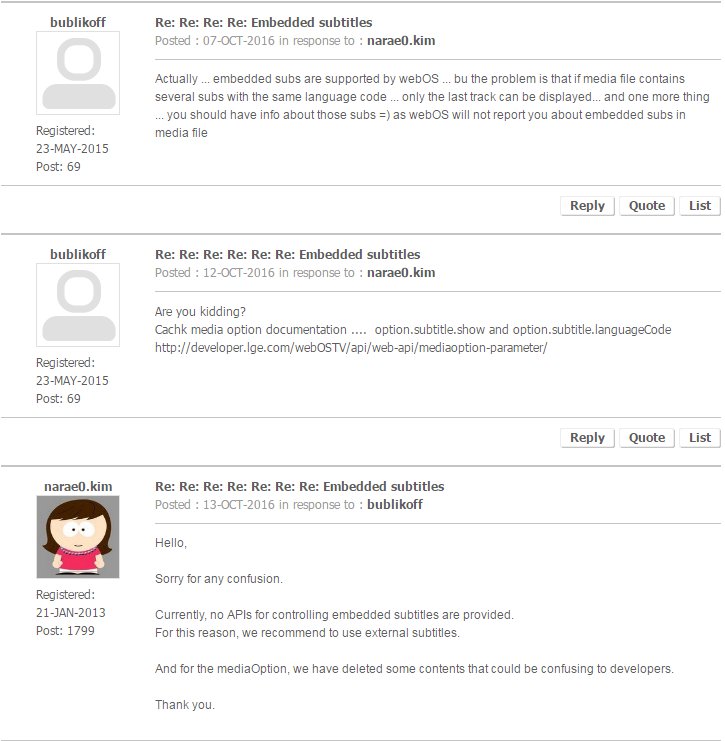
The iterested thing that they claim that embeded subs are not supported at all BUT
already used this functionality by that time )))) And after my post that they have documented this functionality in Official API docs they have removed this part from API docs)))
And it seams to me that they also removed my post about it))) and the app can still use this functionality … not stable … not so good as LG’s bultin video payer) but sometimes it works)
@magic_k said:
Same here, MKV with 3 Audio tracks (german, english, english). No matter what i select, XPlay plays the german track. Plex plays the one i chose. WebOS 3.5.
Unfortunaly official TV webOS 3.x emulator does not work well and not fully suitable for testings… it just shows white background instead of playing media file. They might still continue chopping some functionality that developers can use in apps or maybe there is anothere problem. Unforyunatly its a bit hard testing functionality for webOS 3.x on versions 1.x and webOS 2.x . As I already posted upper Im almost ready to buy new TV for testing purpose . Actulay I dont even have time to watch TV … only my son watching cartoons)))
For information I got the same audio track problem on my LG TV (WebOS 3.0).
