@bublikoff. any news about that fix? it became my issue too since latest plex release…
Just downgrade to the version I mentioned above. Works fine with me. Linux and Windows versions.
Why to downgrade if the developer should follow the future versions and fit it to it?
if the app will be discontinued, so it’ll be a workaround but until then…I prefer not to downgrade.
You are right, but it seems likely the dev abandoned his project. This is a good time to put some pressure on the Plex team to fix their LG client. I rolled back a server version after trying the official client to be sure. It couldn’t play a simple 720p h264 without constant buffering. With Xplay I can play the biggest 4k hdr atmos files without any problems.
It is annoying that Xplay stopped working, but it is much more annoying that the official client never worked right at all.
Effectively the dev did a rewrite, regressed a bunch of stuff, and lost the original code to be able to let people roll back. He also tucked tail and abandoned the project when people started asking insistently that the issues be fixed or that the previous version be made available again.
It was altogether extremely frustrating, especially as he effectively refused all help to actually debug/fix the issue from other devs and insisted there was no way that his updates could be at fault, even though many people could show the previous version working fine on files that the new system didn’t handle properly anymore.
My suggestion is that you find another solution here as xplay is effectively entirely dead.
FYI, I updated my Plex server to the latest 1.18.7.2457 and no problems using XPlay.
Thank you thank you thank you.
You saved my marriage!
BTW it’s a pity that this app is not mainained anymore. I tried to switch to the official client who has recently updated but it still sucks.
It’s a shame how plex force us to use a different client against the “official” client and, moreover, to downgrade to have a stable situation. Damn.
That’s a total shame. My XPlay broke as well with the same error message. And I only purchased it about 2 months back, exactly because the official Plex app for WebOS is so bad. XPlay worked beautifully, much better layout for big screen if you ask me, and it was fast in navigation, unlike the official client.
To the developer, in case you are still reading this forum: I have no idea what happened here in the past, but IMO XPlay was brilliant. Please do not give up! For now, I’ll see if I can figure out how to downgrade PMS and wait and see.
Hi… I just paid for xplay and so fact works pretty nice (as opposed to the official app) howere i wonder if you could implement some improvement over the AUDIO section of the player. For instance sometime when loading a new artist it takes a while to populate and there is no direct access to albums, also it would be nice to be able to use remote buttons for skip, stop and play (my tv uses the original remote and not the magic remote). Anyways, great app, I like it but it could use some improvements. Good luck.
The developer has been seemingly missing for a very long time, would not count on getting an enhancement - let alone a bug fix.
He isn’t, check his profile.
It’s not supports its own app, anyway.
Hi!
I get error message if I I try change subtitle or audio where is " …(T)" :

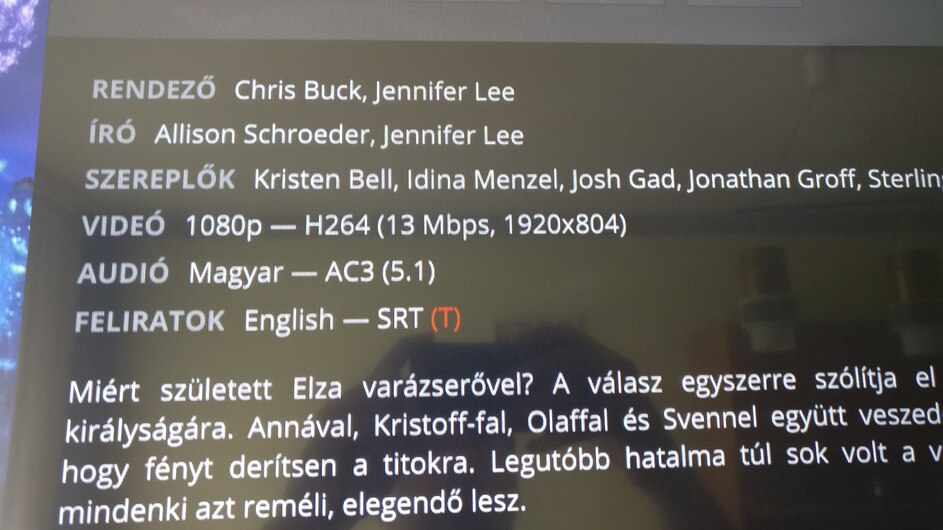
I think it is a transcode failure.
Can u help me? If I play it with Plex app then works it fine.
I have LG 42LB670V-ZA tv with webos 1.4.0-2532 (afro-ashley), 05.05.70 software version.
edit: If I change in Settings the playback mode to Transcode —> It doesn’t work. (nothing)
So it’s been a long time and this resume functionality is still not OK.
I have the following:
- LG LF652V (latest: 04.06.30)
- Plex server on Synology (latest: 1.19.2.2737)
- Xplay 2.75.841
The resume functionality sometimes works and sometimes completely not.
Where should be the problem?
TV? Server? Plex?
If there’s a newer beta version… can I get it? Maybe that can solve this issue.
User ID: 6784666-HU
Thanks for any kind reply.
hey guys… I know there is not much support these days, even though the application is still being sold. Anyways, my xplay on webos 4.0 doesn’t skip to the next track when playing music albums stored on Plex RaspPI server (the latest, just update) Any fix or workround? Why is this important to me? Because Xplay can actually play FLAC fiels on a TV which through SPDIF cable streams them in FLAC quality to my amp.
New Play user,
joined the app because PLEX stopped working nicely with subtitles and 4K content. So decided to test the app and felt working fine during the 7 day testing. Sadly didn’t have time to test it all deeply. Then i bought the full access and now all seems worse.
*** The resume functionality worked but now doesn’t.**
*** subtitles sometimes work, sometimes not. (always SRT, same name as the movie, with the language code . example: Behind.You.2020.1080p.WEBRip.x265-RARBG.es.srt**
I have the following:
- LG SM8500 latest firmware
- Plex server on iMac (latest: 1.19.3.2764)
- Xplay 2.75.841
Please Enroll me on the beta.
User ID: 14718-ES
Hope this problems go away, else i wouldn’t feel confortable with having paid a program for nothing.
Thanks for any kind reply.
Hi. I just bought the app because I thought I could play all 4k contents on it (my TV has webOS 2.0), having tested the app for a week. I found out today that some 4k contents are not playing on the app, though they work fine if played from a USB drive connected to the TV. The error message that is displayed says the format of the video is incorrect or something to that effect.
Does anyone else have this problem? How can I fix it?

Tonight XPlay stopped working for me completely (Android client).
If i choose a movie, it just loads cover, and there are three little orange dots near bottom.
Nothing happens.

PS. Reinnstalled App. Helped
You cannot choose subtitles indicated with red (T). That format is not supported. Usually it happens when it’s encoded into the MKV file in a special format.
You must download an external SRT subtitle. Put it next to the movie file with the same filename and SRT extension. Update the libraries and it will work if you choose that.
For those who are having problems with XPlay (playback, resume, etc) I will share my experience. When rumours came up about problems with the resume function, I stopped updating XPlay on webOS to stay on a working version. Later I also had problems with playback but that was caused by some new ‘features’ in Plex Server. So I decided to stay on the latest working XPlay and downgrade my Plex Server to the latest known working version. I experimented with many versions and according to my research I currently identified these versions as latest working without problems:
Plex Media Server: 1.18.7.2457 (macOS and Windows version both work)
XPlay: v2.715.622 (on LG webOS 4)
I have an LG OLED65C8 and I can confirm that with these software versions everything works perfectly with XPlay: resume function, direct stream, etc are all OK. It is capable to direct stream even a 70GB mkv file 4K HDR content with SRT subtitle over WiFi without any problem.
Unfortunately I don’t know how to downgrade XPlay on webOS, but if you need to downgrade only Plex Server here you can find older versions.
