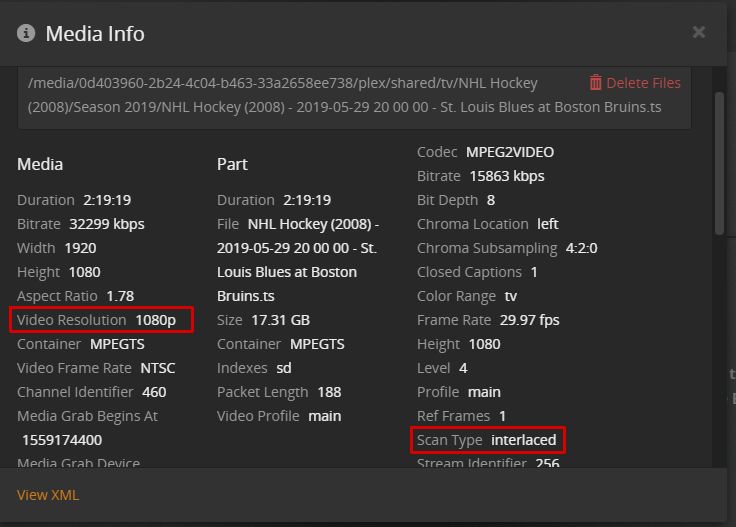
How I can improve the playback quality of fast action DVR recordings with interlaced content? Watching DVR recordings of the Stanley Cup is rough as all players in horizontal motion are skewed and blurred. In the screenshot below I’m using Plex Media Player Version 3.100.1 with Plex Server 1.15.6.1079 on Debian Linux, both the latest versions as of this writing.
I’ve read numerous posts on interlacing yet with no solutions made clear (to me anyway). Interlaced content can be addressed via server transcoding or via display rendering, yet I cannot find any interlace settings in either the Plex server, transcoding, or Plex media player settings.
Thank you.
Reply to this message constitutes acceptance of the following: (1) Thou shalst not suggest the Poster RTFM; the OP attests that s/he has made a best effort to RTFM; hitherto the FM does not address the matter or the FM is otherwise unavailable. (2) Thou shalst not implore the OP to Google(r) said matter, as assuredly the OP has googled the matter expeditiously to only wade through bolstered content without profit toward resolution. (3) Thoust reply shalst address the complaint levied by the OP and shalst not address the multitude of thine own matters. (4) Thoust being naive or a simpleton regarding the matter shalst not reply under any circumstance.
There is no good solution available, which covers all situations and clients types.
However, the PMP offers a ‘Deinterlace’ option.
(Available in the TV mode. Settings - Video)
Hi OttoKerner, thanks for the reply. I did not find TV Mode Settings - Video, or a Deinterlace option. Are you referring to options during playback (Playback Settings)? I can change the transcoding (Quality) there but do not see anything about deinterlacing.
i don’t think you specified what DVR tuner you are using, but if you are using an HD Homerun tuner, there is an option within the tuner settings to transcode.
Wow, found the hidden menu. To be clear, one has to enter TV layout, select the user icon, and video settings appears as an option. Wonder why these options are not available in the default PMP layout, which seems to contain the bulk of the options? In any event, setting the deinterlace option worked great, thanks!
Hi TeknoJunky,
I am also using HD Homerun Quattro. Transcoding does not necessarily deinterlace. In theory we should be able to transcode from 1080i -> 1080p, but it seems the content I record is listed as “p” already (mistakenly?). Maybe deinterlacing is best left to the playback device, not sure.
if the content is listed as P, but it isn’t, then that would seem to point to problem with the content provider not having properly encoded video streams.
as far as I remember, there is no 1080P ota content. there is 1080i and 720p.
cable may or may not be different.
i believe some content providers are now using x264 instead of the more prevalent mpeg2, which may complicate issues further.
The Media Info lists 1080p with Scan Type Interlaced. Content provider is a somewhat rural cable co. that still provides clear QAM, recorded by the HD Homerun tuner.
in your case, I would suspect your best bet is to create a post-processing script for plex to run after recording, that can use ffmpeg or whatever via command line, to reencode the streams to whatever works best with your devices.
unfortunately I don’t have any info on what particular commands will help you there. You are best served by experiementing with some test episodes outside of plex, getting the CLI working, then you get it working on future recordings, and decide later if you want to go back and post-process any existing recordings.