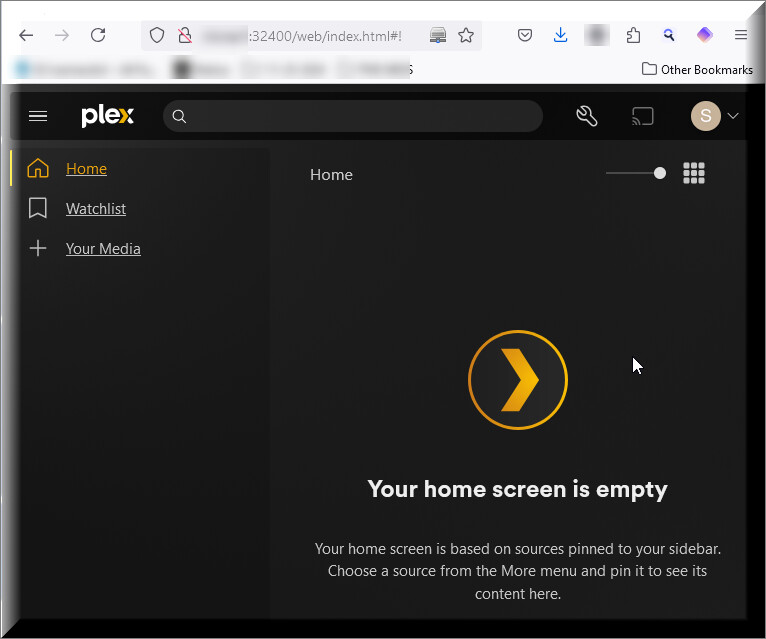
Your Home Screen is empty

Server Version#: 4.136.1
Player Version#:

Plex Server running on QNAP TVS-1282 without issue for years.
Copied TV Shows and Movie Folders to a Windows 11 System, installed Plex Server there.

I now can’t see either Server in my Plex Home screen when I go to Plex.tv or locally at http://192.168.1.5:32400/

At one point, I could see the server name for the Windows PC based Plex Server install (but no content/folders), but lost view of the QNAP based Plex Server Install.

I deleted the Windows based Plex Server from my Plex Home view, and now I see nothing but this:

If I click on “+ Your Media” I land at:

Clicking on “Get Plex Media Server” takes me to the Downloads page to download Plex Media Server.

How do I recovery my two Plex Servers?.

SJ

I don’t see any servers on your account. Looks like they were removed manually.

I would restart servers to start since they may just log back in them selves. Check their logs if they are having trouble signing in (claiming).

You can also try this. GitHub - ChuckPa/UserCredentialReset: User Credential Reset utility for Plex

or this https://support.plex.tv/articles/204281528-why-am-i-locked-out-of-server-settings-and-how-do-i-get-in/

Good Morning BigWheel, thank you for the reply.

I then tried this on my Windows PC based Plex Server, and that Host still does not show up anywhere to view it when I log in at plex.tv.

The PC based install of Plex contains the same folders as the NAS based Plex install. (my goal being to have a backup available, so I can factory reset my NAS, then setup everything from scratch on the NAS (Plex as well as everything else on that NAS.

I am using Syncthing to mirror my Media Folders between the NAS & the PC.

Should be able to see both servers when I log into plex.tv? Do I need to change the port on one of the Plex Servers so they don’t both use the same default port?
thank you for your assistance, I appreciate it.

SJ

Replying again, as part of my reply for reason’s unknown didn’t make it into the first reply:

This worked as designed, and my folders and server on my NAS are back to normal. Thank you very much for this, I appreciate it.

I tried this on my Windows PC Plex Server, and I still cannot see PC1 visible on my Plex Server.

I used to be able to see both servers in the Pinned area, and the folders on each respective server under the servername.

I assume I should be able to see both servers?

thank you for your time,
SJ

This topic was automatically closed 90 days after the last reply. New replies are no longer allowed.
