Iøm not sure where to put this question, I hope it fits well in here.
Running Win 11 Pro with latest Media Server installed.
On a USB harddisk I have several folders, and in these I have different media files
Running latest updated AppelTV (4th genr.) and witg latest Plex app version.
Here I can see the media files from my computer.
Questions:
Among the folders, I also see a lof of ‘trash’ like folders with strange names, like tmp, RecykleBIN and so on. But these I cannot see when I look at my USB harddisk from my computer. Why is this and can I do something here?
I have some mp4 and some mkv files. They are showing up when I look from my computer, but not when I look with the app from my tv. The files are playing fine on my computer too, but not on the tv at all since I cannot see them. Any idears?
I’m not entirely sure I follow as for what issue you have been running into.
As for #1 – your computer will create a number of folders to manage its activities on a HDD (incl. USB drives). Windows will hide those by default – Plex might not reflect that and might try to actually scan the content of those folders.
Generally it’s good practice not to point your library to a drive letter but to a library folder on that drive (e.g. point to P:\Movies\ instead of P:\).
As for #2 – as long as your Plex Media Server has properly scanned and cataloged those files, they should be showing up in any connected Plex client. For anything else you’ll need to provide some more details or it’ll be all guesses
Do what @tom80H says, but check to make sure your media is named according to the Plex Movies and TV Shows guides. If they are not properly named, Plex will incorrectly match the files to a different one than you expect, mark a movie as a duplicate of another (will look like Plex didn’t find your movie at all), or in the case of TV Shows simply not pick up the media at all if the name is wrong.
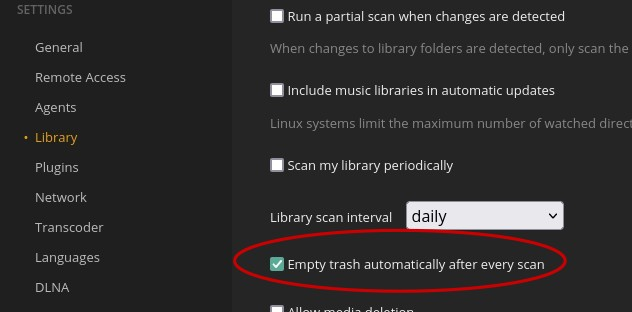
Since this is a USB drive, you might also be running into an issue where Plex tries to update metadata when the USB drive is asleep or disconnected. To avoid this issue, you’ll need to disable the ‘Empty trash automatically…’ option: