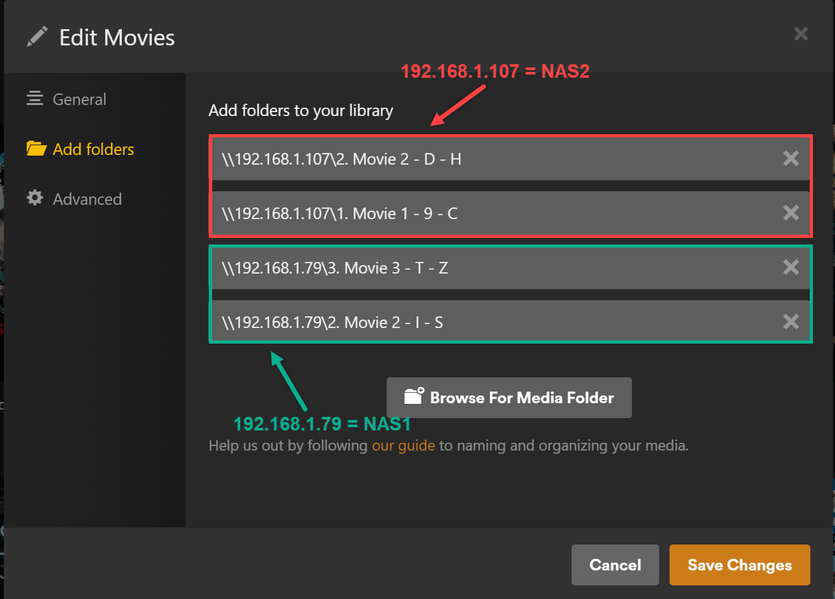
For the longest time, my plex source was coming from 1x NAS and now this NAS is reaching capacity. I transferred a portion of my movies which was on NAS #1 to NAS#2 and when I went into plex > Folder > Manage Library > Edit > Add Folders
I removed the old NAS#1 but then added the new NAS#2 which has the same files; however plex is not seeing the files from NAS#2. Can I not simply add new locations for a plex folder?
It’s worth mentioning that I’ve checked my NAS settings and they are the same in terms of overall system settings and folder settings.
For Plex, I’ve tried to do a Folder “Scan Library Files” on the movie folder and a “Scan Library Files” on the entire plex server. Still not seeing the movies from NAS#2.
Hey @OttoKerner. I guess my concern is my Plex Server username/password were different from my NAS#1 credentials and this was working fine. However when I introduced NAS#2 that has different credentials that’s when the issue surfaced.
I’m not sure how the credentials being different between Plex and NAS would be the issue when they were previously different for the Plex/NAS#1 combo and it worked.
As is mentioned in the linked post: it is not reliable. It can work, if you’re lucky. But if some tiny thing is different, it won’t. Like a software version etc.pp.
Ah! I see the issue. I was not adding the NAS network paths to the location that was hosting the Plex Server. Once I added the NAS network paths to the correct location, this worked as intended.