I am currently building a Tizen based App for the Samsung Galaxy Watch, and would be interested to hear of what kind of interest there is. I became tired of currying my S9 around the gym in the morning, and even forgetting it a couple of times. Since they made their WiFi available for members, I thought this would be fantastic.
So far:
The App allows Sign-on and User selection (including pin input).
Lists Playlists consisting of audio tracks.
Play selected Playlist.
Stream unsupported audio format via the transcoder.
Shuffle/Repeat currently queued items.
Pause, Next, Previous track
Select item from queue to play.
Jog/Rotary Prev/Next track.
Flow:
User selection, Pin input
Playlist selection
Player
Back at the Playlists (while audio is playing)
Next steps:
Volume control from within the App.
Advertise as audio player on device.
Bluetooth audio controls (Play/Pause, Prev, Next, Volume, etc…).
Detection of connection via SAP, to reduce the bitrate to be more BT friendly.
Detection of connection speed in general to deliver targeted transcoded audio.
Various fixes/optimization.
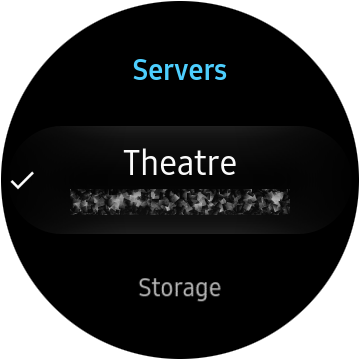
Server selection - for those of us who have multiple Plex servers.
Later:
Allow finer selection of media (Genre Artist, Album, Track or a mixture).
Fading/Mixing of audio tracks.
Podcasts
Anyway, thanks for listening and I would be keen to hear what kind of interest there is for this type of App.
Generally speaking, before using the App, with BT and WiFi on, I finish the day on around 85%. This is with the watch connected to my phone via BT and home and office WiFi for most of the day.
I use it most vigorously in the morning, after about 1h30m session of music via WiFi (BT off, as I need to iron that out for the lower data-rate) the battery is, from memory, at about 85%. But this is hardly scientific… I have other apps running on the watch during my gym session (e.g. routine tracker, heart rate, step counting, etc…).
I will get round to running some isolated testing for battery usage at some point. I am interested to see what impact the data-rate has on battery life, and how far transcoding can go to mitigate the problem. That said, I haven’t once killed the battery within 24h, and since it is on charge when I sleep, for me it isn’t a huge deal.
You could go down to 96kbps OPUS (if the player supports it).
During workout, you probably won’t notice those minor artifacts (or won’t care about them).
I have been thinking about how this would be implemented, and I don’t see a problem with it. My only concern would be the amount of storage available on the device. I have about 1.5GB free, and I don’t really have many additional Apps installed.
Having said that, at 96kbps as suggested by @OttoKerner, I could probably sync about 30 hours (25 hours @128kbps and about 12 hours @256kbps) of music to the watch, which isn’t an insignificant amount.
I will stick this on my board and start looking into the service calls to achieve it.
I have been beavering away on this for a while now, and I think I am pretty close to releasing a beta on the Galaxy Store.
Since my original post, I have implemented some new things
Switching between servers attached to a single account. When logging in and from the Playlist/Media list screen.
Volume control from within the App.
The current media bitrate is shown, along with an indicator of direct or transcoded.
When the current Bluetooth headset is disconnected, the player is paused.
Audio continues when switching between bluetooth outputs.
Bluetooth audio controls (Play/Pause, Prev, Next, Volume, etc…).
It is clear when you are connected via WiFi or SAP over Bluetooth.
It is clear if the Playlist in on Shuffle and/or Repeat, and if you rated the media.
Next steps:
Work on the player layout, incl. track seek time and duration.
Work on the Playlist/Media list page layout when the player draw is shown.
Give an indication of buffer duration.
An Artist and Album view.
Some Bluetooth audio devices (particularly my Sennheiser CX6.0 BT) seem to cause the audio to stop when the App becomes a foreground task. I have worked around this, but it can be very noticeable.
Automatically switch the bit rate of the current transcoding when Bluetooth (SAP) is connected. This is really noticeable when switching from WiFi to BT while playing 320kbps audio - BT just doesn’t have the bandwidth.
Automatically switching to the local server connection (as apposed to remote server connection), when on the same network.
General polish.
Future:
Syncing of playlists to the watch
A companion widget for interaction from the home screen.
To allow the preference of a particular connection type e.g. WiFi over SAP. Currently if the watch is connected to the phone via Bluetooth, it is probably connected to the network/internet via SAP - which is slow. 96kpbs works in most cases, but if there is lot of Bluetooth radios in the area, it can get a bit choppy.
I would like to investigate the possibility of “handing off” current playback to the Android client.
Voice search integration.
I still have a long way to go, but I should have a beta available soonish for anyone who is interested.
Again, thanks for listening, and if anyone has thoughts/suggestions, there will be appreciated.
I am quite excited to see that you are close to a beta product and would be more than willing to help in what ways I can.
i am using a sun fire x4600 server with windows server 2008 R2 as my plex host on a gigabit home LAN with multiple 2.4 and 5 ghz access points
a Samsung note 9 SM-N960W running with android Pie
and a Samsung galaxy watch (2018) LTE version SM-R805W with tizen version 4.0.0.4 and software version R805WVLU1ASD6 which i believe is all the latest versions available here in Canada.
what sort of additional information do you need before hand?
I wonder if the One UI has dropped for you yet? I am still waiting here in Australia.
I wish I had spent a little bit extra on the LTE version, as I wouldn’t be restricted to WiFi and BT for the connection modes. This also limits the testing I can do, so any feedback you can give me here would be a great help. Out of curiosity, what kind of mobile/cellular data plan do you have with your phone/watch? can you couple/share them over in Canada?
It will be a week or two before I submit a beta to the Samsung Galaxy store, and I have no idea what Samsung’s turn around time is for new publishers and certification/acceptance. Playlist playback works great for me at the moment, but ideally I would like to get Artist and Album playback into the beta. Later releases would include podcasts and syncing.
I will let you know when it becomes available to beta on the store.
i got a software update the day before yesterday and it is the one ui update that adds a slew of new things, and changes some things and keeps the rest.
My cellphone is with Fido, and i have 3 gigs of data to use per month because no one needs more than a few hundred megabytes for emails a day right? sadly my carrier does not yet support data on my watch because of reasons, but the cellular carrier i used to be on but left because they were scamming me (rogers) does support the LTE watch from what i understand.
as for sharing, rogers did that, as i was sharing cellular data between my phone and my x230t thinkpad, but with fido it is on it’s own data plan, 2 gigs for 30 dollars a month. i would imagine i’d have a separate plan for my watch when fido supports it as well.
one thing i liek so far with this update si there is a quick button that allows me to set the watch to be connected to wifi never/automagically/always and i now have it set to always which might be of benifiet for you to be a made aware of.
I am hoping the update fixes some bluetooth quirks I have noticed, but I am not holding my breath.
The reason for asking about mobile/cellular data is that it would need testing. Short of getting the LTE version myself, this could be problem. Given that North America seems to get shafted when it comes to network connectivity/data plans, streaming over cellular should probably be transcoded way down to avoid massive data charges.
To give you idea, my partner and I have a 45$ plan each, which includes 50GB data. The carrier we are with, Vodafone, allow use to share our data (as do other carriers). So between us, we have 100GB of data. Having Plex streaming (direct) on my phone a lot of the time, barely puts a dent in it.
I am yet to do any kind of battery usage/data usage telemetry collection yet, so I have no idea what kind of burden this would put someone like yourself while beta testing.
i pay 50 dollars for the privilage of 3 gigabytes of cellular data on my phone and 30 dollars for 2 gigabytes of cellular data on my thinkpad computer, plus anotehr 18 dollars for a gig and a half as a monthly addon for said thinkpad because windows 7 doesnt manage cellular data well.
im not too worried about using battery, a battery is there to be used, and eventually replaced. i have two wireless chargers, the duo charger by my bed and the oen that came with stays in my backpack. and i have a HELI-on solar bank and other battery bank with me at all times anyways. power is of no concern to me.
I have now made a Beta available on Samsung Store. If you would like to be involved with the Beta, if only to get early access, you can PM me the email address you use to access Samsung services.
I haven’t had a whole lot of time to work on it this week, so I wound back some of the feature work that was in progress, and just worked on stability.
Available features:
Server selection.
Play music from a Playlist only. Add music to playlists to play on Galaxy Watch.
Skip Forwards/Backwards through the Playlist.
Select individual track from track queue.
Shuffle/Repeat.
Auto-detection of connection method for delivering lower bit rate audio.
Others not really worth mentioning.
There are known issues:
My Sennheiser CX6.0 BT cuts out, but the player is still playing. Hit pause and play will work around this. If you find this effects you, you can press the headset icon (you will notice haptic feedback - tap again to disable) on the player screen, and the player will auto pause/play when the player becomes visible. I think this may be due to the Bluetooth LE profile, as it is the only Bluetooth device I had this problem with (my ICE and other Bluetooth speakers were fine).
Bandwidth usage is unknown at the time, so be wary when connected via cellular.
There is no control over SAP at the moment, so if you are connected to your phone, data will come through SAP as apposed to WiFi or Cellular.
Battery usage is a sort of unknown. I did some measurements during this passed week and battery usage seems to be about 4 hours to 50%. That was pre-optimizations for Samsung verification.
Heyyya buddy! I had already decided I was not going to buy the Galaxy Watch due to the lack of a Plex App to take my music with me… I am considering buying one because I stumbled upon your post here awhile ago… How goes your development my friend?
This looks so awesome! Is your app by any chance open source? Hosted on GitHub perhaps? I’d love to take a look to see if I can contribute to the features you’re working on!
Thanks for all the interest. The project isn’t dead. I just haven’t had a lot of time to spend on it recently, with other commitments. I will get things moving again very soon.
For those of you who have PMed me in the last month or so, asking to be part of the Beta, I will get back to you all individually very soon.