Server Version#: 1.42.2.101056
Player Version#: 1.110.0.351
Hi all
I’m seeing a major performance issue with Plex for Windows and Plex HTPC on an Intel N100 mini PC connected to a 4K Samsung TV.
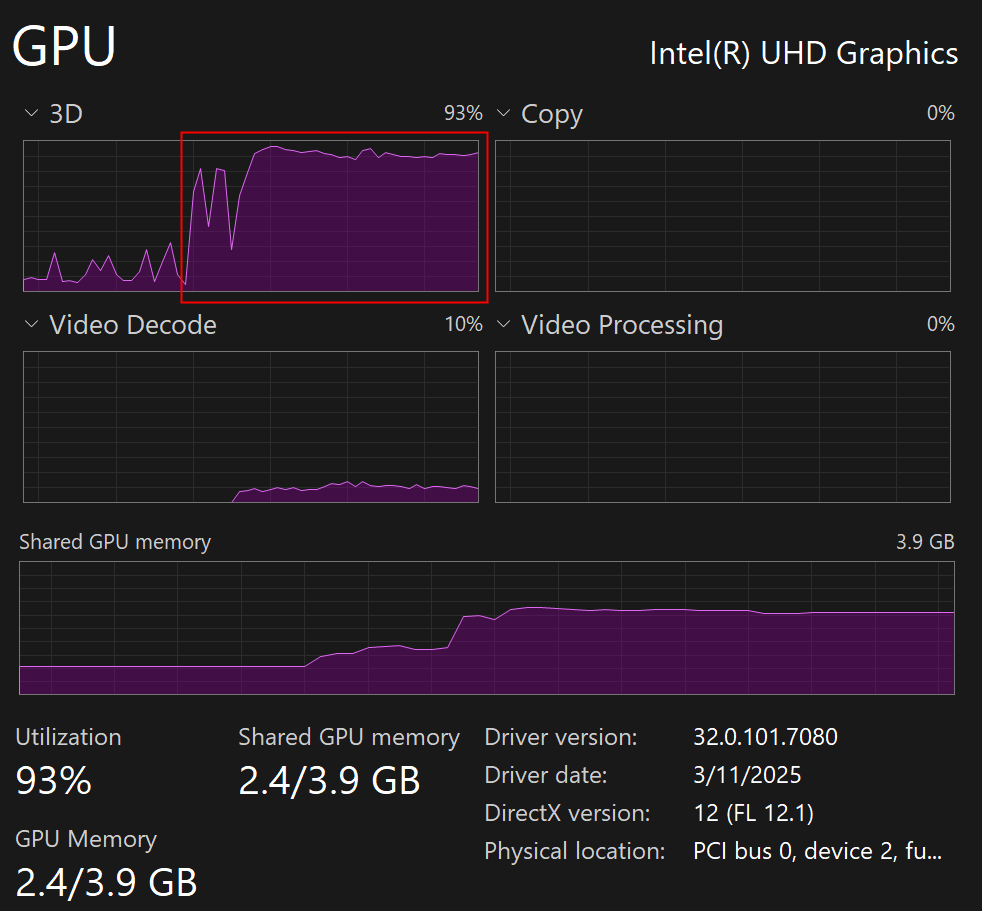
During Direct Play of 4K HEVC 10-bit MKV files (tested with two different files), GPU 3D utilization sits consistently around 90–95%, and playback stutters badly. This is not a server-side transcoding issue as everything is direct streamed.
In contrast, the same files on the same machine play flawlessly using Plex Web (Brave) and Windows Media Player Classic, both utilizing hardware decoding properly and keeping GPU load below 50%.
The Plex logs confirm hardware decoding via d3d11va is active, yet performance remains poor. I believe this confirms that the hardware and drivers are capable of efficient HEVC 10-bit decoding, but the Plex Desktop app’s pipeline seems to have an issue causing excessive 3D engine usage.
Couple of important configuration settings on the devices involved.
-
I own a Plex Pass.
-
Plex Server / Settings / Transcoder settings:
Enabled: Use hardware acceleration when available.
Enabled: Use hardware accelerated video encoding.
Disabled: Enable HDR Tone mapping. -
Plex for Windows / Player settings:
Enabled: Use hardware decoding. -
N100 PC - Windows 11 specific settings:
Latest Intel (downloaded) graphic driver installed: 32.0.101.7080 (3/11/25).
Under Graphic Settings Plex.exe added and GPU selected for High-Performance.
Screenshot showing movie delivered as “Direct Play”.

Screenshot showing the client 3D GPU usage when on Windows Media Player Classic.
(Original comment said when on WMPC & Plex Web, but this only represent WMPC).

Screenshot showing the client 3D GPU usage (excessive) when on Plex for Windows.
Screenshot showing the overlay with hardware decoding enabled, but frames dropping.

I would really like to get Plex for Windows working with correct hardware decoding.
Any recommendations?
Thanks in advance..
UPDATED findings 12/11/23
By lowering the playback quality from Normal to Low and adjusting mpv.conf (hdr-compute-peak=no + tone-mapping=reinhard), I saw improved performance in Plex for Windows. GPU 3D utilization dropped from roughly 90% to 65%. Unfortunately, this didn’t translate into much better playback. GPU usage still spikes, and 4K panning scenes show visible degradation.
Screenshot with 3D GPU utilization in Plex for Windows after quality + mpv.conf changes.

When comparing this with Plex for Web, a key difference appears. In Plex for Windows, the Video Processing graph in Task Manager shows zero activity. By contrast, both Plex for Web and Windows Media Player Classic show clear utilization of the Video Processing graph during playback.
Screenshot showing 3D GPU usage when running Plex for Web (via Brave).

It’s not completely clear to me what “Video Processing” does exactly. Microsoft’s documentation states that it represents GPU resources and may include tone mapping, color conversion, or scaling. Whatever its exact role, the consistent difference between players suggests “Plex for Windows” isn’t engaging that part of the GPU pipeline.
If that’s the case, the app may still perform hardware decoding, but some post work could be left to the GPU 3D engine which may explain the uneven GPU loads and frame drops during 4K videos.
Any further feedback appreciated.
