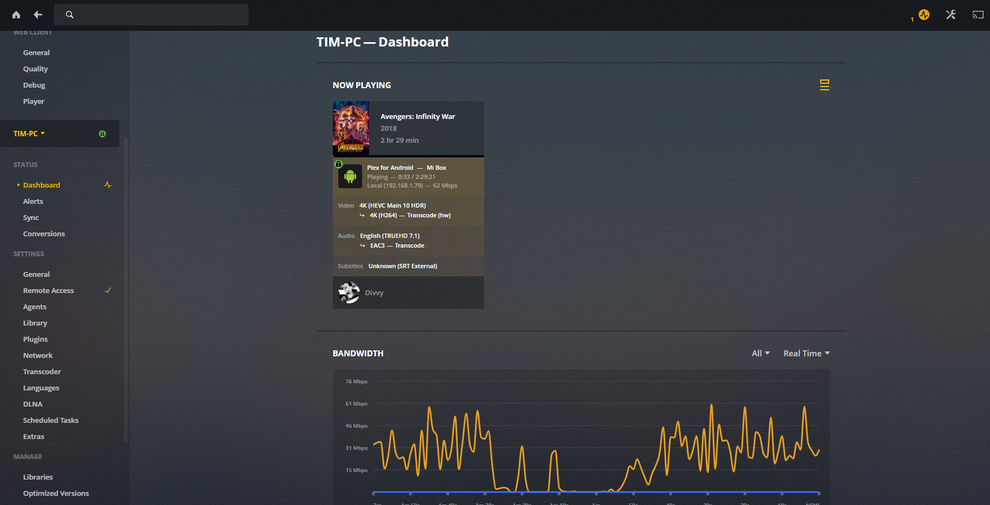
Today I wanted to test a 4K movie using Plex, but the movie is always pausing with the following error message: “This server is not powerful enough to convert video”.
Any idea of what could be?
I have a good computer (i7-4770K with 32GB RAM 64bits Windows and Gigabit Ethernet).
I’m using an Android Box (Xiaomi Mi)
I even can’t play the movie directly, only using transcode.
Please check the attached file, what does it mean 62Mbps? Is my network speed? It should be around the 900 Mbps if I have Gigabit. Correct? Do you think is the reason why it says that the server is not powerful enough? Or is related with the server settings?
See if the video has an alternative audio track (AC3) if it does, select this instead. I doubt the Xiaomi Mi can direct play TrueHD.
as a test see if disabling subtitles makes any difference, I know as they are srt so they should be ok, but I am not sure if it might be an issue if it’s transcoding.
And make sure your settings in Plex on your android box are set to Maximum for home streaming
You need a Plex client that supports TrueHD audio passthrough. AFAIK, the Nvidia Shield & Plex Media Player are the only clients that passthrough TrueHD audio.
You need a receiver/soundbar that supports TrueHD audio (preferably TrueHD + Atmos). I’m not aware of any TVs that support TrueHD audio.
FYI, if you’re going to all this trouble, make sure the receiver/soundbar supports dts-HD MA 5.1/7.1 as well. I’ve ~250 HD & ~75 4K movies. The ones with dts-HD MA audio outnumber those with TrueHD by a pretty good margin.
3a. Connect client to audio component via HDMI.
Example (my setup): Nvidia Shield <–HDMI–> Denon 4300 <–HDMI–> TV
3b. If TV and receiver/soundbar support eARC, then using Plex app on TV, feed audio to receiver/soundbar. NOTE: This capability is theoretically possible. I have not seen posts of it actually working (new tech, takes time to work out the kinks).
If you don’t have a system capable of playing TrueHD, you might be better off just remuxing the file to remove the TrueHD track (or if you do want to keep the TrueHD track then just change the default track to the AC3 track)
You should be able do this with the MKVToolNix software
So I tried removing that track from my copy and then using Mediainfo (MediaInfo) to view the info
I can see the overall bit rate has decreased a bit, but the Video track has the same bit rate (46039 kbps), so I would say there should be no loss of video quality.
Not sure why windows shows such a massive difference on your’s though… I would try using Mediainfo and see what that reports.
You are right, I checked both files using Mediainfo and they have the same bit rate too.
I think Windows shows the “overall bit rate” only. If you check your last post, you see that they have different overall bit rate too, but the most important is the video bit rate only (not overall).