Server Version#: 1.14.1.5488
Player Version#: 2.25.0.940-485e2ea4
I bought a small media PC (Pepper Jobs GLK-UC2X) to use Plex and circumvent limitations of player versions like on my Sony KD-55A1. It runs Win10 and is based on an Intel N4100 and UHD Graphics 600. All drivers are recent. It is hooked up to the Sony TV.
Unfortunately for 4K content this has not been very succesfull so far and I cannot figure out why. Server is on a separate PC i7-7700k. No transcoding is taking place on the server side. On playback video is choppy and no sync with audio.
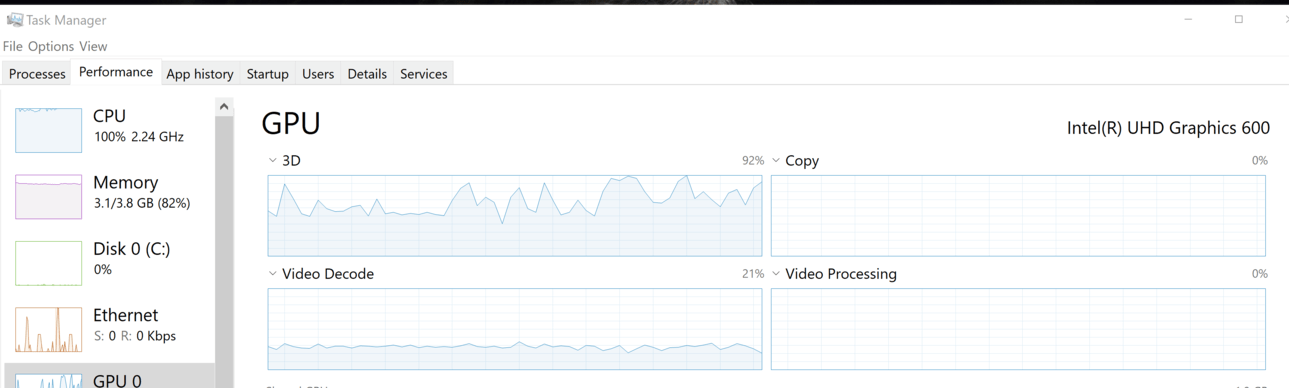
I did a comparison with PMP on the server pc (connected to a HD display). There, playing the same content, the CPU load for PMP is very low (2.5%). On the N4100 the PMP load is around 60% and overall 100%. On the N4100 the TaskMngr only shows GPU-3D in process view, but the graph also shows video decoding… On the i7 PMP only shows GPU-Video decode&processing alternating.
Obviously both PCs have a significant performance difference, but I don’t think it explains the differences in behaviour. The GLK is supposed to play 4k flawlessly. On Kodi, VLC etc it does.
The above is illustrated in the attachments. Suggestions to the above are highly appreciated!
PlexMediaPlayer - (i7-7700k-HD Graphics 630).log (108.0 KB)



PlexMediaPlayer - (N4100-UHD Graphics 600).log (272.1 KB)
