Server Version#: Version 1.14.1.5488
Player Version#: Nvidia Shield: Plex Client 5.6.1.505 (25ece77b)
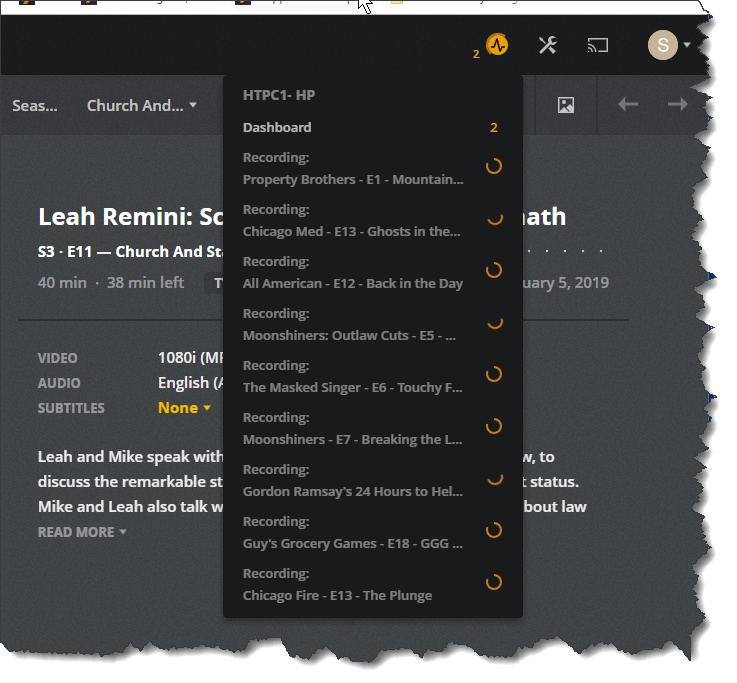
Very strange in deed… Especially since two of the shows you have listed, Chicago Med and Chicago Fire, don’t air at the same time…
Did any of these recordings actually finish with usable files???
My wife tried to watch “The Masked Singer”… no go… froze up in the Plex Media Player on my Nvidia Shield… but… opening up Kodi on the Nvidia Shield and navigating to the file location for the recording… and playing it within Kodi . played without issue.
We tried to play the file via Plex on a Roku 3 as well… no dice, wouldn’t play either.
AS OF TODAY… I’M DONE WITH PLEX… I’LL COME BACK IN A YEAR OR SO… WHEN IT IS PERHAPS A USABLE PRODUCT.
I do IT support for a living … and have done IT support for 20+ years. I AM DONE WITH COMING HOME TO HAVE TO SUPPORT PLEX’S SHORTCOMING ON A DAILY BASIS.
MY WIFE, WHO IS DISABLED AND STAYS HOME, WATCHES TV THROUGHOUT THE DAY
I’M DONE WITH HEARING OF ALL THE ISSUES SHE EXPERIENCES EVERYDAY. I’VE NO ANSWERS FOR ALL THE STUPIDITY THAT SHE KEEPS EXPERIENCING. AND THE STUPIDITY IS NOT THE END USER HERE… IT’S PLEX.
HARSH, AND NOT MUCH INFO TO GO ON, YOU ARE CORRECT. I DON’T HAVE THE TIME TO KEEP CAPTURING SCREEN SHOTS AND TRYING TO EXPLAIN IN THESE FORUMS WHAT AILS MY PLEX EXPERIENCE.
WHAT UTTER CRAP PLEX IS WHEN IT COMES TO LIVE TV & DVR ABILITIES.
I’ll go dust off the Windows Media Center and set my recordings there, and get my evenings back.
Once again a suggestion to the folks at Plex… install windows media center on a PC… and try to duplicate its features and what it is able to do as a baseline. Make sure that actually works… check again… make sure it works… and then one more time… TEST it… don’t continue to make your users your unwitting beta testers…
I will NEVER make Plex my main LIVE TV and DVR solution ever again.
And to think I paid for the privilege of a lifetime plex pass for this crap…
Ok… I feel better now… had to vent on my way out the door form using the Live TV and DVR features of this software.
Have a nice day,
Stephen
Just saw this thread with your last post. have you tried updating the Plex Player on the Shield? The version you posted that you are running is almost 2 years old, released in March 2017. Go to the Google Play store, find the Plex app and install it which should force the current version 7.12.0.8980. Then check your settings in the player.
1 Like
@sjtsnix If you have the DVR set to Transcode (and your tuner doesn’t support transcoding to h264 itself), Commercial skip, etc., those happen post recording and will show as spinning items under Recording.
Depending how beefy your PMS server is, that can take ALONG time with that many happening simultaneously.
So you likely have a bunch of the post-processing happening simultaneously on top of some live recordings happening as well. That would be how you get 9 items for 6 tuners.
The freeze up could be related to your old Plex client on the NV Shield, the amount of simultaneous recording/post-processing you were doing or a combination of both.
Hello John,
Thank you for your email.
I downgraded the Plex Player on my shield due to the ‘out of the blue’ upgrade that rendered plex on my shield unusable. Seeing other posts stating something along the lines that uninstalling updates in the google store for Plex resolved issues for others. It did… but now I had a somewhat generic looking interface, and no Live TV / DVR.
Today was the last straw for trying to get Plex to be our daily driver… for live TV and DVR services.
The items that lead me to finally call it quits are things like:
-
DVR recordings get cut off at just the most inopportune moment at the end of a TV show or Movie…, I was not crazy about padding a each show with 1 minute at the end, only to potentially lost a minute at the beginning of a show should all six tuners be in use.
-
Setting a one time recording at 5pm, for example, and the airing of the show that met the requirements to be recorded were at 6pm and 11pm… Plex opted for the 11pm recording over the 6pm recording… and there were plenty of tuners available at 6pm to record at that time. My wife wasn’t happy that she couldn’t watch the show at 7 pm, when the recording completed.
-
Unable to watch a TV show while it is being recorded.
-
Set to record something, such a recent show by title of “Psyco Brother in law” from the Guide, got the show “Psyco MOTHER in law” instead, this is just one example of this behavior that happened many times.
-
A show that was set to record new shows, got a handful of times that it said that it recorded that weeks New Episode, but it actually recorded the ‘new’ episode from the previous week instead and titled it as the current weeks show…
-
Commercials full cut out of some shows, No commercials cut from others.
-
The list of recordings, when watching from their, when you finish watching and delete the show, it doesn’t remove it from that list.
-
Many half hour shows, only recorded about 1/2 of the available air time (minus the cut commercials)
And many other issues that contributed to my frustration level peaking yesterday.
I had a choice, set Window Media Center back up, and regain my evenings and weekends of ongoing ‘tech support’ for my wife on regular basis (Set it and forget it for the most part)
or
Stay with Plex and go postal.
That said, I really wanted Plex to work… very much so, I even opted for the lifetime plex pass as I saw some hope that it could replace WMC as our DVR / Live TV solution. It just became such a time sink to get it to work, (which I’m willing to do), but I can’t have my homes main DVR Live TV source that unrealible. When I have the funds to do so, I will buy a 3rd Silicon Dust with 3 more tuners, and start 'beta testing" Plex again at that time. (If I could get Plex to use just ONE tuner from one of Silicon Dust Homeruns, and let me make the other FIVE tuners available to my tried and true and working WMC… then I’d be able to test today.
(If you check some of my previous post, you will see that I’ve kept my Player and Servers current until I downgraded the player on the Shield in an attempt to have a usable Plex system)
Stephen
Not sure if this is beefy enough for my Plex Server… (I did try to run Plex Server on my Shield, and that was a futle attempt, I quickly went back to my ‘dedicated’ HTPC system for Plex:
I don’t know if this is “Beefy” enough, or not:
I’ts an HP Pavilion Elite Desktop with:
i7 960 CPU
24 GB PC2 Ram
240 GB SSD drive for boot drive, and using a folder on the SSD for transcoding.
Initially was recording to/ playing content from a NAS on my home network. which seemed to work just fine in the beginning of my using this setup… then, when stuttering and pausing hit my Shield based Plex Client without abandon… I moved from the NAS for that purpose to the local 2TB’s of storage on this PC.
When you say a 'Long Time" for the post processing… that screen shot was taken about 20 hours ago… and when I uninstalled Plex on that machine about an hour ago… I still had 6+ items spinning away as before…
Stephen
Thanks Stephen for the additional information.
The i7-960 isn’t a particularly beefy CPU be todays standard (passmark of around 5811). Just as a comparison, an AMD Ryzen 5 1600 has a passmark of 12,213. I recently saw an ad for the the Ryzen 1600 for $99us.
The other drawback is you don’t have an embedded GPU for the older CPU to help with HW transcoding.
What OS is your HP Desktop running? If you are on say Windows 10 AND you are using an Nvidia GPU in it, then in many cases you can use that to help.
If your NAS and PC are connected via 1GbE hard wired connection, in general I would recommend using the SSD for your transcoding temp directory, and the NAS for media storage. But it depends on your NAS config and without knowing more details hard to give an absolute answer.
At the end of the day, I think your issue really just boils down to trying to do too many things at once and because of the limited HW resources, you are bottlenecked and none of them are getting anywhere fast.
Short of just spending some $$$ for newer/beefier HW, probably the best short-term answer would be to do the following:
- Disable Transcoding in the DVR Settings
- Disable Remove Commercials in the DVR Settings
This is going to basically tell Plex to just write the data to the disk. Assuming you aren’t running HD HomeRun Extends that have built in h264 transcoding, your files will be in mpeg2 form factor (if you are in the US). This isn’t the end of the word, but they do take up more space.
Buy MCEBuddy (http://www.mcebuddy2x.com) and schedule it to run off hours (say 11pm - 6am) for example. Have it do the transcoding of your media as well as commercial removal. I would start with doing 1 file at a time. See what the average is to convert/comskip a 1 hour show.
Then try doing 2 files at a time. See if the TOTAL time needed when running 2 at the same time is less than running 2 sequentially (show 1 then show 2). That will then help you determine where the bottleneck is.
Again I would likely keep the media on the NAS, and use the SSD for your transcoding/commercial removal.
This topic was automatically closed 90 days after the last reply. New replies are no longer allowed.
