A server could not be found. Download and install Plex Media Server, and it will appear here

Packages Tried:
Current package from Plex website (1.18.4xx) and synology package manager (version 1.16.5.1552) have been tried.

Network Topology:
fortigate firewall ↔ Cisco 3750x ↔ DS 918+ synology NAS , running LACP 2x ports on the synology to the cisco switch , etherchannel summ is up/up …

posted config for sanity:
NAS:
cisco switch:

everything is inside (local network that I am testing with) firewall policies are not denying anything - shouldn’t be hitting Allow_All (NAS → outside if that matters it shouldn’t (?))

default route, etc is setup correct (network wise - can ping from different devices on multiple vlans, synology has connectivity to outside)

everything has routes, can reach http://nas_local_ip:32400/foo ( nas_local_ip == 10.0.30.14 - once again, everything pingable/plex server with respective port is accessible)
after logging in, I do not receive the setup wizard.

error I’m receiving:
“A server could not be found. Download and install Plex Media Server, and it will appear here.” shared folder for plex has perms to RWX every user…have tried multiple plex accounts (created this after i deleted previous plex account)

expected outcome:
welcome msg about paying for plex pass, then plex server setup??

multiple install/reinstall on synology from it’s built in package manager and the up-to-date package from plex, have also tried docker still same error…any advice would be appreciated

this is a vanilla install (everything fresh)

I am waiting for plex to get back to me about resetting the account that correlates to the synologies admin account email (i read somewhere that may be a problem, no idea how though?)

pics:


any advice would be appreciated/Please let me know any other info I need to provide to troubleshoot this.
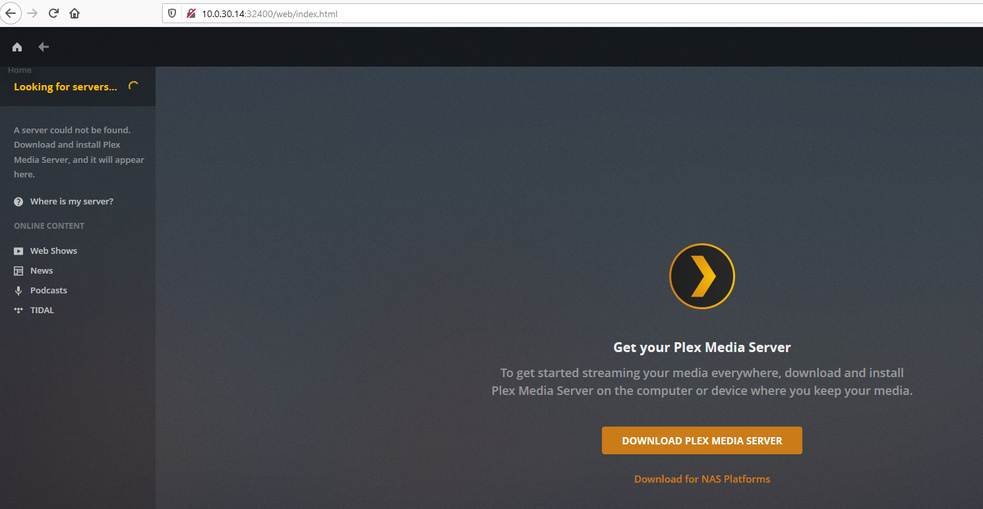

after the plex advertisement msg


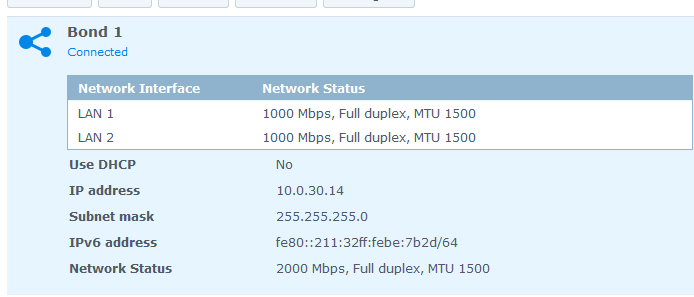
post of NIC bond from synology to confirm the host’s IP
Thank you for the help!

Logs.zip (82.9 KB)

posting logs for clarity

In case you haven’t seen this Synology FAQ - Questions, Answers, and a few How-To's

Thank you for posting but this has nothing to do with my error

I will presume you’re running a /24 on 10.0.30.x.
Is the originating workstation/laptop also in the same subnet? If not, it must be in order for PMS to be found and ultimately ‘claimed’ (attached to account).

  1. Sign out of Plex/web (upper right)
  2. Stop PMS on the Synology
  3. Open Control Panel - Shared Folder - EDIT the Plex share - Permissions tab
  4. Give your username R/W access to the share.
  5. File Station: Open Plex / Library / Application Support / Plex Media Server
  6. Rename “Preferences.xml” to “Preferences.xml.old”
  7. Start PMS. Give it about 10 seconds to get started.
  8. Open incognito window in browser.
  9. Connect to http://10.0.30.14:32400/web
  10. Be greeted by signin & Got-It pages.
  11. Setup Wizard will automatically start.
  12. If you have previously defined shares, do not define new. Existing shares still exist. (SKIP this part)
  13. Continue through the wizard making setup preferences as you wish.
  14. When you complete and “Finish” you will be at the dashboard.
  15. Plex/web will be signed in (upper right avatar) and server will now be associated

At some point, you will want to allow “Private Domain: plex.direct” in your DNS resolver. It will greatly aid / speedup Plex communicating with clients (player apps)

Thanks for the reply ChuckPA - switching my workstation to the same vlan solved the issue.
I can now access plex from all subnets after server finished setup wizard.

Thank you for your help!

Glad it worked!!

If I may? IMHO

MAC vlans (even when on the same subnet) make sense in a good if you want to keep certain devices from seeing others.

I have two VLANs here. It keeps the guest WiFi from seeing any of the main.
Guest AP can’t even see the wired LAN. VLAN 1 & VLAN 1002. that’s it :slight_smile:

From the administrative perspective, to me:

  1. All on the same subnet keeps the hair from getting pulled out or going gray a little longer :wink:
  2. If someone gets on your LAN at that level, all the security in the world is meaningless (really), you’ve a bigger problem of how it happened. true?

I am using SVIs for each subnet on my switch to act as default gw, if i don’t want a section of the network to talk to one another I can use an vACL or simply not route to it – My network is sectioned by certain devices that go to each of there own network to keep broadcast traffic down and easier for logs/security - i can just make a blanket statement and summarize which ever network i dont want to access, etc

plex is on 30 because I will be able to use the synology for most services i run on there - replacing the esxi running 24/7 to now only when I am labbing something heavy

I see your point about keeping everything happy on the same subnet for cases like this one (not sure if i just browsed the documentation and skimmed the part about keeping plex on same subnet as client for setup wizard…It is easier maintenance for me to keep certain devices into there own subnet…really just depends on how you choose to manage!

All great points though - thank you!

How can I remove servers that are unavailable. I use to be connected to other servers that people had running at one point but now they are not running anymore. I just want to remove those inactive servers off my server list. I am running plex server through a NAS drive if that information is needed. This probably isnt the correct place to post this but I couldnt find anything in support forums about this.

This topic was automatically closed 90 days after the last reply. New replies are no longer allowed.
