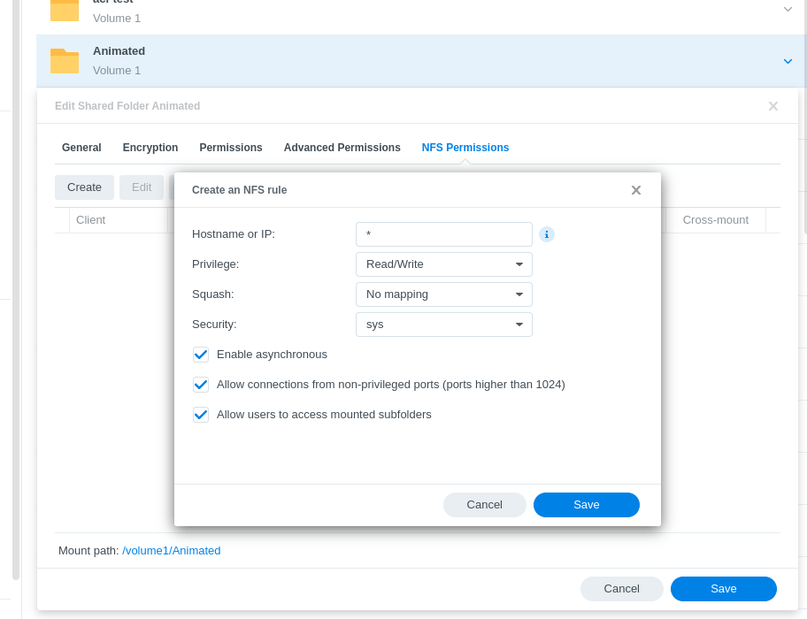
I have PMS running successfully on my DS918+ holding my films/TV.
After adding a second DS918+ for other media and security cameras, I moved my music to this NAS to free space on the first.
How do I now add the music folder on the new NAS to PMS on the original. I don’t see the second NAS when I browse for the folder in library set up.
Both Synology are running the current release of DSM7 release 3.
PMS is 1.29.2.6364-7000
I have been scratching my head on this for days. Any help to fix would be great.
It’s two different devices, so… As far as I’m aware, you can’t add folders from 1 NAS to another NAS’ Plex setup. You have to install the plex service on there and have a separate device in the list.
Select the shared folder you want to use on the Primary NAS
– FIleStation → Left Panel
– Right-Click the folder you want to use on Primary
– Properties → Permissions tab
Add permission for “Everybody” to “Read only” (allows all files over the network)
– “Apply to this folder sub-folders and files” (important)
On Primary:
Create a shared folder for the other syno: (Good practice but NOT required)
Optionally create a sub-folder to mount to if a conflict arises. (DSM creates sub-folders for you based on remote shared folder name)
Open FileStation
– Tools → Mount Remote Folder → NFS
Tom, thanks for the reply, yes I believe I did, been through then process step by step more than once. I am wondering if there are other settings which may cause a problem