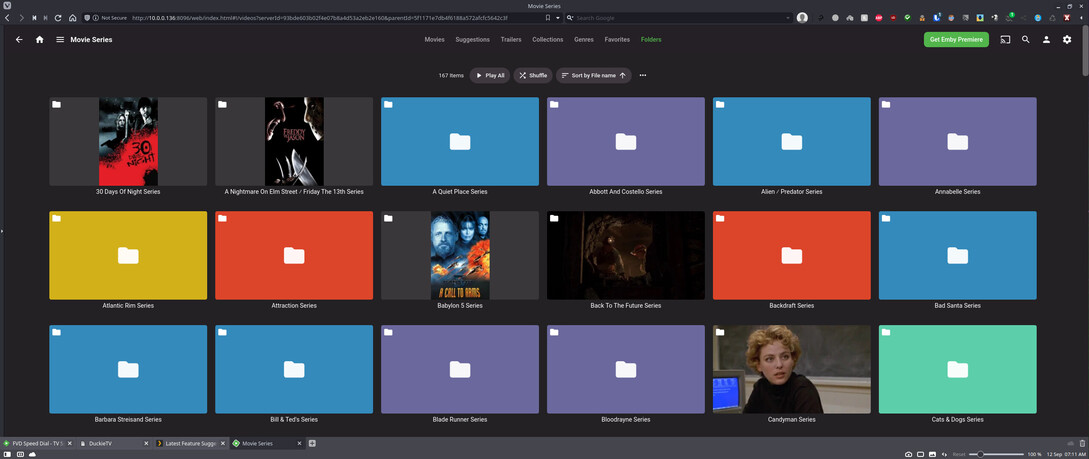
I was going to go in and manually create my collections to find to my surprise that instead of actual folders under folder view I had a compact view, and when selecting a folder to select all the content in it to create a collection the name I gave the collection on the system isn’t showing above the Items I want to make a collection out of. I like in Emby when I go to my Movie Series library and select folder view I actually get folders, and if I select one it opens to show me the content the folders name is right there. With the folder name right there I can hi-lite and copy the name and then use that to name my collection. For most collections this isn’t really a big deal, but there are ones that have custom names and short of going into the file manager and looking at the name there it’s not always easy to remember exactly how I have it named. Image examples below. I would like to see the option for viewing folders like Emby has it and the name of the collection listed above the movies like it is in the second Emby image. Thanks



Not what you’re asking for… though Collections might actually be what you’re looking for (except they’re not auto-generated based on folder structures – there’s a feature suggestion asking for that).
I’ll have a look at your link. As for not being autogenerated that’s perfect in my book cause I have several series / collections that have more than one series of movies in them cause they really all belong together. Like Alien / Predator, Puppet Master / Doll Man / Demonic Toys, etc… I’ll let you know if collections as PLEX has it works for me or not. THanks
O.K. from looking through both of those linked pages for now I think the best I can do is just use the current folder view and have Dolphin open to Movie Series so I can see exactly how I have the series / collection named.
