Hi,
Not sure where the correct place is to post this.
If it should be elsewhere, please point me in the right direction.
I have a new Synology DS218Play to add more storage to my media collection.
I already have 7 other Synology 2-bay NAS units.
All of which, I have setup fine previously.
However I have now hit a problem when trying to add the shared folders on the new unit.
The folder levels and naming conventions are identical to the other NAS units.
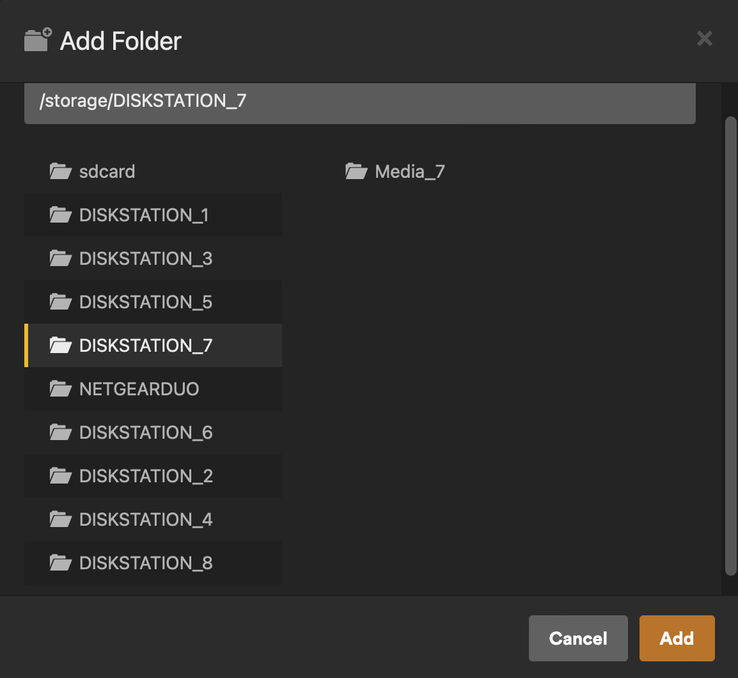
But, when I go to add an additional folder in Plex, it only sees the DISKSTATION drive, not the folders on it.
When I choose the other DISKSTATION drives I see a folder icon and all the sub-folders listed.
When I choose the new DISKSTATION drive I see a file icon and no folders listed.
I have checked that all the permissions and settings are the same as on the other units.
I can access the drive and all its contents using finder on macOS and file explorer on Windows 10.
2 pictures are attached.
DISKSTATION_7 - shows how everything as it should be.
DISKSTATION_8 - shows how only a file icon is showing.
So, I am unable to add my new media files to my Plex Library
My PlexMediaServer is running on a NVIDIA Shield.
All media content is stored on my Synology NAS units.
Any help appreciated.
Thanks.