Adding new songs to my Plex Library

I have my QNAP NAP Server running and providing Music song to my iPhone, Samsung TV, etc.

I now want to add more songs to the Plex Server.

Can you point me to documentation that shows how this is done?

Also, can you tell me how to find where Servers and Libraries are stored?

Many Thanks!

When you installed the server and created the music library you told it the folder where the music files were on your NAS. All you need to do is add the new music media to that same folder and then for that library or the server as a whole you “scan library files”

Screen Shot 2020-11-02 at 4.14.02 PM

  1. https://support.plex.tv/articles/200265296-adding-music-media-from-folders/

  2. Qnap faq.....read me first!
    Q14 in particular

Thank you BigWheel; This was just what I needed!

I don’t know why I forgot the NAS copy. Senior Moment!

I do have another issue that I will post as another topic.

Thanks OttoKerner,

Good advise!

I will give the Plex Media a new unique name to avoid issues.

Do you know why Plex does not show where the win 10 directories are for the music directories and actual server locations in Win 10?

Sorry, I don’t understand your meaning here.
I thought you were running Plex server on your NAS? A QNAP NAS has nothing to do with Windows 10.

OttoKerner,

Your are right.

So does Plex indicate where the Music Library is stored on the NAS?

I am still unsure what you are asking.

Do you already have a music library in Plex?
Or are you asking how to create one?

Hello OttoKerner,

Sorry for the confusion.

Yes, I do have a PLEX Music Library stored on my NAS and Plex does scan this library.

So, what I would like to know is, If PLEX can scan this library does Plex identify somewhere in Plex where that the Music Library is stored. I know where that is right now but after I have more info in the NAS, can I rely on Plex to identify the library location for me some time in the future? If not, I believe this would be a good enhancement.

Thanks, Paul

Isn’t your server already on the NAS?
What do you want to move to the NAS? From where to where?

Take a look into the Plex media info. It tells you precisely where Plex is expecting to find the media file of any item in the library.

The properties of each Plex library, on the ‘Add Folders’ tab will define which locations are scanned by Plex for media. https://support.plex.tv/articles/200289266-editing-libraries/

OttoKerner,

I am running app.plex.tv but I do not see the … content menu and Get Info.

11/7/2020 2:46 PM - Screen Clipping

11/7/2020 2:46 PM - Screen Clipping

At the right end of the line is the ellipsis …
In your screenshot.

Hi OttoKerner,

I am running app.plex.tv/desktop, version 1.20.4.3517.

As you can see below the ellipsis, “…” menu does not show the “Get Info” that was shown on the “Open the Media Info Window” documentation that you referenced. Perhaps this is a difference in Versions.

However, the “Edit Library” feature that you highlighted does show under “Add Folders” the location of the Music folder that I was looking for.

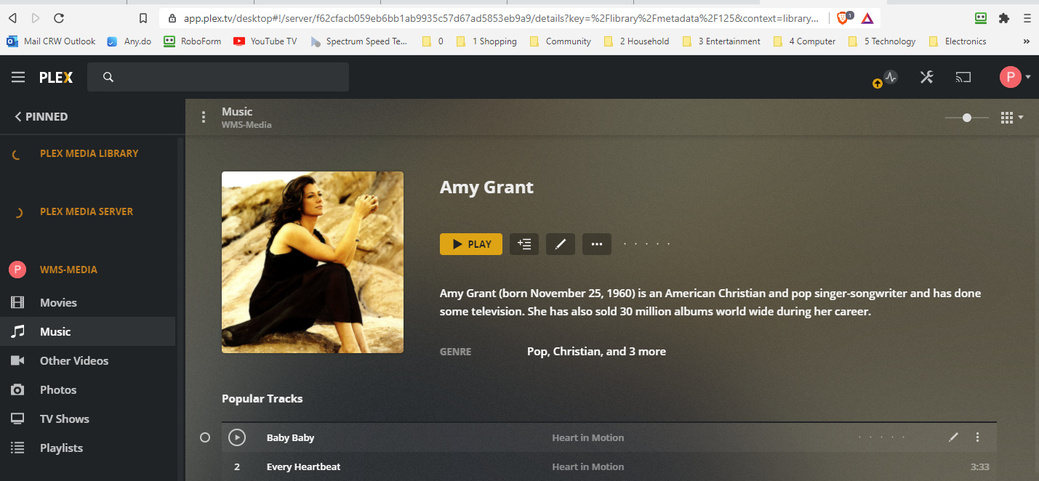
Many thanks!

It shows up on tracks, not on albums.

This topic was automatically closed 90 days after the last reply. New replies are no longer allowed.
