not sure if i’m in the right section…
i can’t remember how to add media to an existing library
for example, i recently added the movie below to my NAS
\NAS*****\Multimedia\MOVIES\BLACK PANTHER (2018)
how do i put this in my plex media server?
not sure if i’m in the right section…
i can’t remember how to add media to an existing library
for example, i recently added the movie below to my NAS
\NAS*****\Multimedia\MOVIES\BLACK PANTHER (2018)
how do i put this in my plex media server?
You just need to point Plex to the folder
\NAS*****\Multimedia\MOVIES\
This should already be the case. You can verify it by Editing your library, go to the ‘Add Folders’ tab.
If that is already done, you only need to ‘Scan Library Files’ on the relevant library. You need to be signed in as the server owner to do that.
https://support.plex.tv/articles/200392106-library-actions/
If you are running Plex Server directly on a NAS, make sure not to use the pre-defined shares/folders . Because some NAS models will claim the media files in there exclusively for their own, bundled software. Which then makes it impossible for Plex to even see them.
But first of all, read & heed https://support.plex.tv/articles/categories/your-media/
There is for instance no need to use ALL CAPITAL LETTERS.
If I may add here:
Per the FAQ:
Multimedia is a software (virtual) share controlled by QNAP.
when you change software on the QNAP, your media will appear to change
thank you for the reply
i made the file lowercase and scanned again, but it’s still not there
i’m signed in, but how do i know if i’m signed in as the server owner?
If you from the WebClient can select Scan Library Files then you are the owner, and when said, the path you referred towards, indicates a QNAP
As such, and if so, then @ChuckPa was 100% correct here:
It’s all in the QNAP FAQ Q14 so you need to create a new share, and name it like medias and then using the FileStation move your medias into the new share
thanks for the reply
please explain further
i have no idea what this means
I apologize. Perhaps a screenshot is best to convey.
I create shared folders for nearly everything (a bit excessive) but that’s how my mind works. (a place for everything).
i think i understand
i should move my Movies, Music & TV folders out of the multimedia folder (?)
if that’s correct, where do i move them?
you mentioned “share” but i don’t see a share folder
and i don’t see an option to create a new folder on the NAS
also, i get a message about an update
when i click download now, it creates a file
when i click the file, i get the error message below
what am i doing wrong?
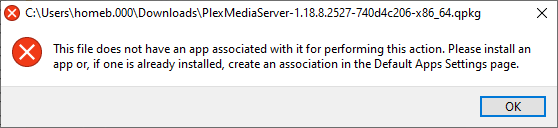
Don’t click on it
See details here for another downloaded qpkg file:
And lastly, please keep one issue pr. thread, so others more easy can search and locate them
Also, I strongly suggest you for a start read the QNAP QTS manual
https://docs.qnap.com/nas/QTS4.3.5/en/index.html


