guess who just lost every single ounce of goodwill they had accumulated over the past several years? you did, plex.
this wasn’t just a security breach and data exposure. it’s not just a password change. now, i have to go through some ridiculous process just to set up access to my server again, and every family member has to do the same thing. ?!?!?! it’s not just a minute, it’s probably a number of hours when it’s all added up.
this is what is wrong with allowing corporations to have control, and this is what is wrong with having central auth. plex might not suffer any financial consequences because of this, but i guarantee you it will take a VERY long time before i have any trust or faith in them again.
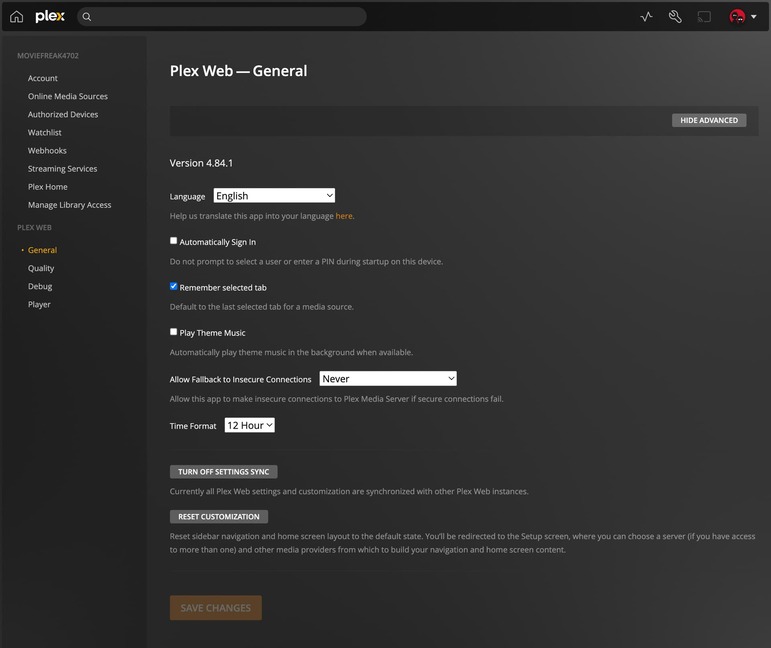
Looks like you’re stuck in the Web settings. Server settings “should” appear beneath.
Try http://my.ip.add.ress:32400/web which should prompt for login?
After that, you should see the entries for Server settings appear beneath the Web settings on the left. You should be able to hit General from those and reclaim.
I have 2 Plex servers on 2 different Syn Nas. I can see both internally (now after doing a bunch of other things people talked about, claiming etc…) but not over plex.tv website
I’m thinking of trying yours steps but wonder if I can do just on one to start and not other. I have a backup NAS also running plex. To see if it works?
The same thing is happening to me after the Plex Email notification my plex server is down hard and I can’t even access the interface. I wonder when it will be back up?
I was able to change my password and reclaim my server. It works fine on my server PC but nothing remotely will connect.
I disable remote access and rebooted. Then enabled remote access and everything shows green there. But still have no access remotely.
I can’t connect to my server either, and I followed the instructions in the email to the letter. I don’t understand what your http://<IP_OF_QNAP>:32400/identity is supposed to do. I don’t see anything other than yet another link to a Plex support page, and no “claimed,” when I put that in the browser on Google.
I think somewhere in this thread, there was advice to restart the server. I’d encountered this very thing, and going to the web version worked for me after restart.
Fingers crossed you get it sorted. Definitely looks like your server isn’t online if you can’t hit the proper interface.
It’s odd, I’m running an UNRAiD setup and all other dockers are running without issue. No amount of restarting the docker/fixing the config entries or other methods of troubleshooting are doing a thing for me.
i have 2 different NAS systems (both ASUSTOR) and on both are a plex server is running.
On both, I performed the previously described path.
After that I was able to log in to Plex using the web link ip-address_of_NAS:32400. As with the initial setup of Plex, I was asked a few questions and on the window where you add the libraries, all my libraries were visible.
The only thing I had to do was rearrange the order of my libraries and set up my internet accessibility.
Yeah, been using that as well. I think there’s something far more broken than the Plex devs realize here, as all over this forum, Reddit and Discord it seems a ton of users are experiencing a bevy of issues around this. We might just be stuck in “wait and see” mode.