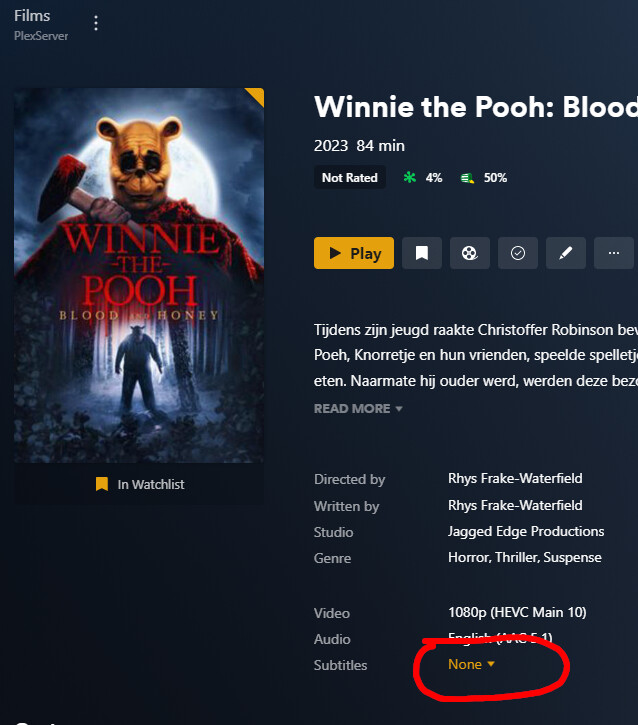
After server migration new .srt files not visible in Plex, existing .srt files are visible and worki

Hi there,

Recently i migrated my Plex server from a Raspberry pi to an desktop computer with Debian 11.

Now i have a wierd issue;

The library is migrated completely, i see all movies including the .srt files and they are working.

But when i ad a new movie with an .srt file, he only sees the movie file, not the .srt file!

When i check the permission from my Windows computer, they are the same. I compared and existing .srt (that works) and a new .srt (what is not visible in Plex). Both the ‘Plex’ user (where i mounted the sare with on the Plex server) are having read and read and execute permissions on the .srt files. So i really don’t know why new placed .srt files nog visible in Plex?

Ps. the datastore is a Synology NAS

With kind regards,

Buck Baggen

Looks like your missing the language identifier in the filename. Try moviename.eng.srt as an example.

See https://support.plex.tv/articles/200471133-adding-local-subtitles-to-your-media and the section External Subtitle Files. You can use 2 or 3 letter language codes.

Thanks, i checked the url you provided. Checked the Agents settings, ‘local media assets’ was not on top, so i placed it on top and refreshed all metadata’. But doesnt work :frowning:

I als added the language indentifier but still doesnt work.

On a existing movie (that was allready present on the old hardware) the existing .srt works (without language indentifier)

But with a movie including .srt i have placed after the migration, it dont :frowning:

Unless your using the old legacy agent those settings are no longer used. If your using the modern scanner/agent Plex Movie then all configuration is under the advanced settings of the individual library but subtitles should be detected by default when naming is correct.

Your naming looks okay. I have the movie myself and added a .nl.srt subtitle and plex picked it up when I refreshed the metadata on the movie (see below).

Filenames:
Winnie the Pooh: Blood and Honey (2023).mp4
Winnie the Pooh: Blood and Honey (2023).nl.srt

Could you provide server logs, might help identify the issue.

You need to Refresh Metadata on the movie after adding new external subtitles.

I dont understand that ‘Agent’ thing. How can i see if i use the moderm scanner/agent ‘Plex Movie’?

I tried, but doesnt work. On the old hardware it worked perfect, ad a .srt, refresh metadata (or scan library files) and the subtitle automaticly added.

Plex Media Server Logs_2023-03-25_15-29-42.zip (2.7 MB)

Edit your library,
go to the “Advanced” tab
Then take a look at the Plex media info XML of that movie. Copy the content of the XML property guid="...

From your logs:

Mar 25, 2023 15:25:53.470 [0x7f5f86d33b40] DEBUG - Matcher: found 1 auxiliary files in "/mnt/Films/Women talking (2022)" (single media: yes)
Mar 25, 2023 15:25:53.475 [0x7f5f86d33b40] DEBUG - Scanner: found local sidecar subtitle "/mnt/Films/Women talking (2022)/Women talking (2022).nl.srt"
Mar 25, 2023 15:25:53.529 [0x7f5f86d33b40] ERROR - Error creating directory "/var/lib/plexmediaserver/Library/Application Support/Plex Media Server/Media/localhost/b/a32843973ddbedb452a06509c21a9910e795cea.bundle/Contents/Plex Movie": Permission denied
Mar 25, 2023 15:25:53.529 [0x7f5f86d33b40] ERROR - Matcher: unable to create directories "/var/lib/plexmediaserver/Library/Application Support/Plex Media Server/Media/localhost/b/a32843973ddbedb452a06509c21a9910e795cea.bundle/Contents/Plex Movie/Subtitles.xml"

“Permission denied”.

1 Like

Cool thank, i checked the directory:
/var/lib/plexmediaserver/Library/Application Support/Plex Media Server/
There were some folders, including ‘Media’ that are only user and usergroup was ‘root’, so i ran this command: sudo chown -R plex:plex ‘Plex Media Server’
Followed by refresh all metadata in the library section and now everything is fine with the subtitles!

Als thanks for the info about the language indentifiers, i added to all .srt files on my NAS the indentifier .nl, now it looks much better in Plex. Now everywhere he is saying 'Dutch (SRT External)'instead of unknown.

:D:D:D

Thanks!!!

1 Like

Sorry, i dont realy get it…
This is what i see when i go edit the library at the advanced tab:

(is that the modern scanner and agent?)

Yes, that is the new modern plex scanner and agent. The top two options say Plex Movie for both scanner and agent means your using the correct one.

BTW… don’t change these, bad things can happen :slight_smile:

Okidoki, thanks a lot!

This topic was automatically closed 90 days after the last reply. New replies are no longer allowed.