Server Version 1.25.2.5319
Windows 10 PC
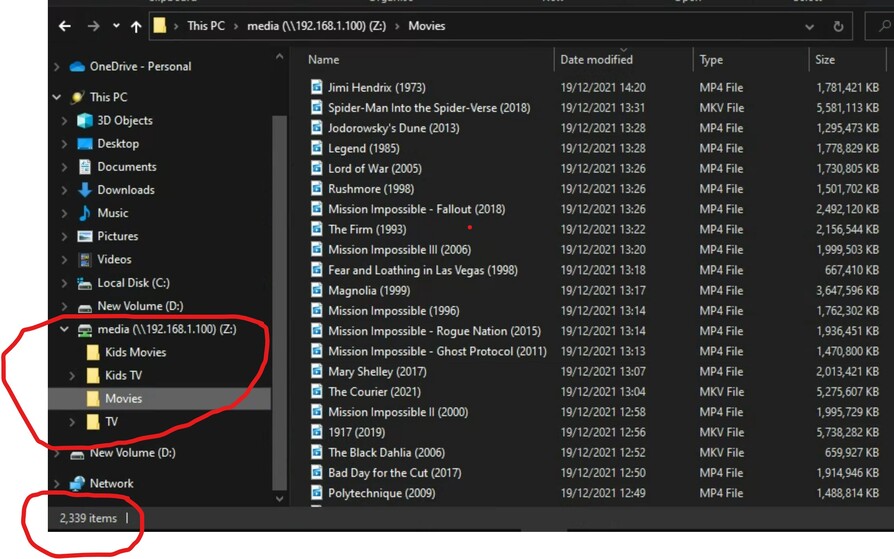
Thecus N5200 NAS (Movie files on NAS - 2339)
Hello,
I was hoping you guys might be able to help me with an issue I am having with my libraries.
I am running a small Windows 10 PC with Plex Server Version 1.25.2.5319.
It’s connected to an old Thecus NAS which is also on my home network.
The issue I am having is quite a few of my movies are not showing up when I use the Plex Movie Scanner and Agent.
I know the main reason for this would usually be related to how your files were named and structured but I don’t feel I am doing anything wrong here - please see the attached as an example.
I have created two library’s both pointing to the same location on my NAS.
Movies Library 1 - //192.168.1.100/media/movies
2263 items
Scanner - Plex Video Scanner
Agent - The Movie Database
After messing with scanners and agents Movie Library 1 is the best I can do and missing under 100 files (movies) but on the legacy scanner.
But with Movie Libary 2, I don’t know what’s going on! I’m using default settings for everything but it’s constantly refreshing and fluctuating the total amount of movies. Its never consistent and sometimes as low as 700 (ish) total movies
Putting everything in a flat folder structure is not advised. Put everything in dedicated folders. It’s helps the matching and overall performance of the scanner.
As you have everything in a flat structure having - in the naming will cause problems as stuff after the - is ignored for matching. I’d bet all the mission impossible movies are combined due to your naming of things.
Pro tip is to add id tags from imdb or tmdb in {} which will help plex match correctly. Example Mission Impossible (1996) {tmdb-954} as the folder name with the movie inside the folder.
BTW… I’d also recommend using the Plex Movie scanner and agent. This is the new modern metadata scanner while the others are old legacy scanners and not as good and likely to be removed at some point in the future.
1 - Ok. Got you.
2 - Make’s sense and an easy change.
3 - Ok thanks. I’ll give that a try.
Weird thing is that with the legacy scanners everything seems for be pretty much ok. It’s the new Plex Movie ones that are causing issues in the libably.
QQ - don’t suppose you know of a way to automate the generation of a folder for each film ?