@drzoidberg33 I would appreciate if you can weigh in on the logs I uploaded. As you can see in thread, a BUNCH of test have been done and no solution has been found.
In my logs I do get this error, and internet searches have not found me an answer on how to eliminate the error from my logs
2024-06-01 15:37:32,688 (154174c02b38) : DEBUG (networking:144) - Requesting ‘http://127.0.0.1:32400/system/messaging/clear_events/com.plexapp.agents.imdb’
2024-06-01 15:37:32,772 (154178027808) : DEBUG (accessor:68) - Creating a new model access point for provider com.plexapp.agents.imdb in namespace ‘metadata’
2024-06-01 15:37:32,776 (154178027808) : DEBUG (networking:144) - Requesting ‘http://127.0.0.1:32400/:/plugins/com.plexapp.system/resourceHashes’
2024-06-01 15:37:32,821 (154178027808) : ERROR (networking:197) - Error opening URL ‘http://127.0.0.1:32400/:/plugins/com.plexapp.system/resourceHashes’
2024-06-01 15:37:32,822 (154178027808) : CRITICAL (runtime:1299) - Exception getting hosted resource hashes (most recent call last):
File “/usr/lib/plexmediaserver/Resources/Plug-ins-f4f0b17e1/Framework.bundle/Contents/Resources/Versions/2/Python/Framework/components/runtime.py”, line 1293, in get_resource_hashes
json = self._core.networking.http_request(“http://127.0.0.1:32400/:/plugins/com.plexapp.system/resourceHashes”, timeout=10).content
File “/usr/lib/plexmediaserver/Resources/Plug-ins-f4f0b17e1/Framework.bundle/Contents/Resources/Versions/2/Python/Framework/components/networking.py”, line 243, in content
return self.str()
File “/usr/lib/plexmediaserver/Resources/Plug-ins-f4f0b17e1/Framework.bundle/Contents/Resources/Versions/2/Python/Framework/components/networking.py”, line 221, in str
self.load()
File “/usr/lib/plexmediaserver/Resources/Plug-ins-f4f0b17e1/Framework.bundle/Contents/Resources/Versions/2/Python/Framework/components/networking.py”, line 159, in load
f = self._opener.open(req, timeout=self._timeout)
File “/usr/lib/plexmediaserver/Resources/Python/python27.zip/urllib2.py”, line 435, in open
response = meth(req, response)
File “/usr/lib/plexmediaserver/Resources/Python/python27.zip/urllib2.py”, line 548, in http_response
‘http’, request, response, code, msg, hdrs)
File “/usr/lib/plexmediaserver/Resources/Python/python27.zip/urllib2.py”, line 473, in error
return self._call_chain(*args)
File “/usr/lib/plexmediaserver/Resources/Python/python27.zip/urllib2.py”, line 407, in _call_chain
result = func(*args)
File “/usr/lib/plexmediaserver/Resources/Python/python27.zip/urllib2.py”, line 556, in http_error_default
raise HTTPError(req.get_full_url(), code, msg, hdrs, fp)
HTTPError: HTTP Error 404: Not Found
Layers of onion but good data all the same. Could you upload the current set of logs from this above test please and will take a look later to see if I can spot something.
Sure. Many thanks for taking a look. This has been driving me crazy!!
Plex Media Server Logs_2024-06-04_12-37-49.zip (5.0 MB)
1 Like
I’ve not reviewed the logs yet as I’m away from my PC but will later however I do now wonder if I the same happens if you use tmdb episode ordering ?
Didn’t make a difference. set to TMDB, library updated to TMDB. Then imported a new season, still not pulling in metadata on first scan. All data shows up after I manually refresh metadata.
Okay, thanks for confirming. Will let you know if I see anything in the logs.
Couple of quick questions:
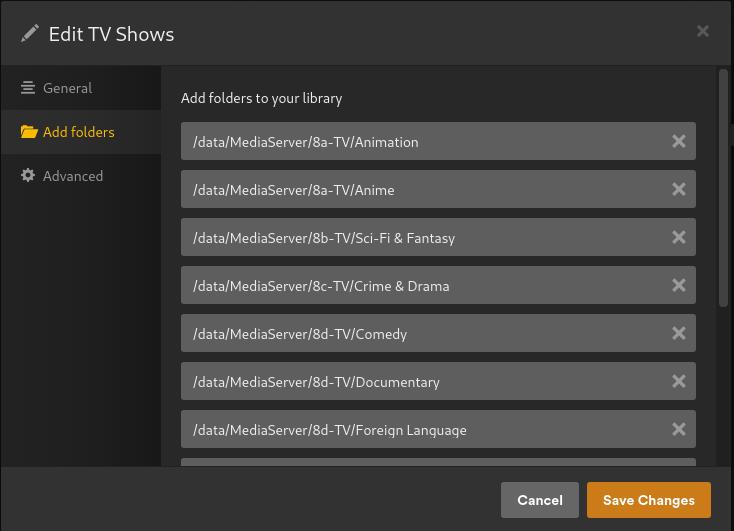
First, What is your top level folder which you have added to your TV library ? Basically your version of this …
Reason I ask is I can see references to /data/user/TV Shows/TV Shows/ and want to make sure its not /data/user/TV Shows/ at your top level folder.
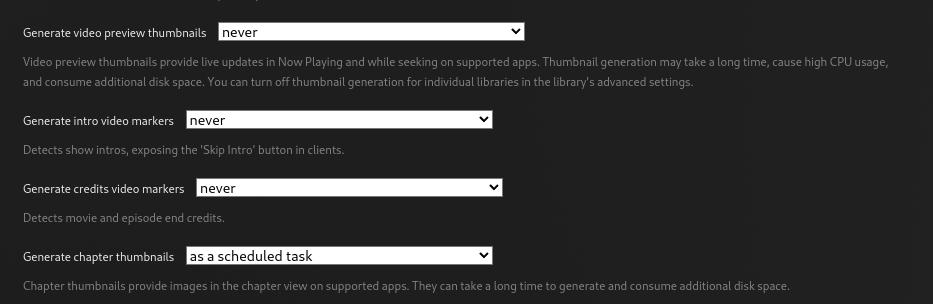
Second, is any of the heavy cpu tasks like video markers, credits etc… set to ... when media is added. This stuff ?
The first entry “/data/user/media/tv_shows” is an empty directory. I was going to rework how all my folders work but never took it further than setting up that directory and mapping it. To be sure, I deleted the entry and let plex rescan for the removal. Added a new season to a show, did a manual full library scan and nope still broken.
for other settings:

and just to confirm… I turned autoscan back on and then tested one new episode. Works perfect. Episode added with metadata.
My issue only occurs when multiple episodes for a season are all added at the same time.
EDIT:
I think I may have found something new.
Looks like adding multiple episodes to a season that already exist with correct metadata works ok.
The issue may be with the creation of the new season. I had a new season single episode not work. I manually refreshed, data showed up. Then added rest of season all at once and it worked ok.
Doing more test to confirm that initial scan when adding a new season is the problem. But can’t finish today as out of time. Will confirm with more test tomorrow.
This issue made me curious because it’s something I hadn’t seen myself.
I have a primary server, on which I have every episode of Star Trek Enterprise recorded (OTA). I have a few test servers (Linux-based) on which I do not have this series. I added the first season of Enterprise to the TV library on one of these servers (which uses TMDB as the default ordering). It found all episode metadata except S01E02, which doesn’t exist on TMDB. I then switched the show episode ordering to TheTVDB (Aired) and it corrected it.
I then added the whole of season 2 to the show folder and rescanned; it detected every episode, with correct metadata, without any manual intervention.
The server to which I added it has very limited resources (Intel Celeron N5105, 8MB RAM), so I don’t think there’s any hardware advantage over what you’re running. I am running it native, not through Docker, but that shouldn’t change anything, right? Is there a network difference? I’m simple GbE, using CloudFlare (1.1.1.1) for DNS.
What’s “special” about your configuration? Is there anything at all you’ve left out? The smallest detail could help.
This is certainly a strange problem and like @pshanew my interest is peeked as its something I’ve never experienced myself.
Two other questions that come to mind. 1) How big is your db and have you ever run the DBRepair tool to optimise it and 2) when you add a new series (with multiple episodes I guess) how is the resource/network usage on your environment. Wild guess but maybe some timeout is happening when stuff is being added, but to be honest I don’t see anything like that in the logs.
Maybe drzoidberg33 still see something in the logs the rest of us have not.
Ok, this gives more clarity on the actual issue, latest test:
Imported 1 episode of a new season: s04e01 of 12 Monkeys
Season created, but was not matched for metadata; season poster defaulted to show poster and e01 did not have metadata
Did manual metadata refresh, season poster updated, and episode data populated
Next, imported episodes 2-11, all episodes matched, and metadata was created.
Conclusion:
Issue is with creation of a new season. On initial import of new season, it does not matter if importing 1 episode or multiple episodes, the season shows up, but no metadata is created for season poster or episodes. Once season is created (but no metadata) a manual refresh of metadata populates season poster and episode metadata. Then importing remaining episodes in the season import fine and all episode data is created.
I would add that I have noticed issues with multi-episodes being imported correctly. Naming convention is ShowName - S04E10-E11 - EpisodeTitle, which shows as one episode 11. This naming convention is plex recommended and has worked fine in the past. I switched to S04E10-11 and that shows as one episode 10. Either this is part of my odd system issue, or a change has occurred as S04E10-E11 is documented as an option and used to work fine and the other options S04E10-11 is not working either.
Here are logs after 12 Monkeys’ season 04 test.
Plex Media Server Logs_2024-06-05_07-55-54.zip (3.4 MB)
Timestamp for initial import of the s04e01 file to create season 04, when metadata does not populate is June 05, 2024 07:19:28.
I had to look back at Plex Media Scanner Analysis 4.log to find that timestamp. I think similar time stamp in log 3 is when I did the manual refresh. For main PlexMediaServer.log those time stamps on in primary file vs a numbered file.
I don’t think there is anything unique.
System operates on a headless unRaid server.
Server only runs unRaid with dockers to support plex ecosystem.
I have a Netgear Orbi mesh router and server is hard wired in. Router was recently firmware updated and rebooted. I did have a VPN running at router level but disabled that as part of testing.
I notice in my logs that plex has issue connecting to itself via 127.0.0.1:3400, which causes some errors. But most of time it connects that way fine. I need to investigate if there is a missing plug-in or something that causes the error when communicating via 127.0.0.1:3400
I also see the error: Unknown metadata type: folder
I have searched on both of these but have not found a cause or solution to eliminate them from logs.
This can be ignored. Been happening for years and plex never have cleaned up the logs. Comes up every now and again on the forum and its been confirmed as just noise in the logs with no impact on anything.
Another WILD one in the absence of anything else. From your logs …
Jun 05, 2024 07:09:09.436 [22721655843472] DEBUG - Network interfaces:
Jun 05, 2024 07:09:09.436 [22721655843472] DEBUG -  * 1 lo (127.0.0.1) (00-00-00-00-00-00) (loopback: 1)
Jun 05, 2024 07:09:09.436 [22721655843472] DEBUG -  * 8 br0 (192.168.1.13) (00-D8-61-34-60-B1) (loopback: 0)
Jun 05, 2024 07:09:09.436 [22721655843472] DEBUG -  * 1 lo (::1) (00-00-00-00-00-00) (loopback: 1)
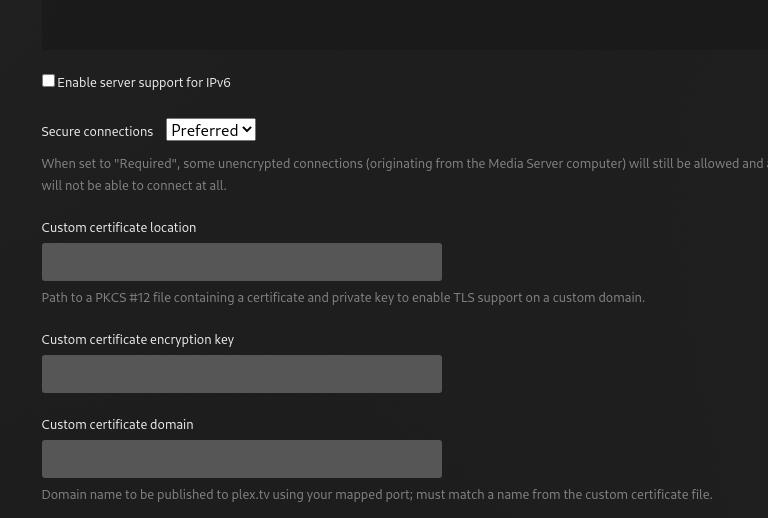
… the last I believe is IPv6. I’ve this disabled (its under plex - settings - network). Can’t remember exactly why but if your not using IPv6 might be worth a shot.
I have IPv6 turned on. I have a user streaming something, I turned it off and it looked like their streaming stalled, so I turned it back on.
I am on google fiber for inet provider and if I remember right, I needed IPv6 turned on.
But will do more testing on that once the server is empty of users.
1 Like
based on one line in the log that is not an error but shows HubCache: Expiring, I changed the continue watching parameters, weeks to consider and # of items. Doubt it will do anything but worth a try. Also will change this setting in next test. As it is a new season maybe this is tripping it up and not showing as an error.

Certainly worth a try. For reference I’ve that disabled.
change plex settings:
- IPv6 turn off
- Add 1 week to Weeks to Consider for continue watching, set to 17
- Chg Max # of continue watching items: 41
- Include season premiers in continue watching: turned off
reboot
Add new show, new season, 1st episode “Big Cigar - S01E01”
- Show Matches, show level metadata populated and poster added
- Season 01: defaults to show poster (not a season 01 poster), episode 1 has no metadata
Show Manual Refresh Metadata
- Season poster updates to a season 01 poster
- Episode 1 metadata populates
Add Episodes 2-4:
- Episodes add correctly with metadata on initial import
Here are new logs that are cleaner than last uploaded as less activity between actions listed above.
Plex Media Server Logs_2024-06-05_09-52-38.zip (2.6 MB)
Arghhh. meant to turn on verbose loging. Now I have to go find another show I can import for another test.
1 Like
Your logs look pretty clean. However, I did see this …
Jun 05, 2024 09:42:04.589 [22728557923128] WARN - [CERT] TLS connection from 192.168.1.13:44766 came in with unrecognized plex.direct SNI name '192-168-1-13.0952612d6a12414898d68b8c0287a03e.plex.direct'; using installed plex.direct cert
Jun 05, 2024 09:42:04.590 [22728532122424] WARN - [HttpClient/HCl#36] HTTP error requesting GET https://136-26-69-186.0952612d6a12414898d68b8c0287a03e.plex.direct:28268 (7, Couldn't connect to server) (Failed to connect to 136-26-69-186.0952612d6a12414898d68b8c0287a03e.plex.direct port 28268 after 0 ms: Couldn't connect to server)
Jun 05, 2024 09:42:04.591 [22728532122424] WARN - [HttpClient/HCl#35] HTTP error requesting GET https://192-168-1-13.0952612d6a12414898d68b8c0287a03e.plex.direct:32400 (60, SSL peer certificate or SSH remote key was not OK) (SSL: no alternative certificate subject name matches target host name '192-168-1-13.0952612d6a12414898d68b8c0287a03e.plex.direct')
Jun 05, 2024 09:42:04.591 [22728525368120] WARN - Connection Tester: Error testing media server Tower in 13 ms.
Do you have any old or dup zombie servers under https://app.plex.tv/desktop/#!/settings/devices/all ? Wonder if removing your server and claiming it again might help which should issue you with a new cert.