Server Version: 1.25.3.5409-f11ee4058
Player Version: Web Browser access:
PMS offered to convert my libraries to the new agent version which I let it do. Result is, that by far most of my posters are not shown any more but stills from the movies instead.
I have saved poster.jpg with eath movie file in a folder, and “Plex Movie” agent is configured to use local assets - but does not do so any more.
Do I really have to manually re-edit > 10.000 movies to have it show the posters?
Best regards,
Dirk
You shouldn’t need to manually re-edit all those if you have a poster.jpg in the same folder as the movie. Three things I would start by checking …
- Ensure the movies with these problem are matched correctly. Check the unmatched and duplicate filters in your movie library to be sure. If not then you might need to revisit some of your media’s naming convention.
- Under your server settings → troubleshooting I would clean bundles and optimise your db.
- Lastly and probably most importantly ensure
use local assets is selected for your movie library.

After doing those steps I would then once again force a refresh of your movie library’s metadata.
If after that its still failing then might be best to upload your server logs so someone can take a peek.
EDIT: The other thing that comes to mind is if you had manually selected a poster at some point in the past for the movie. Plex would see that then as a locked field and won’t necessary refresh it upon a metadata update. However, I think local assets (poster.jpg) override that scenario but I mention it as it could be another factor.
Thanks for your fast answer. This is what I did and tried now, using a small library (ony 572 entries):
-
I cleaned duplicates and refreshed the library’s metadata.
-
I toggled the extended filter for “unmatched” between positive and negative, receiving the same results (only 8 entries):
But most of the missing poster views do not appear in these 2 identical filter results.
-
I chose one movie with missing poster view and verified file and folder naming and found a missing exclamation mark. I repaired that and refreshed it’s meta data. Now still not poster.jpg was shown, but at least another one.
-
I triggered “add new movie files”, and now the poster view is gone again and replaced by the same still from the movie file.
-
So I verified again the “use local assets” is ticked.
Next I completely deleted and recreated the library with slightly different settings: I unticked “generate video thumbnails” setting.
Result: the same. Perfectly. With the same movies missing their poster views - as far as I can tell from memory.
Maybe there is something wrong with my agent settings?
If you deleted and recreated the library then it might have something to do with how you have stuff named.
Could you give us the exactly naming of your folders, movies in the folders and the local assets (poster.jpg). Screenshot will do.
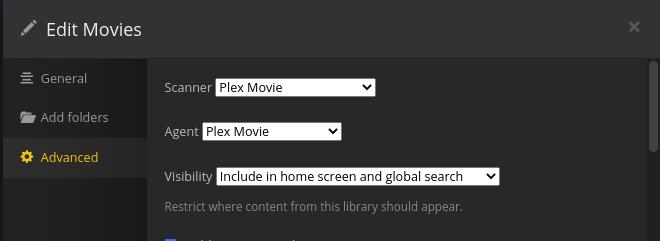
Those agent settings are no longer used if you are using the new modern movie agent and scanner. Those settings are only used with the old legacy ones.
Agent settings are now controlled via the advanced tab on the library settings itself. Also ensure your library is using the new scanner and agent, its the plex movie one like in this screenshot.
Looks like an mp4 file with an embedded poster.
Disable “Use local assets” and refresh the item and see if that fixes it.
I assume you mean to disable Prefer local metadata as they want to use the local assets via the poster.jpg which Use local assets is needed for.
Oh my bad, guess I should read better 
Then yes, knowing what the folder structure for one of the movies looks like is important.
Also refresh the metadata for a problem item, then grab server logs.
Okay, there we come nearer. 
Disabling “use local assets” did not change the behaviour.
Disabling “prefer local metadata” does!
But now I have a problem.
Nearly all my movie files have an embedded poster since they come from EyeTV which does that with a still I do not want to be used.
And all my movie files have embedded tags I manually edited which I want to be preferred (e. g. translations not yet available in themoviedb.org).
Does that mean I have to choose between
- deleting thousands of embedded posters
- editing very many themoviedb entries?
My main approach was to be independent from movie databases and to use those just as enhancement of local data, but I never thought about embedded posters. :-(/
You could scrub just the movies posters from your files?
Any idea how to do that efficiently? My favorite editor seems not to offer that.
I use EasyTAG (mp4) and mkvpropedit (mkv) to scrub all my files before adding them to plex.
Think EasyTAG may do what you want if you just want to remove all images. Try selecting a few files, then on the images tab select the images and remove them and save the files afterwards.




