All iOS devices unable to load a subset of TV shows

For the past couple of months, I’ve been unable to open certain TV shows from one of my Plex libraries on any iOS device, due to what looks like a bug in the recent major iOS update. I’d appreciate any help you can provide to help resolving the bug!

Note that I’ve manually redacted personally-identifiable information, replacing with REDACTED in log messages and error screens below.

Steps to reproduce:

  1. Open Plex on an iOS device (e.g. iPhone or iPad)
  2. Navigate to a specific library, grouped by “TV Shows”
  3. Navigate to a specific TV show in the library

Expected result: TV show loads as expected (showing which seasons are available).

Actual result: Spinner appears, and TV show never loads. I see the background poster but no seasons/episodes. After a few seconds, the following message is displayed:

Uh Oh… Something’s Not Right
Sorry, that didn’t work. Check that “REDACTED” is available and try again.

A “Retry” button is displayed, but selecting that triggers the same problem.

If I leave the iOS device on that same error screen for a minute or two, the screen is replaced by a new error screen with:

Uh Oh… Something’s Not Right
Sorry, that didn’t work. We are actively monitoring for issues. Try restarting the app or come back later.

This happens consistently across all of my iOS devices, but only for certain TV shows. All other TV shows load as expected. Out of 20 TV shows in the library, 6 of them exhibit this behaviour. Suspiciously (and unfortunately), the TV shows with the issue are also the ones that are used/watched most frequently. There’s nothing special about these specific TV shows vs other TV shows in this library or other libraries.

In addition, the “Recommended” tab always shows the same “Uh Oh” message. However, I don’t typically use the “Recommended” tab so that isn’t a specific problem for me.

As a workaround, I can switch the grouping from “TV Shows” to “Seasons” (or any other value like “Episodes”). When I do this, the individual seasons are selectable and I don’t encounter the problem.

The problem happens only on iOS devices, and only since the recent major update. Viewing via web browser and the Plex Apple TV app both work fine.

Checking the debug logs on the Plex media server itself doesn’t reveal anything useful. The following log lines are generated when I try to load a specific problematic TV show:

Jun 02, 2025 18:27:34.587 [140591485803320] Debug — Auth: authenticated user REDACTED as REDACTED
Jun 02, 2025 18:27:34.588 [140591288961848] Debug — Request: [REDACTED:49211 (Subnet)] GET /media/providers (4 live) #11d60 TLS GZIP Signed-in Token (REDACTED)
Jun 02, 2025 18:27:34.592 [140591288961848] Debug — [HCl#256f] HTTP requesting GET https://epg.provider.plex.tv?X-Plex-Token=xxxxxxxxxxxxxxxxxxxx
Jun 02, 2025 18:27:34.614 [140591474383672] Debug — [HttpClient/HCl#256f] HTTP/2.0 (0.0s) 200 response from GET https://epg.provider.plex.tv?X-Plex-Token=xxxxxxxxxxxxxxxxxxxx (reused)
Jun 02, 2025 18:27:34.616 [140591487912760] Debug — Completed: [REDACTED:49211] 200 GET /media/providers (4 live) #11d60 TLS GZIP 28ms 6891 bytes (pipelined: 14)

Checking the logs exported from the iOS device, the following log lines were the only ones generated at the time of the above event:

06/02/2025 18:27:34:569 [REDACTED] DEBUG [Connections] Testing connection for REDACTED at https://REDACTED.plex.direct:32400
06/02/2025 18:27:34:575 [REDACTED] DEBUG [Connections] Testing connection for REDACTED at https://REDACTED.plex.direct:25573
06/02/2025 18:27:34:628 [REDACTED] DEBUG [Connections] Current best connection to REDACTED is https://REDACTED.plex.direct:32400 
06/02/2025 18:27:44:576 [REDACTED] DEBUG [fetchJson] Fetch timeout: https://REDACTED.plex.direct:25573/media/providers

and:

2025/06/02 18:27:17.792 (2575241) ➖ (private) | check local network permission with timeout 1
2025/06/02 18:27:52.400 (2575934) ➖ (private) | check local network permission with timeout 1

I also tried reproducing the entire flow from clean app open to selecting the relevant TV show. When I loaded the library itself, prior to selecting a problematic TV show, I get these warning/error messages:

Jun 02, 2025 18:29:51.090 [140591295290168] Warning — [Req#11e63] QueryParser: Invalid field 'contentDirectoryID' found, ignoring.
Jun 02, 2025 18:29:51.090 [140591295290168] Warning — [Req#11e63] QueryParser: Invalid field 'pinnedContentDirectoryID' found, ignoring.
Jun 02, 2025 18:30:02.026 [140591301618488] Error — [Req#11f05] Unknown metadata type: folder

Things I’ve tried that have not resolved the issue:

  • On iOS device:
    • Force-closing app
    • Rebooting
    • Uninstalling and reinstalling app
    • Signing out of and back into Plex
    • Switching user
  • On server:
    • Rebooting physical server
    • Restarting Plex media server application
    • Refreshing TV show metadata

Please let me know if you need any other info to debug. I’m happy to provide more detailed log files if you can give me a way to share them non-publicly.

Version info:

  • Plex server version: 1.41.7.9823
  • iOS app details:
    • Client Version: 2025.17.0 (1082)
    • Platform Version: 18.5

One extra note: I’ve now found that switching the grouping to “By Folder” makes the library permanently inaccessible on my iOS device.

The only thing that permitted library access again was fully uninstalling and reinstalling the app. (Where the original problem of “TV Shows” grouping causing the inaccessibility bug still remains.)

06/02/2025 18:27:34:569 [REDACTED] DEBUG [Connections] Testing connection for REDACTED at https://REDACTED.plex.direct:32400
06/02/2025 18:27:34:575 [REDACTED] DEBUG [Connections] Testing connection for REDACTED at https://REDACTED.plex.direct:25573
06/02/2025 18:27:34:628 [REDACTED] DEBUG [Connections] Current best connection to REDACTED is https://REDACTED.plex.direct:32400
06/02/2025 18:27:44:576 [REDACTED] DEBUG [fetchJson] Fetch timeout: https://REDACTED.plex.direct:25573/media/providers

Are the redacted parts in this log line the same? If so, something is wrong. Your server should only list itself at 1 address/port. Having 2 can cause conflicts. Turn off remote access in the Plex settings and restart pms. Then turn the setting back on. This should reset the list of addresses for your server and hopefully there will only be 1 this time.

You might need to sign out and back in on the clients to update the addresses there.

1 Like

Thanks @MovieFan for your thoughts here!

The redacted parts in this log line are not the same. They are:

  • 1st line: https://192-168-1-100.<same long id>.plex.direct:32400
  • 2nd line: https://<public IP>.<same long id>.plex.direct:25573

<Public IP> is the same as my internet egress IP (i.e. the IP that’s reported when I check https://whatismyipaddress.com.) “Current best connection” is detected as the private IP.

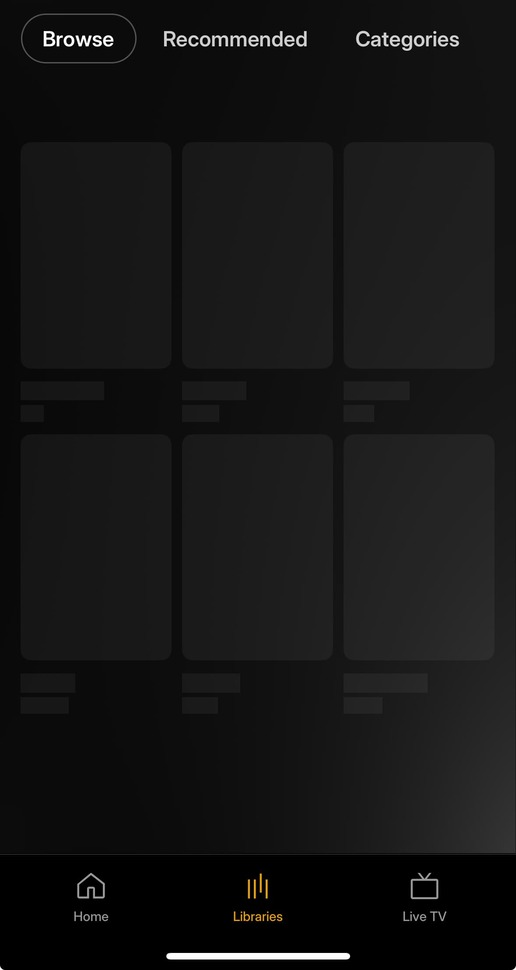
Per your advice, I turned off remote access, stopped PMS, and restarted PMS. On my iOS device, I signed out, force quit the app, and signed back in. Unfortunately the issue with the “Browse” screen persists: the same TV shows do not load. The log lines remain in the same structure as before, where both the private IP and public IP are detected as connection options.

I did a further test where I kept “Remote Access” disabled in PMS (then restarted PMS, then signed out of + back into iOS device, etc), to see if that would change the behaviour at all on the iOS device. The issue still persists, albeit this time only with the private IP connection in the iOS device logs. So, looks like the 2x connection options could be a red herring.

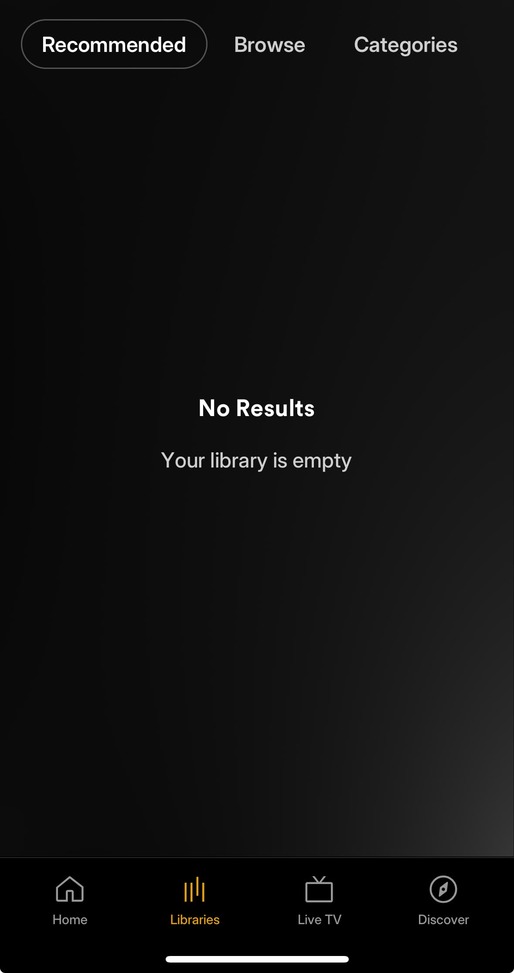
Interestingly, the “Recommended” tab behaviour has changed since I performed this test. Rather than ending up at the same error screen as before, I instead see the “No Results / Your library is empty” screen shown below. (I’m including this data point in case it helps with pinning down troubleshooting, not because I’m too concerned with the functionality on the “Recommended” screen.)

Ok, thanks for checking. The other thing i see in your logs is it detects changes in your database that hasn’t been applied. This could indicate an issue with your database.

Thanks @MovieFan for your thoughts about the database. Just to confirm, is your indication of “changes in your database that hasn’t been applied” arising from the warnings like QueryParser: Invalid field 'contentDirectoryID' found, ignoring, or something else?

In any case, I took a backup of my databsae and then performed the following:

  • Ran the “Optimise Database” and “Clean Bundles” troubleshooting tasks within the PMS UI
  • Following the instructions on this page, I performed all diagnostic commands apart from the “Low-Level Database Recovery” step.
  • Rescanned the library files and refreshed metadata.
  • Restarted PMS.

Unfortunately the issue still persists (and again, only for certain TV shows in a specific library, and only on iOS player devices). The only difference is that I’m now getting lots of log messages of the following form.

2025/06/03 13:33:45.715 (3088815) ⚠️ (private) | File does not exist at path: /var/mobile/Containers/Data/Application/<long ID>/Library/Application Support/downloads

And also:

DEBUG [IntlProvider] Missing translation for [@formatjs/intl Error MISSING_TRANSLATION] Missing message: "Library fallback title" for locale "en-GB", using default message (Library) as fallback.
DEBUG [IntlProvider] Missing translation for [@formatjs/intl Error MISSING_TRANSLATION] Missing message: "J1MitG" for locale "en-GB", using default message (More) as fallback.
DEBUG [IntlProvider] Missing translation for [@formatjs/intl Error MISSING_TRANSLATION] Missing message: "L/h8hy" for locale "en-GB", using default message (Settings search input) as fallback.
DEBUG [IntlProvider] Missing translation for [@formatjs/intl Error MISSING_TRANSLATION] Missing message: "4LxYsP" for locale "en-GB", using default message (Search) as fallback.

Not sure if these are red herrings, but figured I’d share just in case.

FYI, this issue persists in the latest version of the iOS app (2025.21.0).

My first thought would be to use GitHub - ChuckPa/DBRepair: Database repair utility for Plex Media Server databases and do a full repair. I have seen issues with larger databases when they become fragmented, the load times are too long for some apps. Optimizing via the repair tool has fixed it for me.

Thanks for the tip @dbirch, I appreciate it!

After stopping PMS, I used the DBRepair utility you suggested, choosing option 2 to Check, Repair/Optimize, and Reindex Database in one step. I then started up Plex again and performed the “Scan Library Files” and “Refresh All Metadata” operations.

Unfortunately it doesn’t look like this has made a difference - I’m still seeing the iOS-specific behaviour where Plex errors out when it attempts to load a specific subset of TV shows.

Random thought: are the affected TV shows in a Collection?

Hi @OttoKerner! No; the affected library has no collections at all.

Hello, I was having this exact problem with my Plex Media Server and I was able to trace the source of the problem and fix it. I wanted to share my findings with the hope they will help others.

Short answer is that it was the “Extras” on each Movie or TV Show that would crash the iOS App on iPhone or iPad when opening the media item every time if the Extra Type was missing.

The “Extra Type” is something in the Plex Database that is now in place, but it was not always there. The types are: Trailer, Interview, Behind the Scenes, Scene, etc. I traced this back to around Feb 28, 2024 update, where the Extra Type started to be added. Before then the Extras just had a Title. Any Extras added before that date would remain having only the Title. Any Extras added after that date; the Extra Type would be included. Refreshing the Metadata of the media item would not update or add the Extra Type. For some unknown reason, the iOS App cares about this and when it’s missing from an item, the crashes happen. You can check your media by opening up a Movie or Show and looking under Extras. There is a Title of the item and then there is the “Type” below the title. ANY media that DID NOT have the “Type” would immediately crash all iOS Apps when opening that particular media item. This was happening on every iOS device I had and all the users I share with as well and it happens whether remote or locally on my home network where the Plex Server is located.

How I fix my Database was to first Turn off the “Find Extras” on each of my Libraries. This setting is under: Manage Library > Edit > Advanced > “Find Extras” and uncheck the box and save. However, turning this off does not automatically remove existing Extras. For that I had to then “Refresh All Metadata”. This can take quite a long time with a larger library before all Extras were removed. There is a way to do it by editing the Database directly, so anyone who is comfortable doing that can try for themselves. This is faster, but more advanced.

You can test this on a small scale by finding a Movie or Show missing the Extra Type (view it from the web interface or other App) and then try opening it from iOS. It will crash. You can then uncheck the “Find Extras” box in that Library and then Refresh Metadata of just that item. Try opening the same item again and it will no longer crash.

Once all Extras were gone from all media items, I re-enabled the checkbox on mine and refreshed all metadata again. All Extras were re-added, but this time they all had the “Extra Type” included. Since then the App Crash has not happened one single time on mine or anyone else using my library. You don’t have to re-enable the Extras if you don’t want to, the App will still be fixed once the bad ones are removed, but I wanted them back on mine so I re-enabled.

Hope this helps someone, it was driving me crazy until I figured it out. Please share if it does.

Thanks so much @bpalloni for the suggestions here!

Unfortunately, for my specific issue at least, this doesn’t resolve my problem. Some of the problematic TV shows in the library have extras, and some do not. Even when I disabled extras across all libraries, and then refreshed metadata on the specific problematic library, the issue persisted. Extras that were previously shown for the problematic TV shows all already had associated types.

I didn’t refresh metadata across all libraries (even the non-problematic ones); did you find that that was required, or was refreshing metadata just on your problematic library sufficient?

Could you let me know the database command to run for me to verify that all extras in the database have an associated type already? That would help me rule out this as a potential issue, at least.

Sorry it didn’t work for you, the issue you are having sounded so much like mine that I thought it would do the trick. I have a Movies Library and a TV Show Library. I turned off Extras on both and refreshed everything, however I was able to prove it to myself first by refreshing a single item and making sure the Extras were removed. When I did that, that media item which previously crashed my iOS App, no longer did. I then tried other items, deleted and refreshed with the same positive results. I did this several times before I finally ran the full refresh on everything. The fact that something as simple as an “Extra Type” caused this for me tells me it could be something else and the iOS App is overly sensitive. A missing ‘Type’ in the Extras should not crash the entire App, but it 100% did in may case, so it could very easily be something else similar that it doesn’t like in yours.

OK, so for the direct database commands, what I found is that the extras are stored in ‘metadata_items’ table as the ‘metadata_type’ = 12.
So, to delete these completely, this will do it:

DELETE FROM metadata_items WHERE metadata_type = '12'

To view them first:

SELECT * FROM metadata_items WHERE metadata_type = '12'

Then there is another table where the extras are linked to the metadata_items table called ‘metadata_relations’
I deleted everything from that as well. You can use something like this:

DELETE FROM metadata_relations WHERE id like '%'

Also to view first:

SELECT * FROM metadata_relations

Of course I don’t need to tell you to make a backup of your database before running any of these commands.

I hope you can fix your issue and if there are any more questions you have I will be glad to answer as best I can.

This topic was automatically closed 90 days after the last reply. New replies are no longer allowed.