Amazon Fire Stick - Issue

Server Version#: 1.41.0.8992
Player Version#: 10.21.0.1527 - Plex for Android (TV)

Hey all,

I am at my whits end with this, and I cannot figure it out.

For various different movies that I have on my PLEX Server… If I try to watch them locally in my own house, using any one of my brand new Amazon Fire Stick 4K Max devices… I get an error that reads:

“An error occurred while attempting to play this video. Please check your connection and try again.”

I have done everything I can possibly think of to fix this problem… Here’s the list:

1.) Reboot my PLEX Server (Windows Gaming Machine… AMD Ryzen 9 7950X + 64 GB RAM + 2 TB WD Black NVME OS Drive + CAT6 Hardwired Ethernet Connection)

2.) Reboot my Amazon Fire Stick 4K Max + Confirm from my router that the Firestick is utilizing the 5GHz band for optimal speed… And for reference, my test subject (1 of 4 Firesticks) that I have been using to try and fix the issue is only 10 feet away from the Router with zero physical obstructions

3.) Reboot my ROG Rapture GT-AX11000 router (Mesh network… with 2 additional Asus Rog Nodes… ALL nodes are hardwired with CAT6)

4.) Ensure that “Better Performance” within the Windows Device Manager is turned on for my PLEX Storage Device which is a Western Digital Easy Store 264D - 14 TB External HDD… Hooked up to my PC with a USB 3.0 cable

5.) Tweaked a few settings within my PLEX Server and on the PLEX App on the Firestick

6.) Uninstalled the PLEX App on the Firestick fully… Re-installed

7.) Ensured the the PLEX Server is as up-to-date as humanly possible

Nothing though… Nothing has helped. I have Googled the issue till my eyes were bleeding, and read through countless Reddit threads about it, but nothing suggested has worked.

Any thoughts on this would be greatly appreciated!

Thanks,
So, update on this for everyone. I feel like it has to be a Amazon Fire Stick issue.

When I watch something on my laptop (Local)… Flawless.

When I watch something on my iPhone (Local)… Flawless.

I had a few friends test from their devices including a Roku Stick and PC… Flawless. (And these were remote connections).

Then, I had my parents test from their Amazon Fire Stick 4K Max (Remotely)… Same issue that I am having.

I also tested a “non” 4K Fire Stick which is physically located at my company’s office (This morning) – and same exact issue.

Curious if the newest PLEX Server update that went live earlier this week (or last weekend, cant remember when it dropped exactly) broke it for Amazon Sticks.

Tried Googling it to see if there is any “News” – But nothing that I am seeing.

Just seems odd that every place else it works flawlessly, whether it is Remote or Local… But the second you attempt it on a Fire Stick device (Remote or Local)… the issue crops up.

So, it would lead me to believe its the Fire Stick. Which in the past has worked flawlessly, with zero issue up till this week.

Please post a sample file of something that will not play. I have a first gen 4K stick, first gen 4K Max, and a 2nd gen 4K Max.

Nx6 - Thanks for the reply.

Perfect example is the1080p (MP4) Preroll that I use (Link below):

Posted it up there.

Thanks,

Waaa. This is doing something stupid.

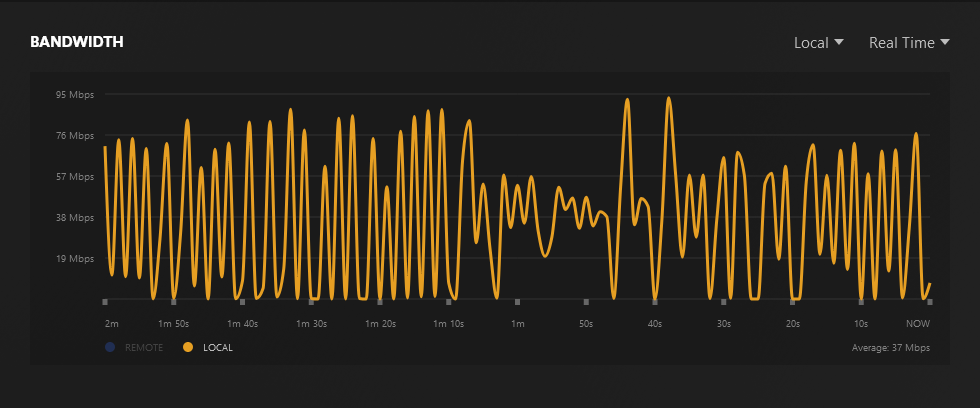
I made it about 15 seconds in, and then everything froze up like it’s buffering, but the dashboard reports this direct playing and only 14 Mbps. It’s now alternating between playing 5-6 seconds and buffering for 30-60 secoonds. The dashboard is showing the bandwidth far in excess of what it should need to buffer this during the entire period, too.

Took over 10 minutes to get through the entire 1 minute sample.

After running this test I played my remux of Indiana Jones and the Temple of Doom.

Screenshot 2024-09-19 at 21-55-49 Plex

No playback buffering issues. Not a local network issue.

Hardware: Fire Stick 4K Max (gen 2)
App Version: 10.21.0.1527 (961568625)

preroll_playback_log.zip (240.8 KB)

This does not play back correctly on my Shield Pro (2019) either.
Same behavior.
The Shield is wired on the network but bottle-necked at 100M.

App Version: 10.22.0.1493 (d2de86fd) alpha

shield_playback_log.txt.zip (234.4 KB)

Remuxed the file to MKV.
Plays back fine now.

Bandwidth use on Shield:

Bandwidth use on Fire Stick 4K Max (2nd gen):

So, it’s either the files themselves or an issue with Plex playing MP4’s from what I can see.

It would be interesting to see if you re-muxed the .mkv back to .mp4, if it played ok. I think that would help to determine if it is the original files or Plex & MP4s, at least on his server. Majority of the files on my server are MP4 and I use a Fire stick and files typically play just fine.

I made two MP4s now. One regular one, and one with the streaming optimize flag enabled.
The plain one doesn’t work. I only played about 1 second and then locked up with behavior similar to the original MP4. I didn’t wait for it to try to buffer and finish since it didn’t even make it a small length of playback.

The second, streaming-optimized, MP4 plays back fine, but then when it ended it played a second time on its own, but without audio. I went back to my settings and disabled autoplay on the Fire Stick client to make sure it wasn’t playing one of the duplicate copies but it did the same thing on my second playback attempt.

Yeah, I don’t have many files on my server that are MP4 but I can’t think of one I have that gives me playback issues right now.

To be honest, the honest, the only time I’ve had problems with .MP4 files, is with a bit different encoding method. Like 10-bit something… I don’t really remember. I just recall trying to play videos and I’d have either a kind of green or purple tint to the video. Of course,Google came to my rescue. :smiley:

A current-gen Fire Stick 4K/4K Max would handle those fine.

Here’s the new MP4 with stream optimization, in case anyone wants it.

Could be, this was about two years ago. I think the Fire stick I was using then was a bit older. It ended up dying and I picked up a newer one last year.

First-gen 4K Max is also fine. The first-gen non-Max 4k (from 2018) will have issues with video streams missing their color space info. If the stream has the info the first-gen plain 4k stick is also able to handle the 10-bit video without green playback. The issue is most likely to happen in older encoding that use a TV or DVD source. I have samples of both.

Nx6,

Thanks for testing - Truly appreciate it.

My question would be, because a lot of my content on Plex are just simple MP4’s — Why all the sudden would these FireSticks (Specifically the newest version of the 4K Max FireSticks… Which are the most powerful sticks that Amazon sells, other than the “Fire Cube”) be having issues playing MP4s?

I have had my Plex server for going on 5 years now, and literally never have I had an issue on any of my FireSticks that are scattered around my house. They varried in generation / age up until this summer, and when Amazon Prime Day hit, I replaced them all with the 4K Max devices, because they are so snappy and responsive.

I feel like something with the latest PLEX Server update made these things sh*t the bed. If I am recalling correctly, an update launched last week or weekend, because typically when I see an update… I just blindly install it. Just figure its best to be on the most up-to-date version – And I recall updating it within the last 7’ish days for sure.

But prior to that update, I cannot recall a time where I have run into so many issues.

Wonder if there are a lot more people are running into this issue?

Because again, if I pull up PLEX on my iPhone… I can watch the “Pre-Roll” trailer that I provided + any movie without an issue locally inside my house on WIFI… Flawlessly, no buffering, no errors, no nothing.

But the second I attempt to watch it on one of the 4K Max FireSticks… NOPE!

So, I just feel like it has to be something with the PLEX Server disagreeing with those sticks that is causing the issue. (IE: The latest update… Or something else).

Thoughts?

That would be a question for Plex to answer. I do think you should stop creating new movie files in MP4 either way. They are less flexible for making movie files, harder to correct issues on, and there isn’t really any benefit to using them over MKV, except some esoteric Apple-specific HDR issues.

I recommend you make a backup/filesystem snapshot of your setup before applying an update so you can restore things to how they were before if needed.

At this point I think you should sideload an older version of the Plex client on one of the devices, a version from back before this started happening, and see if the files play fine then. Testing an older Plex client version is a lot easier than reversing a server change, for you and and any other users you have.

Nobody else is posting about it, so not likely.

This topic was automatically closed 90 days after the last reply. New replies are no longer allowed.
