Server Version#: Windows 1.19.1.2645
Player Version#: Android 7.30.1.16475
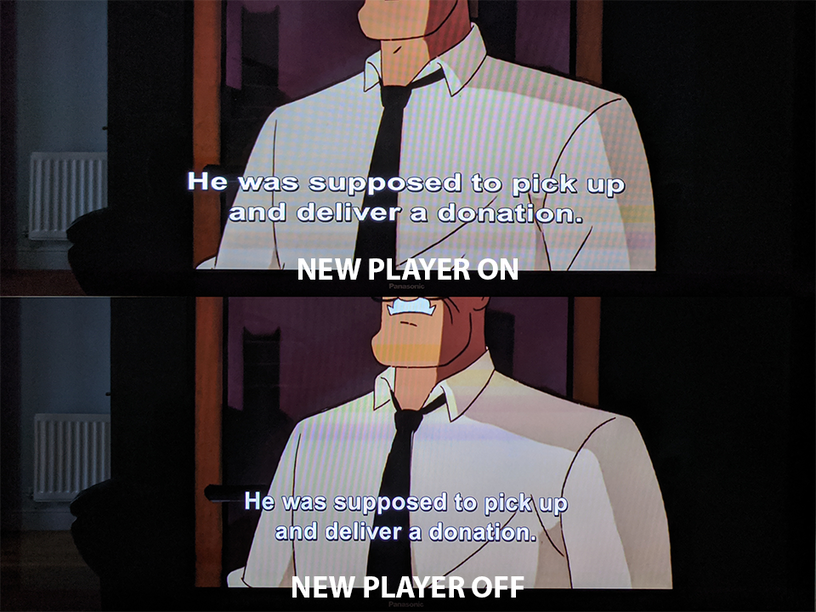
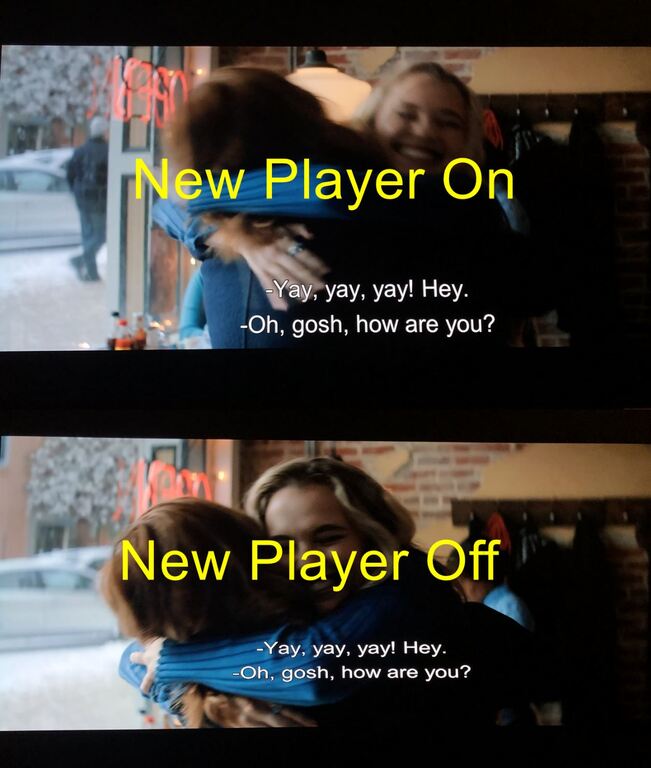
It appears the new player is forcing the PGS overlay to match the device’s aspect ratio, rather than displaying at its native aspect ratio, which results in the text stretching as seen below.
For my media, I scale the PGS subtitles to match the aspect ratio of the video I’m encoding. This works great for all media players, including Plex, up until the Android ‘new player’.
My use case is quite unique but I believe this would also be an issue for users with devices that have unorthodox displays, such as super-wide mobile phones or 16:10 / 4:3 tablets.
Yes, the video dimensions are 1920x804. I use handbrake and I include the original PGS subtitles. Other than checking the box to include the subtitles, I don’t change any other options for the subtitles. Good eye
By the way, I happened to watch a movie that wasn’t cropped yesterday (i.e. full 1920x1080 resolution filling the entire 16:9 aspect ratio tv screen) and the subtitles were not squashed short while the “New Player” was OFF. That seems to imply that the old player is using the video file’s aspect ratio/dimensions to size and place the subtitles while the new player seems to go off of the tv aspect ratio instead? Just theorizing since I don’t really know what’s going on under the hood.
Cool deal. I can’t imagine that they will fix it on the old player since they plan on getting rid of it eventually.
Also, that is really funny that you used that example because I literally just re-ripped and encoded that movie last night because I botched the forced subtitles when I originally ripped it. I had an SRT file with the forced subs to compensate but I wanted the stylized version you are showing there.
I’m glad I found this since I was wondering why my subtitles weren’t displaying correctly. Once I turned off the new player, all was good.
The new player handling of this should only apply when the subtitle resolution doesn’t match the video resolution (which is the case when copying from handbrake while cropping and/or changing the display aspect ratio). I crop my subtitled externally then add them back in so they display correctly on my PC and the old Plex player, but the new one botches it up.
I’d still love to know if this was implemented on purpose.
The new player seems to handle image subtitles differently to any other media player out there and I’m worried disabling it won’t be an option for much longer.
Unfortunately Kodi (at least 18.7) is handling image subtitles the same as the new Plex player (only tested on Shield 2019 tube). I saw at least one issue raised on their forum about it. My guess is that it was intentional, but not tested or thought out well enough.
After thinking about it more, the only correct way to display image subtitles is based on the video resolution. It’s not the Players job to try and change it to match the screen aspect ratio. It’s job is to display what’s given to it.
If someone doesn’t like how they look then it’s up to them, the user, to change the subtitles. There’s free programs out there.

 ) PGS subtitles?

