Version 4.146.0
I only noticed this today but in Season 1 of Transformer 1984 cartoon series the metadata has it all effed up for the entire season. Example: It shows episode one as a totally different title. The files are labeled correctly. ie S01E01 - More than meets the eye (1)
I tried moving the folder and re-scanning the library. Clearing out the trash. Moving it back in the folder and re-scanning. I also Unmatched and Fix Matched. It STILL labels the episodes incorrectly.
What should I do?
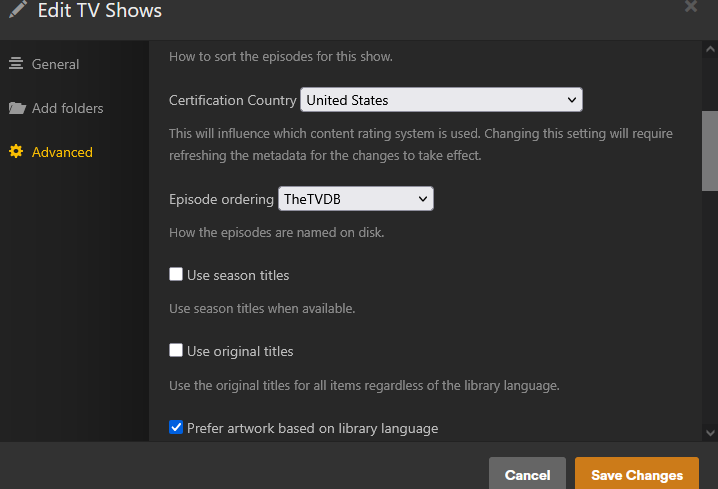
It depends on which episode ordering (Edit Library > Advanced tab) you have selected for your library, The Movie Database or TheTVDB.
The movie data base is exactly what it is labeling as. So, how do I delete the metadata for it and start fresh? I changed it from Movie DB to TVDB but is still uses the same metadata. I tried moving it out of the folder and scan it. Empty the trash. Then move it back and rescan. But it’s like it’s just using the original meta data that it downloaded initially
@drzoidberg33 Could you check the Plex metadata backend?
Plex show guid:
plex://show/5d9c081346115600200a71a8
Guids:
<Guid id="imdb://tt0086817"/>
<Guid id="tmdb://4269"/>
<Guid id="tvdb://72499"/>
sorry i dont know what that means
After switching the Episode Ordering, you only need to Refresh Metadata.
Set the library default to the metadata source that you are using most often.
Episode Ordering can be overridden per tv show, if you occasionally need it differently.
The metadata returned from the Plex metadata API is incorrect for The TVDB episode ordering. Refreshing metadata on the server won’t solve it. That’s why I asked a Plex employee to look into it.