Apologies and I believe the answer is no. I was wondering if you can use the pre roll feature with media on your own NAS?
If yes then I must have something balled up. Thanks for help.
If not let’s add this feature to Plex.
Apologies and I believe the answer is no. I was wondering if you can use the pre roll feature with media on your own NAS?
If yes then I must have something balled up. Thanks for help.
If not let’s add this feature to Plex.
Not exactly sure what other media you have in mind it’s going to work with 
Just make sure to use the path of the pre-roll video you want to use as it’s visible to the Plex Media Server. If the PMS is not installed on the NAS itself, you might need to mount that folder and point to the local path from PMS’ point of view.
There’s a number of feature suggestions on improving the preroll handling (e.g. allowing the addition of an entire folder) --but what we got so far is very straight forward / easy to configure… all it takes is entering the full path of the video in the pre-roll option. If you add multiple video paths, all you’ll need to think about is if you want Plex to pick 1 random video from that list or play them in sequence (and in consequence pick , or ; to separate the video paths).
The configuration itself looks ok. However you should not store any media inside the Plex share on your Synology. That share is solely intended for Plex’ own data!!
There’s a reason the Plex share is hidden by default and there’s tons of files in different languages pointing out you shouldn’t story anything in it.
That being said… (with a super strong recommendation to move all your media to a different share)
Have you checked Enable Cinema Trailers in the advanced tab of the library where the preroll should play? Without that, no preroll will show… if you don’t want to see any trailers, you can configure your clients to show 0 trailers.
Thanks for reminding on the Plex directory. I upgraded my Synology box and totally forgot that. I will try what you suggested on the other issue and report back.
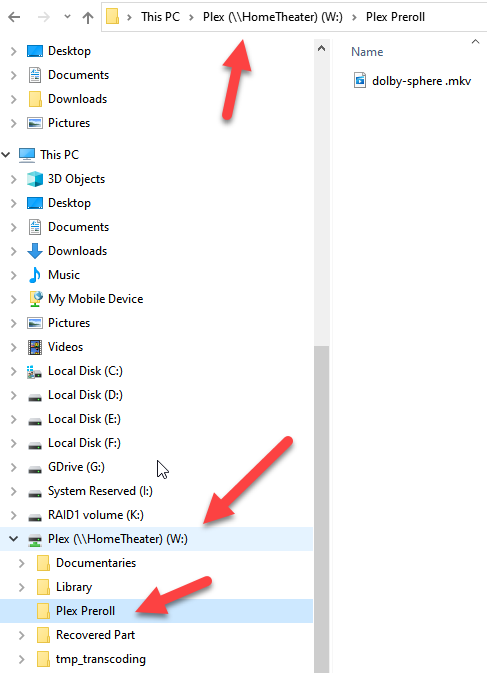
In the image, your file appears to be named “dolby-sphere .mkv”, with an extraneous space.
YOU ARE THE MAN!!! Great catch!
That’s what happens when you have 62 year old eyes. I really appreciate your help! CUDOS