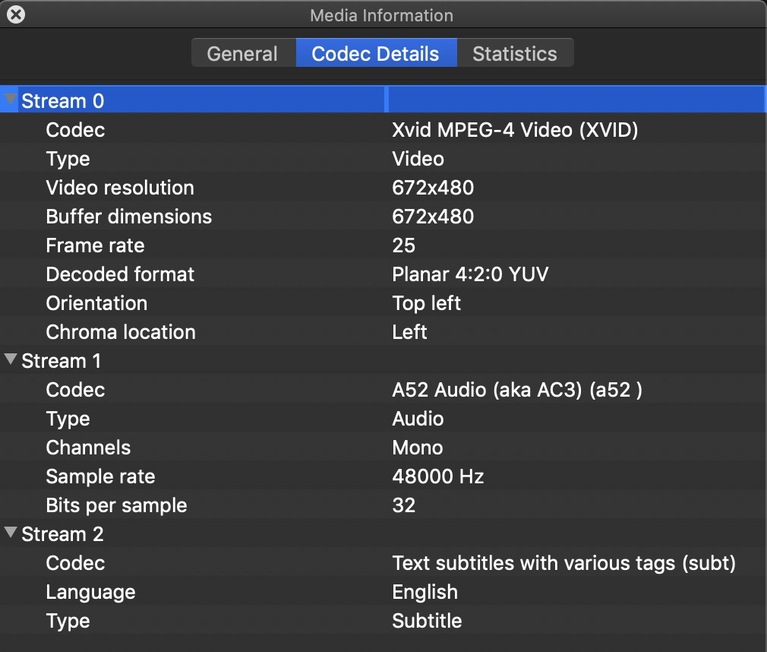
Server Version#: 1.18.5.2309
If I apply any server update past the version indicated here, AVI files do not play.
Please advise.
Server Version#: 1.18.5.2309
If I apply any server update past the version indicated here, AVI files do not play.
Please advise.
on what clients?
AppleTV v2.16(1)
Log files please? (Preferably something which demonstrates the error)
I did the update earlier today and ran my test and so hopefully the error is in the attached logs
I am not seeing any obvious errors but that’s not to say there isn’t a codec issue.
I did see where the CPU got bogged down at one point but seemed to recover.
Apr 25, 2020 11:13:55.669 [0x6322f460] WARN - SLOW QUERY: It took 1290.000000 ms to retrieve 6 items.
To give me something to compare against, would you please do the following?
AVI is a container which has the same codecs as MKV and MP4 so I’m not understanding the problem here yet.
Will do. I will. upload the log tomorrow AM as I am at my office for the rest of today. Thanks so much!
Plex Media Server Logs_2020-04-26_07-25-49.zip (2.8 MB)
I ran an MP4 for 30 seconds. Then attempted an AVI which will not play - It just takes me back to the detail screen for the movie. So I just repeated the play function over and over for 30 seconds. Then I waited 30 seconds to gather the logs 
Maybe local to your box because I just played five random AVI films on my Apple TV box and all worked fine.
They work fine with version 1.18.5. Just nothing newer than that will play them.
I’m on 1.19.1.2701.
I am running a Qnap TS-531X. I suspect you are running a different model.
Oh, sorry. I didn’t see this was on a NAS.
Any update?
Mike,
There is nothing in the logs which show any kind of error.
What I am seeing is HEVC codec references.
Is this HEVC in an AVI file?
that explains it.
XVID . That has been largely discontinued by upstream FFMPEG.
You need to handbrake them into real H.264.
Thanks, Chuck! Do you know of any way to quickly identify files encoded with XVID?
Yes,
ffmpeg -i <filename.ext>
or
mediainfo <mediainfo.ext>
Windows “Mediainfo” will also show it.
[chuck@lizum Avatar (2009).510]$ mediainfo Avatar\ \(2009\).mkv
General
Unique ID                                : 94504382822008401447274724325199537616 (0x4718E1CFAF66BC553AF50D0DEEE965D0)
Complete name                            : Avatar (2009).mkv
Format                                   : Matroska
Format version                           : Version 4
File size                                : 34.4 GiB
Duration                                 : 2 h 58 min
Overall bit rate mode                    : Variable
Overall bit rate                         : 27.7 Mb/s
Encoded date                             : UTC 2015-09-09 03:39:23
Writing application                      : mkvmerge v8.3.0 ('Over the Horizon') 64bit
Writing library                          : libebml v1.3.1 + libmatroska v1.4.2

Video
ID                                       : 1
Format                                   : AVC
Format/Info                              : Advanced Video Codec
Format profile                           : High@L4.1
Format settings                          : CABAC / 2 Ref Frames
Format settings, CABAC                   : Yes
Format settings, Reference frames        : 2 frames
Format settings, GOP                     : M=3, N=24
Codec ID                                 : V_MPEG4/ISO/AVC
Duration                                 : 2 h 58 min
Width                                    : 1 920 pixels
Height                                   : 1 080 pixels
Display aspect ratio                     : 16:9
Frame rate mode                          : Constant
Frame rate                               : 23.976 (24000/1001) FPS
Color space                              : YUV
Chroma subsampling                       : 4:2:0
Bit depth                                : 8 bits
Scan type                                : Progressive
Language                                 : English
Default                                  : No
Forced                                   : No

Audio
ID                                       : 2
Format                                   : DTS XLL
Format/Info                              : Digital Theater Systems
Commercial name                          : DTS-HD Master Audio
Codec ID                                 : A_DTS
Duration                                 : 2 h 58 min
Bit rate mode                            : Variable
Channel(s)                               : 6 channels
Channel layout                           : C L R Ls Rs LFE
Sampling rate                            : 48.0 kHz
Frame rate                               : 93.750 FPS (512 SPF)
Bit depth                                : 24 bits
Compression mode                         : Lossless
Language                                 : English
Default                                  : Yes
Forced                                   : No

Text
ID                                       : 3
Format                                   : UTF-8
Codec ID                                 : S_TEXT/UTF8
Codec ID/Info                            : UTF-8 Plain Text
Title                                    : forced
Language                                 : English
Default                                  : Yes
Forced                                   : Yes


[chuck@lizum Avatar (2009).511]$
This file is proper AVC (H.264)