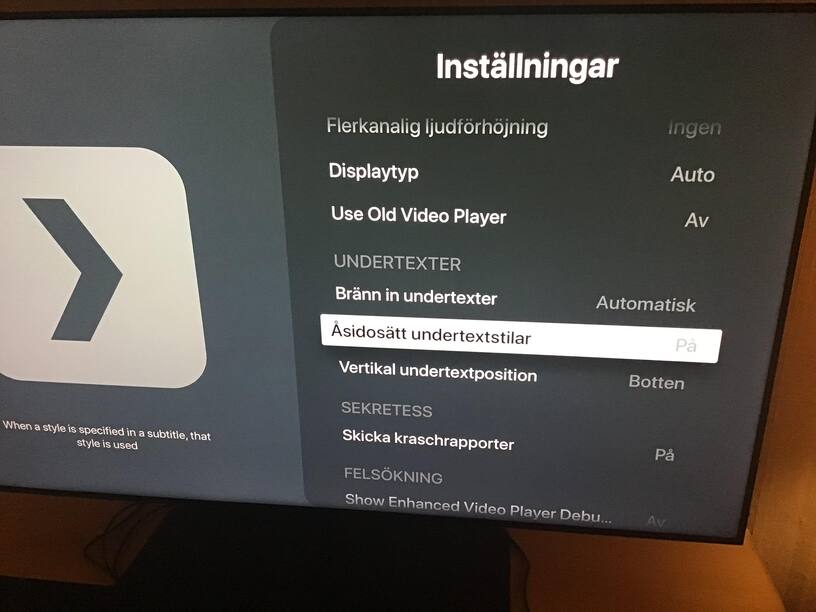
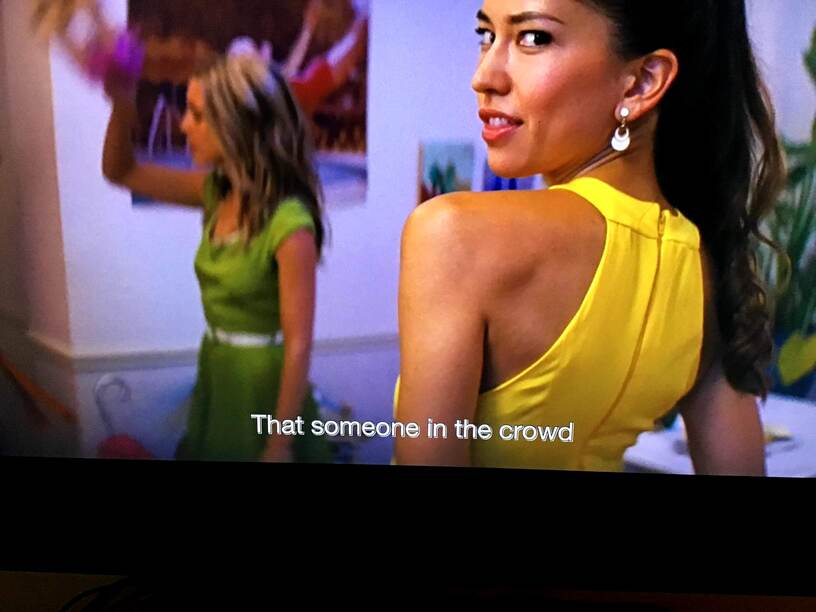
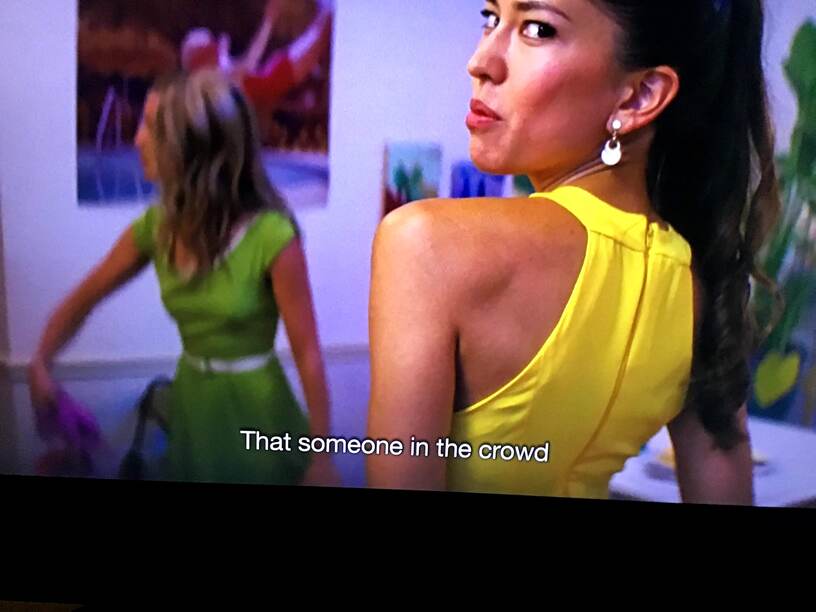
So I’ve been trying the new enhanced player that is now available for everyone on Apple TV (yay!) now and what struck me immediately is that subtitles (SRT or embedded, such as in an MKV file) look… super weird. Instead of a black shadow/border, they all look like they have a white shadow/border which makes them really hard to read on a bright background.
Here is a comparison with the old player turned on versus the enhanced player. This occurs with all files played from my Plex server using either SRT or embedded subs.
I was also asked by the support person on Twitter to check my captions settings in tvOS, and it appears that the Enhanced Player doesn’t know or care much about them. I set them to huge and colorful and they still look exactly the same using the Enhanced Player (they change applies to all other apps, as well as the old player).
I tried uploading a video sample, but it failed. Hmm.
Server Version#: Version 1.19.1.2701
Player Version#: Oh, shoot. I forget the numbers. The latest one available on Apple TV 4K as of the 28th of April.
Thanks for reaching out with this issue. I’d love to reproduce it on my environment, so it’s easier to fix it.
Could you share with me:
1- One of the conflicting subtitle files?
2- The values on the Plex.app settings under “Subtitles” section?
3- The values (maybe a screenshot?) for tvOS general settings for General > Accessibility > Subtitles and Captioning > Style in the case you have a custom style please describe it’s properties.
And a final ask on the tvOS settings section mentioned above (in 3) could you select Transparent Background and see if the player behaves “as expected” with that style?
Screenshot, coming up! Annoyingly, my Apple TV is in Swedish and I can’t figure out how to set it to English… Basically, burn subtitles is set to auto, ignore styles set to on (I tried off, it looked the same) and position is bottom.
More screenshots!
Translated: Font, helvetica, size medium, color white, background black (0% opacity, so not seen), text opacity none, shading is “side shadow”. None of them allow the video to ignore styling.
It doesn’t seem to change anything when I fiddle with the settings in the enhanced player, only the old one… except… you know what? It actually looks like it -does- change if I enable transparent background! Check out this screenshot. Now there’s no double-white styling around the letters, and the only setting I changed was adding the black background. Huh! Not sure if it shows in the image, but it looks like the white shadow is gone.
I wonder if there’s something about having a completely opaque background that somehow interferes with the shadow in the Enhanced Player?
I can confirm the same issue.
I always use the Accessibility feature in TV Os, to change the default subtitle style to yellow and set drop shadow.
You can set it to override the player’s setup. It works pretty good with the oldplayer, but the enhanced player seems to can’t be overwritten…
If we got back the system fonts, every problem would be solved.
Have been having this same issue ever since the new player saw dayligHt. Didn’t bother to make a topic for it cos i thought you’d already know. I mean - who doesn’t change the sub setup on an appletv?! That stupid ‘transperant background’ fills up a third of the image.
Why not do as Infuse… make us able to select font, size, bold/italic etc to match our preference?
I am having the same issue as mentioned above! I guess that after the update of the app today, and after the new enhanced video feature that i found out today, the new player have this issue with the subtitles. When you switch to the old player the subs plays flawlessly
I´m getting the same issue with subtitles.
It seems the “New Player” got some issues to sync up with the Apple TV subtitle settings;
I´ve solved it out switching to the “Old Player” on Plex APP Settings.
I am in the boat as well. My subtitles are as seen in the last screenshot above. I would prefer to have no grey bar at all but just white subtitles like Infuse displays.
I added the 25% opacity background and with this, the subtitle looks as it should. This, however, is not a fix, but just a workaround. I don’t like this border either. Plex needs to use the subtitle style settings correctly(or to have custom settings, the way Infuse does it), it’s the only app in which the subtitles look like this.
I’m hoping an actual fix for this comes in the future.
 on the tvOS settings section mentioned above (in 3) could you select