great links. None of those setting are found in my Plexpass edition. Struggling to find anything related to these network fallback settings, and they’re all gone.
Except you can’t even do that…down again.
okay, and how do you do that?
Has nothing to do with restarting the pms. it’s that the pms is completely inacessible!!
@rednekcowboy - On the machine that has PMS installed, does this link work?
The local connection settings only work after it was set up when everything is working. You can not use the info from those links until then. Afterwards once you set it up you will have local access even without the internet.


deep breaths folks.
history is just repeating itself.
the link above will help show you how to avoid the the problem in the future (it probably won’t help while things are still down though).
I understand that there is an issue with Plex now. Is that also the reason that in the Plex app (for Android) I only see myself and not other users? There is also a button to add a user, which I’ve never seen before.
That is NOT correct. First on the device that is running your plexmediaserver find out what the IP is. Lets say its 192.168.1.5, then using this IP (and on the device running plex) open a browser and access http://192.168.1.5:32400/web/index.html (changing the IP to match your device).
Then you can configure the rest of the settings no problem as per the doc.
The problem I have found with having manual servers defined, is it appears to play content as a user called “Local” and not my actual account.
All the same, when the whole thing was down earlier, PMP didn’t even let me get into the settings screen so it was actually impossible to put IP’s in the Manual Servers page.
That is not correct either, at least in this instance, with this problem. I could not access using 192 at first and only by 127 and then I lost 127 and had to switch to 192 and back and forth
Is there a mod on here to get rid of this guy? He is clearly here just ridiculing people and trolling!!
my plex is and has been working, even remotely.
of course mine was already setup per the guide linked above.
And i have the exact same settings as Juice and mine is not so clearly repeatedly saying that accomplishes nothing does it?
I posted screens above. I am having the same issues as everyone else.
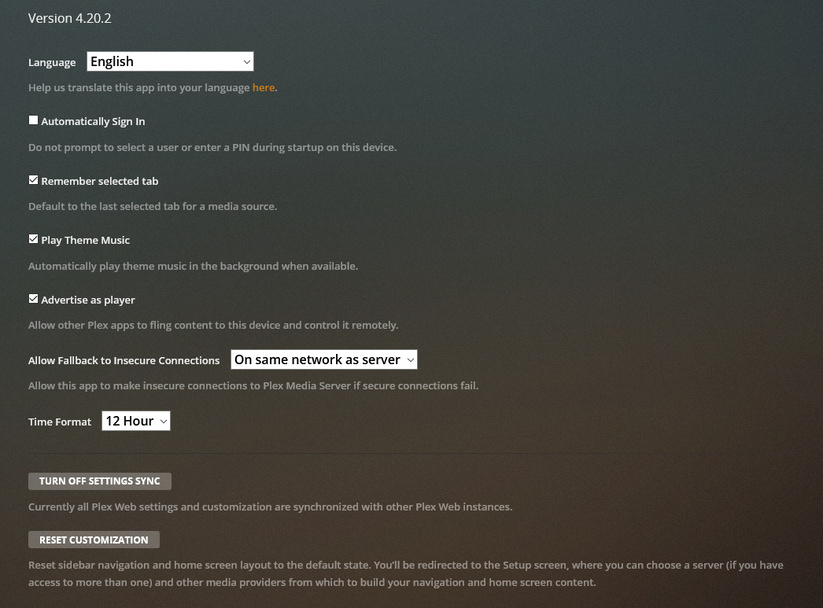
For me, my PMS is correctly set for Encryption: Preferred, and my Client (PMP) is set for Only on same network, but it wouldn’t fire up at all. Also couldn’t get into the settings screen to add Manual PMS Server IP’s.
All appears to be running OK now, however I honestly believe this highlights the necessity for the product to be able to run Offline - BY DEFAULT.
Currently, if Plex HQ were to actually go offline, pull the plug, or whatever, stuff will effectively run like crap no matter what settings you try and tweak!
The servers are not fully operational regardless of what the status link says. I have several shared players the family cannot yet connect with over the net.
Couldn’t have said it better myself. Now that I am back online and stable, I’ve followed the link provided and already had everything set as it said I should and still had issues like you others–even to the point I had great difficulty accessing it from the host it resides on. There is clearly an issue here that needs to be addressed.
The first line of the post linked tells the tale! “I’ve seen too many posts about this subject”
Clearly if there is too many posts on a certain subject that is the fault of the application–not the user!!
