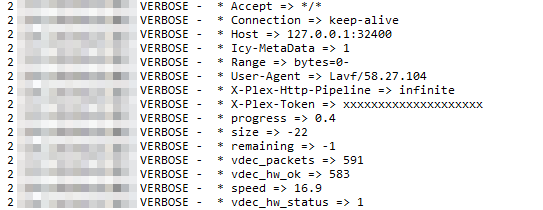
In version 1.18.0.1944 HW Tanscoding works normally
However, from later versions until now, HW Tanscoding will be like an attachment.
I have waited until now believing that it will be fixed in the next version, but it has not been fixed yet.
Downgrading to version 1.18.0.1944 will work as expected with HW Tanscoding.
Delete or rename Intel HD driver and restart PMS, it works normally.
The other solution is to download the source of Intel HD Driver 19.3.1 from here, build and insert it.
I’ve downgrade to 1.18.0.1944 and works perfectly.
Can you make a little tutorial to how to fix the Intel driver?
I have no idea to how to touch the Nas or Plex.
Thank you.
If you don’t understand your Linux environment, it’s hard to build your own Intel HD Driver.
In the case of hardware transcoding, even if you remove the iHD_drv_video.so, it works normally with VAAPI.
The issue of transcoding AS5304T is a problem with Intel media drivers.
As you can see from here and here, it is not currently being reflected.
Currently, Gemini Lake has an encoding problem with Intel media drivers
Even if I compile a new Intel media driver, the same problem is still repeated, and Intel is not suggesting a solution, so I am re-publishing the revised version here.
I think I am having the same issue but ASUSTOR and emby (so far) are clueless.
I have a brand new ASUSTOR AS5304 with 4x 8TB Seagates. Raid 5. 8GB memory. Tried and tried for weeks to get PLEX and Looksgood to play videos on my Samsung TV without buffering terribly or locking up the chrome/chromium web browser they use. I bought this unit so that I could play my videos “directly” through HDMI2 to my 75" Samsung 4K TV, but it displays unwatchable video (pixelated and buffering) or it locks up the chromium browser interface that PLEX uses. Looksgood does not lock up the browser but only buffers and pixelates. This happens even if I bypass the HDMI and use a direct Ethernet cable from the same router shared by the NAS. Switching to WiFi is no different. All apps are latest editions. IMPORTANT: I previously used a PLEX Server on my PC from another room and transmitted everything via wifi-connected LAN with NO BUFFERING. I have Xfinity Comcast Blast internet (>200down and 12-15Up) and a Mesh Network (Netgear Orbi). I create the problem when I open ADM, select PLEX, wait to load and usually locks up before I can attempt to play anything. If I get to play anything. It pixelates and buffers until it locks up the browser interface. I have a PLEX Pass. If I try Looksgood, it does not lock up the browser but pixelates. I have removed and then reinstalled the 4GB memory card (it was not the problem) on my ASUSTOR and checked all 4 of my 8GB HDs for errors. None.
AFTER installing the 3.5b version of ADM, I can no longer start emby. Now, I can NOT use either PLEX or emby and this is killing me. I even reset my network router back to factory settings, reset my windows network settings, uninstalled and reinstalled the pre-beta and beta emby server program and it still cannot start and therefore never shows up on my external devices. I can connect to the NAS remotely, but emby will not run remotely or directly using the ASUSTOR Portal (connected directly to my TV via HDMI cable).
Lastly, although I do not want to reinstall all of my data for a third time, but is there a way to “force” my ASUSTOR AS5304T to install and run the non-beta 3.4 version of ADM? I tried factory reset already and it reinstalled the beta.
It’s been a long time since I’ve been updated.
Intel finally solved Gemini Lake error.
This is not yet in release, but in the master brunch of Intel Github.
So I built and tested it.
It works perfectly and no longer causes a fault when calling encoder.
Modified package was tested on AS5304T.