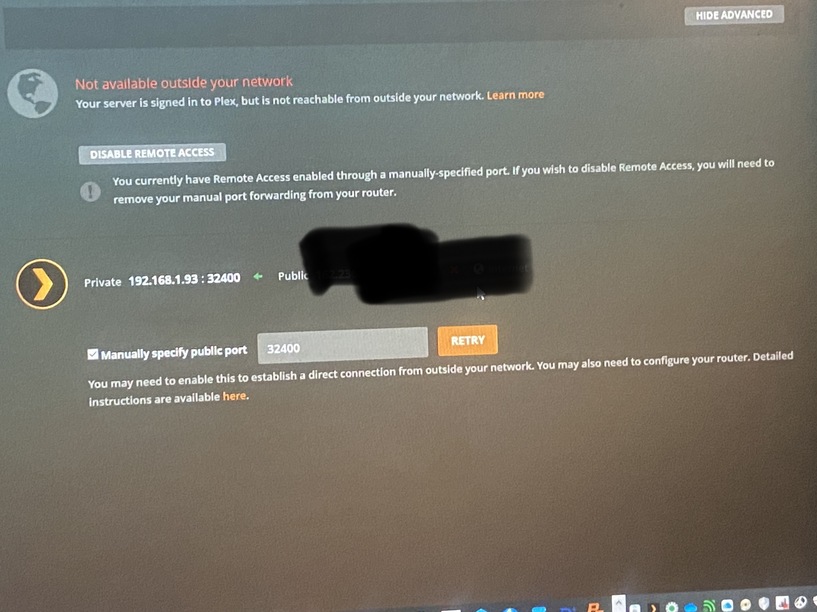
I could use some assistance… I’ve tried following all the steps in the forums and googled, but am still stuck. I have a Plex server, running the latest version and can’t seem to get remote access working on my ATT Uverse router connection.
I’ve got a Pace 5268 Router connected to an Airport Extreme, but the server is hard-wired into my Pace router. I’ve checked through the forums and followed all the rules, setting up port forwarding on my router for the server and I still get the ‘not accessible outside your network’ error. Can anyone offer me some assistance? Thanks!
Can you post a screenshot of your port forward configuration for Plex on your router? When (if) you do, also list the private IP address of your router. Also include a screenshot of the remote access settings on your Plex server (blank out the public IP address).
The private ip of my router is 192.168.1.254.
I have checked everything and I think I’ve got my settings right. It’ll pop up very briefly and say fully accessible, then goes back out.
Is that image from your router of the actual firewall rule, or just its status? It looks like there’s another section (Firewall Rules) where you actually define the rule; that’s what I was hoping to see. And what was it that you redacted (what is the label of that field, not the value)?
I’m not sure what router you’re using, but the rule should be defined something like:
Private/internal/forward IP: 192.168.1.93
Private/internal/forward port: 32400
Public/external port: 32400
Protocol: TCP
If there’s a field where you configure the source/remote/from IP address, leave that blank or set to none (whatever option your router provides to leave it unspecified). Or your router may give you an option to allow you to specify any remote IP address; if so, select that. The idea here is to not restrict the traffic to a specific source.
Here’s the relevant portion of my port forwarding rule as an example:

I found the firewall rules.. the first one was the applications, pinholes and dmz settings where someone said to try. Does this look correct now?
My initial though was that yes, this looks correct now. However, the description above the rule states that this section is for creating packet filters to devices on the LAN (or additional network); it specifically says that it’s not used for NAT’d clients.
I found the manual for the Pace 5268. Based on what I read there, it is indeed under “Applications, Pinholes, and DMZ” that you should create your rule. It’s a two-step process: First you define an application profile for the application you’re hosting (Plex Media Server) and second you configure the actual firewall rule. Here’re the relevant pages from the manual; defining the application profile is described on the second page:
Pace Firewall Config.pdf.zip (573.2 KB)
Try setting that rule up (again?) and show screenshots of the configuration dialogs from the steps above.
Not sure if I’m on the right track.
That looks good so far, to my eyes at least.
Thanks for all the assistance. I think I have it working now… not exactly sure what I did differently, but I believe it works.
No problem, glad you got it working.