Hi,
I’m trying to make this work, but no luck so far.
ATV3 is connected via ethernet and my plexserver is running on my iMac which is connected via wifi. Both has ip address on a same subnet, 192.168.1.3 and 192.168.1.8. But when I go to “trailers” I dont see my library (plexconnect).
Any idea?
thanks
Well on the Apple TV 3, you have to use The IP Address of the machine where are you have Plex connect installed as the DNS on the Apple TV. For example, the Machine where I am running Plex connect is 10.0.1.13. On the Apple TV you go into the general settings under network and go to your DNS, Set it to manual and enter 10.0.1.13 as your DNS. The best way to set this up is to set your network on automatic and then re-start (note: not reset) The Apple TV. Then after the Apple TV reboots, go into the general network settings and set your DNS to manual and enter the IP address of the machine where your Plex connect resides.
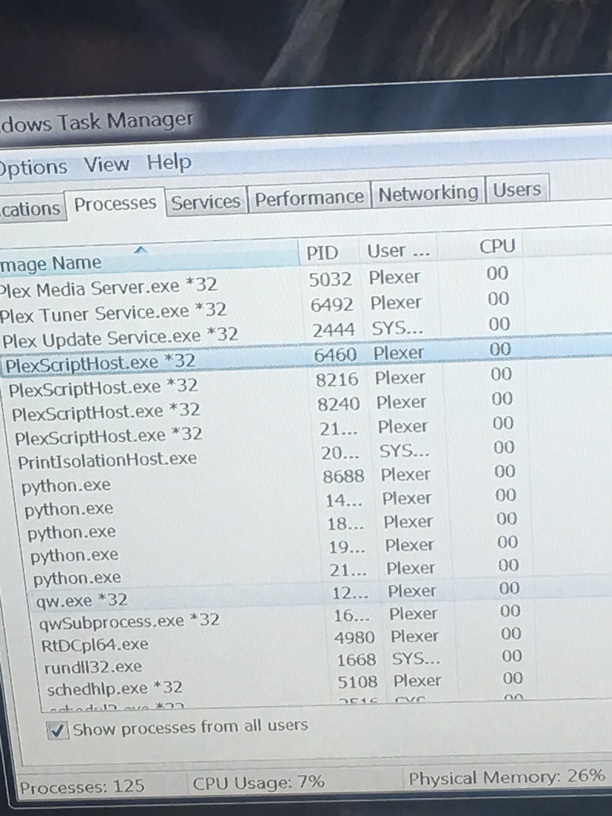
Consequently over on the machine where you are running Plexconnect, make sure that the script is running. On windows 10 this is difficult to ascertain so you have to look in your task manager to see if python is running and your Plex connect modules are loaded…
Add images
you will see something called PlexScriptHost running about four instances and there will be several instances of python probably five instances of python running as well. On Windows 7, there will be a command window open. Just make sure that Plex connect is actually running. Notice you don’t have to run Plex connect on the same machine that you are running your Plex server, but you do have to run it on the same network. There was a time when I ran Plex connect from a laptop and my Plex server was on a desktop. Ultimately I installed both onto the same machine just to make it easier.
If Plex connect is set up properly and running properly and you have the certificate added into the Apple TV, then you should see your library in the trailers app.
I have found that it is relatively easy to set up a Plex connect but you simply have to read through all of the tutorials carefully and then read through any relevant discussions in this forum because Plex connect is definitely not dead.
I’ve already done all these, but it’s not working.
Plexconnect and Plexserver are running on my iMac 192.168.1.8
ATV3 192.168.1.3
The DNS on ATV3 is set to manually to 192.168.1.3
certificate path is set to http://192.168.1.3/trailsers.cer
When I have ATV3 connected by wifi I can see my library from Trailers, but when I change to ethernet the Trailers showed the ATV original movie trailers.
Also restarted ATV3 after every configuration change.
Well if that isn’t a typo then no wonder you are connecting. DNS on your ATV3 is pointed to …1.3 BUT the server is on …1.8 . DNS on the ATV3 must be pointed to where the server is located, in this case …1.8
Soory
Typed wrong
The dns is set to 192.168.1.8
The cert is set to that ip
But no mater what I do so I cant see plexconnect on trailers
Wondering now if there is some setting which is missing in router. Maybe activate/allow some services between lan and wifi
Or maybe should I activate port forwarding for the port 53.
I’ve tried to replicate the problem with my ATV3. These are the steps I’ve used:
- Setup the ATV3 using ethernet, load certs and set DNS. PlexConnect running Ok
- Disconnect the ethernet cable and reboot the ATV3. As expected it acquired a different IP and DNS. After changing the DNS to manual PlexConnect was working
- Connect the ethernet cable and reboot the ATV3. It acquired the previous (fixed) IP that I had setup, but the DNS setting was no longer as it should be for PlexConnect, so I had to change it
My conclusion is that certs are not dependent of the lan/wlan configuration, but DNS is reset whenever the ATV3 detects a new LAN/WLAN, so it has to be parametrized again.
hi,
thanks for the answer.
I’ll try it.
just for the info:
Is this how you set up your environment, like atv3 by ethernet and your “pc” with plexconnect by wifi? and both your atv3 and your pc are using DHCP.
if this is true, then I guess it should work for me too.
could you please attach your Settings.cfg file to see if I have it right.
thanks
I did exactly as you described but same problem
Im suspecting the router, that some setting should be there.
Iv already tried with port forwarding on 53, but didnt help
I have Plex Media Server and PlexConnect installed in a QNAP NAS. Both (QNAP and ATV3):
- Have fixed IP, both of them authorized in Plex Media Server so that I don’t need to login the ATV3 to Plex
- Are connected to the same switch with cat5e cabling
I’ve used Windows to generate the certs, and I’m not intercepting trailers (but WSJ instead). Here is my Settings.cfg
enable_plexgdm = False
ip_pms = 10.100.10.210
port_pms = 32400
enable_dnsserver = True
port_dnsserver = 53
ip_dnsmaster = 10.100.10.1
prevent_atv_update = True
intercept_atv_icon = True
enable_plexconnect_autodetect = True
ip_plexconnect = 0.0.0.0
use_custom_dns_bind_ip = False
custom_dns_bind_ip = 0.0.0.0
hosttointercept = video-api-secure.wsj.com
icon = movie-trailers
certfile = ./certificates/marketwatch.pem
port_webserver = 80
enable_webserver_ssl = True
port_ssl = 443
allow_gzip_atv = False
allow_gzip_pmslocal = False
allow_gzip_pmsremote = True
fanart_quality = High
loglevel = Normal
logpath = ./logs
The problem is still exist.
The thing is that, when I use wifi on my atv3 I put my iMac (there plexconnect and pms running) as the dns server and everything works fine, but when I use ethernet and add iMac as dns it wont communicate with plexconnect. So some how when I use WAN it wont matter if I use manualy DNS or not, it will still use the routers default GW as the DNS address too.
confusing :((
What happens when you use ethernet ? You see trailers ? Or do you see PlexConnect with an empty library ? Pls note that, unless you are logged in to Plex (in the ATV), you need to authorize the IP of PlexConnect (192.168.1.8) and the IP of the ATV (which may be different in the ethernet and wifi situation).
Can you post the PlexConnect log ?
When using ethernet I see trailers icon and on that I can see the Apple’s default trailers page and not my plex-library. So some how the atv will not use my iMac ip as a dns server to find my plex.
yes, when I use ethernet the ip of atv will sure be different than when I use wifi, but should I put the atv’s ip in plexconnect config file to make this work?
When I use ethernet the atv does not communicate with plexconnect and therefor nothing comes up in plexconnect.log file.
Can you pls try with a manual IP in the ATV ? It’s what I use. If you see the Apple trailers this is because ethernet configuration (DNS, Router or Netmask) is incorrect in the ATV.
will try it …
but I dont think its incorrect.
the network is on auto which results to:
IP: (dhcp)
netmask: 255.255.255.0
DG: 192.168.1.1
dns (manualy): 192.168.1.8 -> plexconnect server (imac)
Tried with manual network setup on atv, but no luck
As soon as I remove the cable from atv and set the dns I see the plex on trailers
I’ve seen some strange behaviours of the ATV in the past (but not like this one) that were solved with a reset to factory settings (a complete restore). Can you try this ? Afterwards you will have to setup the ATV again (language, dns, wifi key, load certificates, etc).
Another thing, whenever you change the ATV from ethernet to wifi (or vice versa) you need to reboot it (or power cycle).
will change it to a ATV4 today, and I guess I wont need plexconnect any more.
let see if the ethernet connection will work or not (without modifing dns) 
Please report the problem using this template https://github.com/iBaa/PlexConnect/wiki/How-to-report-an-issue so that I can investigate further.
ATV4 supports more functionality than PlexConnect but who knows, you may have a secondary TV that doesn’t need that. Or give the ATV3 for charity.