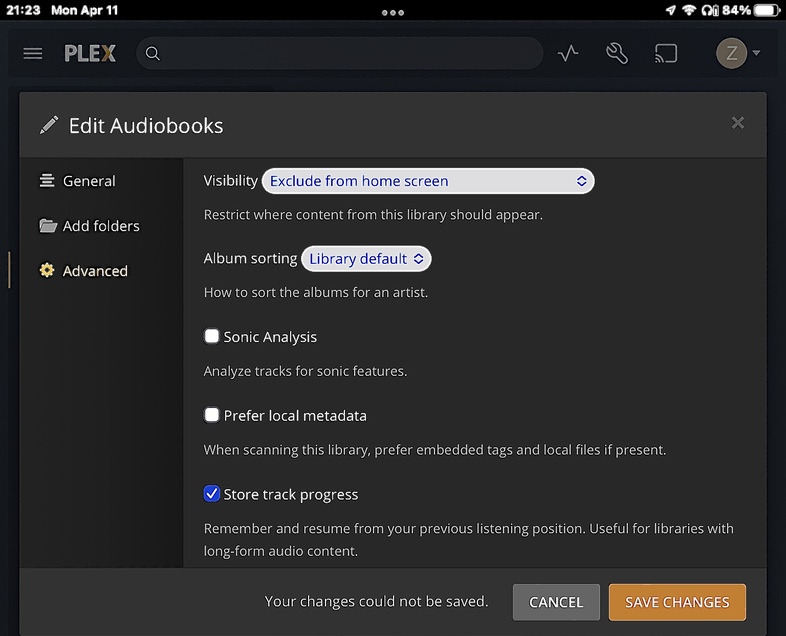
I am currently unable to enable the “Store Track Position” option in the “Advanced Settings” for my music library that I use for audiobooks. I have seen a few forum threads that discuss this topic with mixed results or functionality. If this is supposed to work I need some help trying to make it work. If it does not work - can we get it working?
Do you experience this issue with other libraries as well (specifically with libraries using a different agent)?
According to your logs, this library is connected to a specific audiobook agent which Plex can seemingly no longer find on your system?!
Apr 11, 2022 21:23:01.254 [13180] WARN - Request for plug-in [com.plexapp.agents.audiobooks] but it doesn't exist.
This is the only library that has this issue. I will check into that agent and see if I made a mistake somehow. Thanks for the info, I’ll let you know what I see.
So I had added a separate agent for audiobooks that uses audible data; I think when I did the last plex update it moved it out of the main plug-in folder. When I went to look there were two separate plug-in folders and the audible agent was in its own folder. I went and moved back to the main plug-in folder and it re-appeared as a selectable agent (in plex settings under “agents”) once I verified that I was able to save the “track progress” setting in the “Audiobook” library. So that problem is solved.
The actual function of the setting still seems clunky and maybe not fully operational (but that is kind of what I have been reading across other forum posts about this). If you have any tips please let me know.