Server Version#: 1.42.1.10060 ( the only working with HW transcode for me )
Player Version#: (Android) 10.30.6.4151
I`m having issue with media sync.
From Plex Server point of view I have switched ON Library → Settings → 1st checkbox to auto scan library.
There is also auto scan each 12hours set.
Previously ( when I was on Synology ) new files in folders were discovered instantly and library was always up to date. Now on Qnap new files are not discovered. I need to manually scan library from player to refresh it. What can do done/checked to have it auto-scan by server side ?
I recommend running a repair on the Plex database to see if that resolves the issue. I highly recommend using DBRepair—I’ve used it to fix similar problems with great success.
I`m not aware where is the problem.
I can just see that refresh auto and scheduled is not working. System is quite fresh (few days). Library rather small.
Looks like you may have at least a DNS issue Oct 24, 2025 13:05:22.319 [140027781606200] WARN - [HttpClient/HCl#cb2] HTTP error requesting GET https://v4.plex.tv/pms/:/ip (6, Couldn't resolve host name) (Could not resolve host: v4.plex.tv)
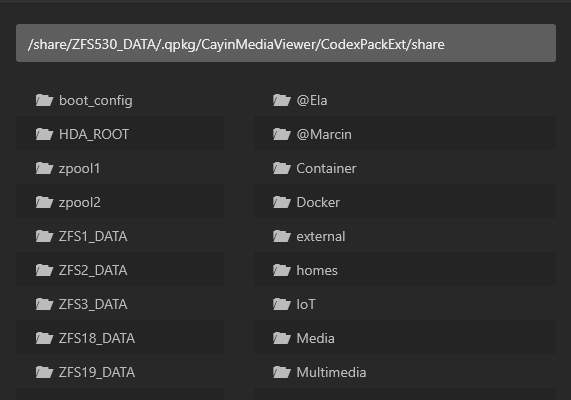
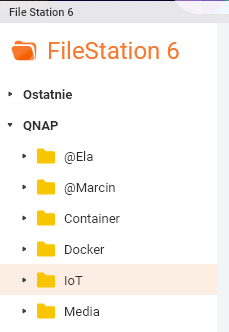
On ZFS, each shared folder is UNDERNEATH the ZFSxxx_DATA name.
You have to look inside each one to find the real shared folder name.
( It is a royal “pain in the ******” but that’s how QNAP did it. Other ZFS implementations do it such that the dataset name is the shared folder name )
The app you’re using isn’t compatible. You can’t use it with PMS.
What you need to do. (what many do)
Either:
A: Create (painfully) each library section as it exists without using the app by browsing into the ZFSxxx_DATA directory first.
-OR-
B: (as many do)
Create different folders under Media (which already exists)
Move your media under that folder
EDIT the Plex Library sections to point to the appropriate /share/ZFS18_DATA/xxxxx subfolder
I had the same issue, but on my synology drive. I have one instance of Plex on my Mac, and one on my DS420+, both using the same source music library on my Mac. The DS420+ instance wouldn’t rescan but the Mac Instance was fine. Both had same settings - automatic rescan and only scan folder with changes. Eventually I realised that there was an additional setting on the DS420 instance - Include music libraries in automatic updates - the box was un-ticked by default. Apparently this option is there because some Linux systems have a limit on the number of watched directories, which can be an issue with large libraries. With the box ticked the automatic scans work perfectly on both instances. Not sure if this helps with your particular setup, but may be useful to others who have this problem…