Be careful with the latest Plex server update

DSM Version: DSM 6.2.2-24922 Update 6 (Synology 218+)
Player Version#: (Plex Version) 1.24.1.4931

When I logged into my Plex Server (through FireFox) I received a notice about a new Metadata scraper. I accepted. BE CAREFUL WITH THIS!!! Turned out it took 2 of my Categories and REMOVED THEM from about 95% of the movies I had assigned to them. Even odder, it didn’t update any of the other categories - just those two. With a library of @1,750 movies you can imagine it took a bit of time (roughly 8 hours) to reassign the Categories to the movies which had been removed (since they can’t be done in batches).

Know this, I would NOT have accepted the change of scrapers - if anyone knows how to revert to the old scrapers, please let me know. I can envision ongoing issues as more media is added.

Anyway, adding insult to injury, it took over 2 hours to re-scan the metadata on the existing database so every time I updated one movie’s category, when I returned to the library list it was complete different. And, not alphabetically. It did it randomly.

It also screwed up the matching of a movie and it’s metadata in about 100 movies. In all by 4 or 5, I had to manually assign a match by getting the tt### ID from IMDB. Otherwise, it absolutely refused to recognize the movie based on the standard filename convention (on just these files - it worked for all the others) of Movie Title (Release Year) and would insist on providing a seemingly endless list of obviously invalid matches while not including the correct one at all.

Good luck!
1 Like

UPDATE: Just discovered it also updated the “Date Added” on ALL the movies to today’s date. That could be a real PIA if you need to know what was recently added.

I upgraded one library at a time (about ten different categories) and I have unique movie filenames so I have to manually do a match. The upgrade seems to have worked fine and the date added kept its original date. Windows 10 host.

All the logs are from after the mass update. I spent so much time updating, refreshing, etc, I evidently overwrote the logs of the mass update itself.

I didn’t have the option to change library by library - it was a Yes or No pop-up when I logged in. Even so, I wouldn’t have thought it was necessary even if I had :(. I hadn’t been on there since March or April of this year so I have no idea when this update would have been offered.

I discovered the Date Updated problem as I had logged in to confirm the match process for 4 new movies. Once I finished with the 8 hour correction of that mistake, searching for “Date Added” after 08/01/2021 gave me a list of every single movie in the DB. Searching for movies added prior to 8/1 returned zero (0).

To give credit where credit is due, “scraper” might not be the correct term. I remember it mentioning metadata, which I though comes only through the scrapers. Then again I didn’t think I’d have to remember what it was called so I might be mistaken on that, too.

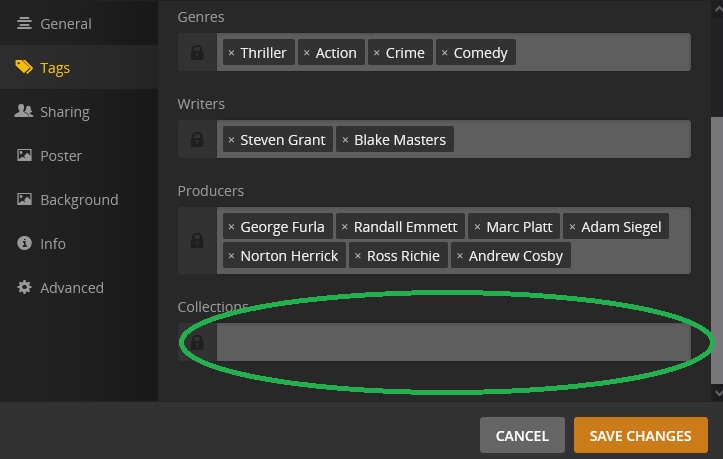
Oops - this is what I get for posting a question after a 15 hour day. I should have said “Collections” (not category). I hate when I do that. I did double check it at the time, my brain just read what I expected. I’ve attached a screen image of what I’m taking about.

There was something unique about both of the categories which were stripped out. Even though I manually assigned a number of other Collection names, those were usually specifically related to the items in it; (James Bond, Ip Man, etc). The two with the issue I mentioned were “Christmas” and “WWII,” both with all included movies manually added. Even then, about 10-20% of the movies in those remained assigned.

Anyway, the point of my post was that anyone receiving the prompt to update might want to not do it until they at least backed up their database. At least that way, if theirs is screwed up as a result as mine was, they could restore the previous version if they chose.

I was also hoping someone knew how to “undo” the “yes” selection for the new whatever. Not only did it screw up the 2 collections and the date added, it also kludged the matched metadata/poster/etc for about 10% of other movies. Particularly irritating as you don’t know it’s wrong until you play the movie - manually checking each movie’s “info” filename to the title would be an impossibly long process.

This topic was automatically closed 90 days after the last reply. New replies are no longer allowed.
