Server Version#: 1.40.3.8555
I’ve had my PLEX database for years and I’ve noticed some of the entries in movies or series that have been in there a long time have old or stale metadata. I’d like to get my metadata current but I have a lot of items in my libraries, too much for just clicking Refresh all and seeing what happens.
Is there a way or script I can run to perform metadata updates for a set criteria? For example “all movies that start with A” or “all series who’s existing metadata is 3 years plus aged”, etc?
Short of manually refreshing every object I’m not seeing a direct way to do only groups of movies or series for updates.
Thanks!
Settings - Server - Scheduled Tasks - Refresh library metadata periodically
Will do this always during the scheduled server maintenance. Always a few items until they all are done. Then rinse & repeat.
Thanks! For some reason I thought that setting only worked for Music not Movies/Series. Just turned it on.
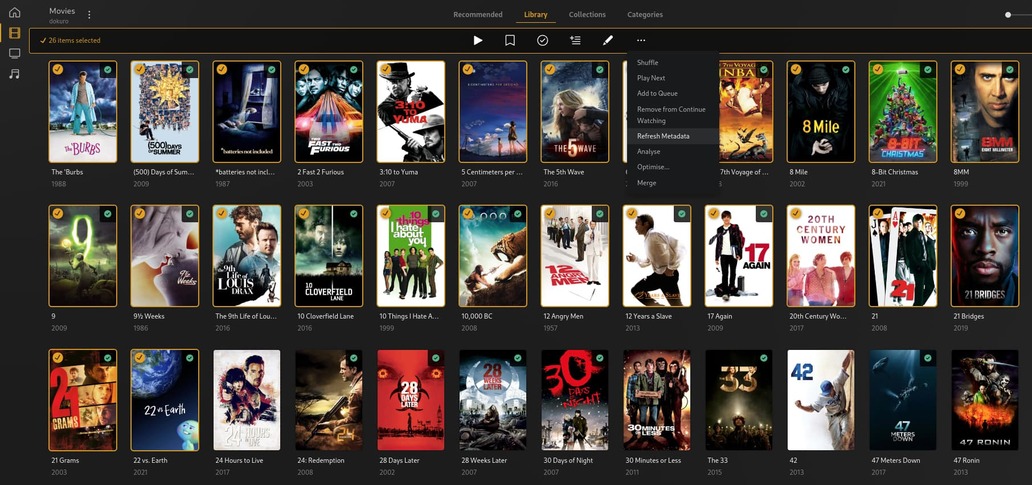
You can also use multi select using the WebUX at https://app.plex.tv. Go to your library, select the circle icon on the poster (upper left corner) and the hold shift on the keyboard and include as many as you want to update. Then select the three dots (…) and select refresh metadata.
The ones with the yellow tick will be updated.
@anon5074910 Thanks! This helps, I can sort the items by date added or by metadata fields that are missing and then pick all the objects missing the field.