EDIT: You will also notice there is no menu button, and no queue button while in landscape here. This is not an issue on my OnePlus 6 though, so either screen size issue or Android version issue.
While I was testing this on my Nexus 7, I also noticed that album art is not properly centered (the bottom of art touches the nav bar):
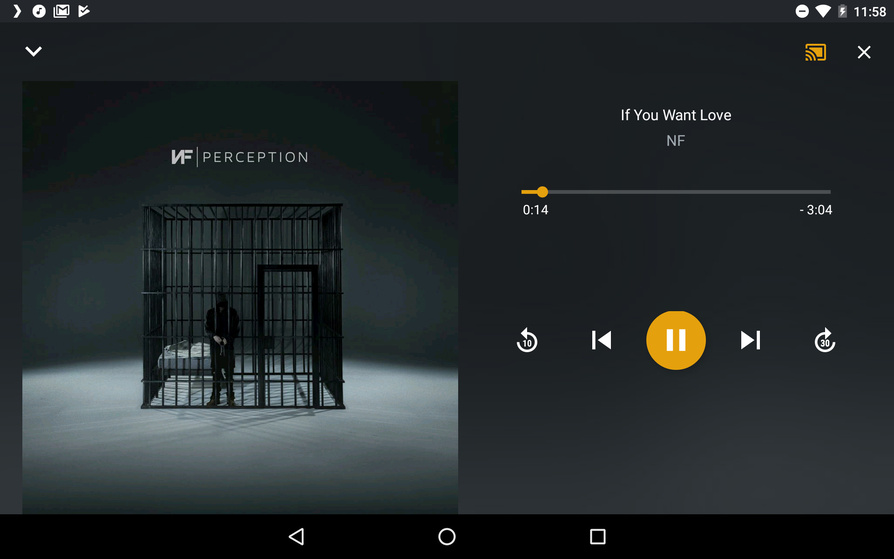
1 Like
Re this, I just tried a ‘graceful’ switch (IE, walking out of range of the wifi connection, and the phone then disconnecting, and connecting to LTE), and it produced the same result. 
Additionally, I noticed that repeat was not an option, while casting to a Chromecast device. Is this an intentional decision, or is the repeat feature missing while casting?
Just had an issue, where music was playing, but the button was set to ‘play’, instead of pause. Then, when I hit play, nothing happened. I had to hit play again, for the song to pause.

plex-log-d2dyno.zip (469.7 KB)
EDIT: It seems the infinite loading icon has made a return as well 
1 Like
In some mp3 audiobooks I have small gaps (or no clean transition between the tracks). I have no gaps in FLAC audiobooks… (configuration: Android Plex (7.8.0.8095), WLAN)
Encountered exactly the same issue today. Additionaly when in this state, you cannot change the progression of the song. When trying to do so, playback just continues and the bar jumps back to its original location after a brief moment.
1 Like
same here…
i also noticed a symptom that i have two visible “lock screen navigation mini players” (how do you call it?you know what i mean?) sometimes…next time i see it on my samsung s5 neo i will make a screenshot and post i here. BTW: OPUS was a nice choice and streaming performance is really great now! Good work! You get all my love when you really sort out all mini bugs with the next releases and make music streaming really that great that it potentially looks like now  Thank you for not giving up the music community!
4 Likes
I’ve also been getting random crashes while casting:
plex-log-d2dyno.zip (458.2 KB)
Where the app is open and casting, then without doing anything, plex closes, and relaunches itself. At which point I must manually reconnect to the cast device (music plays fine the entire time)
And not sure it’s related, but track title, art, etc is staying in one place on Chromecast for me. Playing through a playlist. The next song should have been labeled ‘Feel the Fire’, which was the audio that came through Chromecast, but not on the Android app:
Search randomly stopped working, had to force close app to get it back:
plex-log-d2dyno.zip (485.3 KB)
Yep, these are what we are trying.
Do the other radios work (Time Travel)?
: You will also notice there is no menu button, and no queue button while in landscape here. This is not an issue on my OnePlus 6 though
I’ll raise an internal issue for this, thanks!
Re this, I just tried a ‘graceful’ switch (IE, walking out of range of the wifi connection, and the phone then disconnecting, and connecting to LTE), and it produced the same result.
Hrmrmrm, what is your Plex network set up, do you use relay or direct connections? Do you have problems with network switch while playing videos?
repeat was not an option, while casting to a Chromecast device
It’s disabled intentionally, I’m not sure for what reason.
Just had an issue, where music was playing, but the button was set to ‘play’, instead of pause.
It seems the infinite loading icon has made a return as we
I think we have a fix related to this in progress, it should be in the next versions (7.9?) beta, let me know if you come across it again after that lands?
i also noticed a symptom that i have two visible “lock screen navigation mini players”
@Radl25 I think this is the same thing, so we will see if the changes we’ve made help with this soon 
I’ve also been getting random crashes while casting:
I’ll report this issue, thanks for the logs!
And not sure it’s related, but track title, art, etc is staying in one place on Chromecast for me
There are a number of issues with that screen not always being up to date with what is going on with the device, they are a bit tricky to resolve as the problem could be in the Android code or the Chromecast code.
Search randomly stopped working, had to force close app to get it back:
Better to make a new post for that, though we are aware that search could use some improvements.
1 Like
I’ll try those next.
Direct only. I’ll try videos and see what happens.
Also, There is some odd behavior with skipping (visual glitch, skipping ahead, sometimes a song a few skips back will show back up for a moment, then go away):
And also queue (swiping items out of the queue, they will come back, then remove themselve again. Very jarring and annoying) :
I don’t think there was a change, but I can’t seem to reproduce this now.
I remember seeing this in the previous releases, as well. Not new, but it is still a bug.
1 Like
Just tried, and no, other radios also don’t work.
Yes:
Starting a Cast to one device, then disconnecting and casting the same queue to another Cast device, results nothing playing. Must destroy the queue to get something playing.
plex-log-d2dyno.zip (464.8 KB)
Hi, I found a bug that is rather annoying to anyone who uses Plex for Android Auto.
When doing a voice search to play music, 99% of the time, it will come back with a Podcast instead of music.
For instance, if you do a voice command “Play Pink Floyd” Plex will come back with a podcast relating to Pink Floyd, and not the actual album. Even if you are specific and say “Play The Division Bell by Pink Floyd” it will return a Podcast.
Please please please fix this, I got Plex Pass because of the Android Auto integration.
Thank you
1 Like
sometime music playback stops in the middle of a song…the yellow “progress bar dot” is going on and it looks like there is still audio playing, but no audio hearable. When i try to “click” in the progress bar to kind of skip forward in the song, the “progress dot” jumps to zero but still no hearable audio but the dot moves forward like its playing corretcly. only going to the next song with the right arrow button and then back again activates audio playback…but also only to the point where audio stops the very first time. Then it skips to the next song. I hope you can understand what i mean… Samsung S5 neo (SM-G903F) - Android 6.0.1
1 Like
I have found a bug that is in the beta, but not in the official release. Since using the beta (4 days ago), When I shut my car off, or disconnect my Pixel 2XL, the song still plays for maybe a second or so. Not that tis is a problem, but when returning to my car and plugging it back in, PLEX forgets where it was in the song and what it was playing.
EB
When playing/shuffling a Tidal playlist, only the contents that are loaded/drawn on the app (IE, the first ~30 items in a playlist) are queued. The rest of the playlist is never queued, perhaps unless you scroll to the bottom, thus ‘loading’ the rest of the items in a playlist Tested this, did not work.
Does Plex even have a QA team? 
