We’re it. 
2 Likes
When playing/shuffling a Tidal playlist, only the contents that are loaded/drawn on the app (IE, the first ~30 items in a playlist) are queued
There is a limitation on the number of items that can be queued for some containers. I wouldn’t have thought it would applied to playlists, I’m checking.
1 Like
Either way, it’s better to raise that concern in the Online Media Sources forum. It’s not a client bug so I cant’ really help 
Aww, but you’re the one who listens to me 
I noticed Plex this morning started doing cross fades in playlists, however it only did it for the first couple of songs, then just started playing back to back.
Are the cross fades happening yet?
@Stephen3001 I couldn’t respond before because the feature wasn’t released. There is a “Sweet fades” setting in the playback options (bottom of the music player)
From the blog post:
- Sweet fades: Crossfades are tired. Sweet fades are wired. Dumb crossfades just overlap tracks by a fixed amount; our sweet fades compute the optimal crossover point between every single pair of tracks and use that to deliver an ear-delighting mix.
1 Like
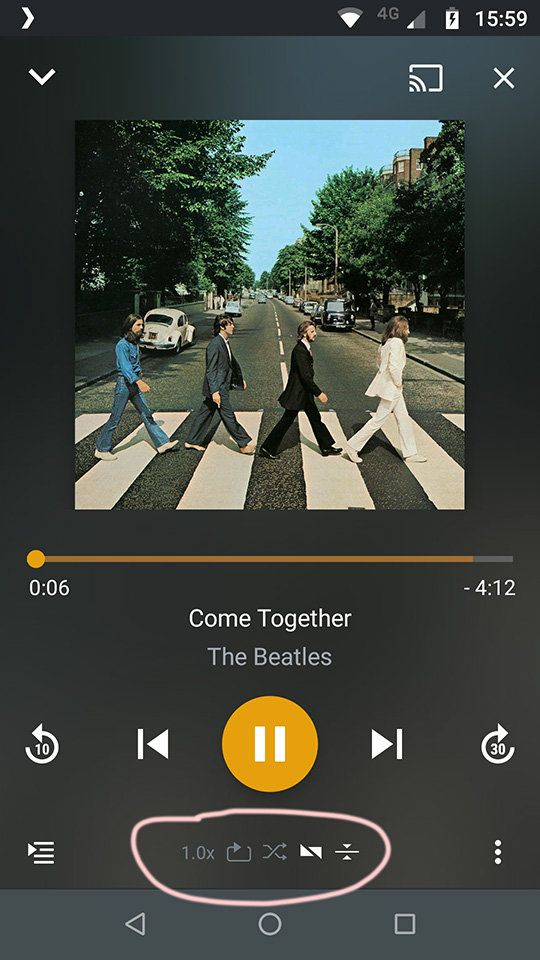
@SamFromPlex also, were you able to review all my recent posts/reports?
Yep, I’ve got everything. I just need to go through them and file bug reports + talk to someone in the Chromecast team to try and figure out what we can do to try and get to the bottom of that.
(By the way, thank you to the beta testers here for helping to test the pre-release of the new Audio Player  )
)
2 Likes
Yes, my pleasure. Figured I’d help get everything ironed out while we had the developers ears  Now to become a thorn in the side of the Tidal team
Cheers @OttoKerner and @SamFromPlex , checking it out now. Good to see audio leveling in there as well.
Edit: Just giving it a listen, it seems to work for the first couple of tracks in the playlist, but after that just does a normal back to back.
Can’t cast to Chromecast anymore, it fails constantly with a force close. Tested with two different devices (bq aquaris x5 plus, samsung galaxy tab s2) and two different chromecasts (chromecast audio, google home mini). casting from webplayer works fine. @SamFromPlex I DM some logs to you. Regards
1 Like
New features are sweet but the stuttering is still present on the latest release 
I noticed that in the state, when the playback stutters when putting plex in background, the screen will stay on forever as long as plex is open in the foreground. Screen turns off fine when plex is in background and music is stuttering or when plex is in non-stuttering state and in foreground.
Edit: Additionally, Android auto says “Plex is not working right now” when the app is in stuttering state.
Ah, that’s annoying!
At this stage is seems like this is device or “audio module” related, the best way for us to be able to try and see if there is what we can do to fix this would be:
- Kill the app
- Open the app and start playing some music
- Check the time and reproduce the stutter problem, let it “stutter” for ~10-20 seconds
- DM me some logs (settings → helper and support → debugging → share…) along with the time bracket and I can pass any info we can glean along to the guys working on the player engine
2 Likes
We have a fix for this, should be in beta later today.
1 Like
Will fix for track not progressing on radio be in the beta as well?
We can’t fix that until we can figure out what causes it, tracking down a crash is much easier unfortunately (or fortunately) and crashes are generally higher priority when it comes to bug fixes.
This may have been reported already, but I found a couple things in 7.8.0 8095
-
Attempting to skip through a track before it completely loads up (indicated by the yellow bar filling up) will not do anything, it will continue playing. When it does load up, the track can be skipped through. Not a huge issue because most tracks load up within 3 seconds anyway, except for FLAC files which take a while longer.
-
It seems to me that if you skip a few songs ahead in the queue quickly, sometimes the song that you let play will start to play and then begin to buffer. This may be a network problem on my end but maybe others are experiencing this too.
-
This one is weird, and I can’t reliably recreate this, but sometimes if I skip ahead to the next song, two songs will play at once, overlapping eachother.
Android 8.1 on Oneplus 5t
1 Like
Another very annoying issue(audio skipping ahead):
Casting to Chromecast
Directly playing via any device does not exhibit this issue. It’s starting to seem like the Chromecast code needs a complete rewrite. Seriously though.
@SamFromPlex what fixes were included in latest beta? Changelog is empty.
