That is unrelated to the new audio player, but can you please DM me some logs of the failure?
@Daimyo How hard is it to disable/remove that to see if it makes any difference?
I videod track not progressing, this time casting to Chromecast Audio:
@Daimyo - I’ve managed to fix a number of the issues you reported, and have a few more being reviewed that will hopefully make it into the beta in the next day or two. However, this is still one that nobody internally can reproduce. I’ve flung different collections to different devices (both Cast based and Plex Companion based), everything is working for me 
Would you be able to share your logs after reproducing this issue? Detailing what track you started, etc to see if anything stands out?
Thanks
@IanDBird Did you see me post after the video? This seems to only happen on radio stations. Playing a Playlist, or album, does not have this issue. Can you try casting ‘Library Radio’ from the main hub on the music page?
@SamFromPlex fairly easy, I’ll try it out today to see if I can reproduce background stuttering without this mod.
EDIT: in typical dyno fashion, the issue resolved itself  I did update PMS to latest version today, maybe it relates to that
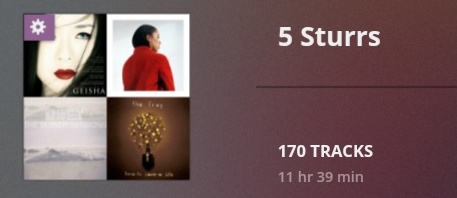
Any idea why auto Playlist count, based on track rating, does not show anything past 129? My Plex for Android has shown that number for some time, while the web shows 170

Stuttering playback is definitely NOT fixed. After playing a few tracks, audio gets really choppy again, sometimes sooner, sometimes later. If you close plex in app view(square button) while audio is choppy, playback stops but player in notifications and on lockscreen remains. You also cannot close those except going to settings and force close the plex app. If you just open plex again, you end up with two players in lockscreen and notifications.
Inline headset controls are still only partially working.
Edit: Issue happens both for local and remote playback.
2 Likes
Can you please sent logs @Fuechslein?
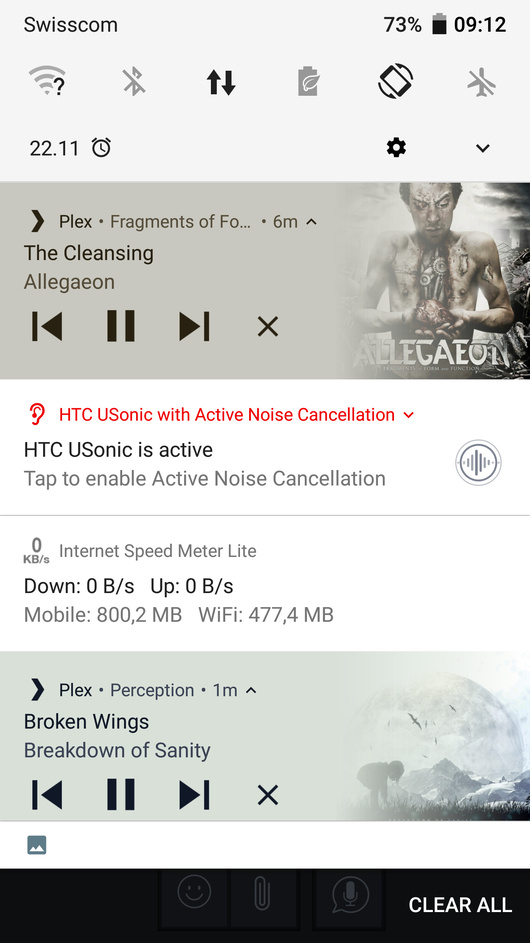
I notice you have an active noise cancellation notification there, I wonder the new audio player and that don’t like each other. Are you able to try disabling it as a test as it will help us to try and reproduce the problems.
It is actually disabled. “Tap to enable Active Noise Cancellation”  I can however try to disable USonic which is just an equalizer and test again.
I sent you the logs per pm.
1 Like
Same thing with it disabled. I could relatively easily provoke the error by skipping ahead several tracks and then put plex in background.

Edit: I couldnt get further than 3

Middle one is the actually working one. Lower two notifications both control working player playback. Top one doesnt respond at all. I now always have refelct the Storm by In Flames played too, no matter what song I chose. Pausing the actual song also pauses In Flames. I cant control it in any other way tho.
1 Like
New symptoms: Skipping forward a lot of tracks rapidly will crash the app.
1 Like
Just seen this topic. Are there any plans to add an Android Widget for the Plex Music player?
I’m on the latest android beta and noticed the following: My library consists exclusively of FLAC. When I start playback remotely (mobile connection) Music gets transcoded with opus with 128kbs. This works fine and consumes very little of my mobile
-data-volume . Today I’ve started Plaback at home over wifi which normally does direct play which is fine and what I expect. Now while playing I went out for a walk (connection switched to mobile). After returning home after 45 minutes I’ve noticed that 500 MB of my data-voulume has been soaked up by plex. I assume transcoding did not happen even I’ve been on mobile data  . Maybe this is a bug? Regards.
@holger can you please DM me some logs?
I thought this bug had been fixed for some reason, but I may be wrong. If not, it is persisting into this new player and I am able to reproduce it 100% of the time.
Sequence of events to reproduce.
- Open any playlist.
- Scroll near the bottom of the list and choose a song to begin playing keeping in mind how many tracks away from the bottom you are or just pick the last one.
- Change to shuffle mode.
- If you picked the last track the ‘Next track’ button is immediately grayed out and continues to be even though the play queue now has many selections ahead with Shuffle engaged. If you pick the 2nd or 3rd from the bottom the ‘Next track’ button will be available until you play the number of tracks equal to how many were left before you engaged shuffle and then once you have done that the Next track button will then become unavailable. If you skip way ahead in the queue the same thing will occur, but when you skip back to the beginning the button becomes available as long as you didn’t pick the very bottom choice before hitting shuffle.
Clearly what is happening is that even though Shuffle Mode has put your current selection at the top of a newly generated Shuffle playlist with many selections after it, the ‘Previous track’ and ‘Next track’ controls seem to not be aware of this change. Other items may be affected as well and I simply haven’t realized it. I only noticed this because when controlling the player through Bluetooth controls I could no longer go to the next track and it would start skipping ahead several seconds instead since the ‘Next track’ command was no longer valid as far as Plex was concerned.
Here is a URL to my original post regarding it:
1 Like
Any idea when the next set of beta requests will get processed? I signed up a little over a week ago and still am not able to get in.
Thanks!
1 Like
Yep same here please.
@SamFromPlex is this a feature request? I’d also like to be able to manually specify a bitrate quality for cellular streaming vs wifi remote streaming. Right now hard-coded 128 is a little low for my taste
Thanks Guys and Gals, Beta is now on my phone and playing away.
2 more things:
- if you add a song as next to the queue, that new song is not cached until playback of current track ends.
- if a library goes offline, it’s position in the app is not respected. For example, in this screen, TheiaHD is supposed to be at the top, as I had previously set it. But when it went offline, then came back, it’s position is reset and must be fixed everytime that happens.

Random question out of left field here. Are you thinking of incorporating the Track cross fading from Plexamp for Playlists and radio?
I really like this feature of Plexamp and was wondering if you are going to bring it into the mainstream.
