No my library, if for example I wish to Play NCIS - S12E19 it will play NCIS - S12E01 after migration. So if I toggle the previous Eps, it will work as expected there after.
But the Eps are marked Played using a Library Launch not from Home
No my library, if for example I wish to Play NCIS - S12E19 it will play NCIS - S12E01 after migration. So if I toggle the previous Eps, it will work as expected there after.
But the Eps are marked Played using a Library Launch not from Home
Okay. I think this is an unrelated issue to the agent upgrade. There was another change in the release which is likely causing this. I believe there is a fix for this in the next release.
Good to know, at this point it is intermittent with different shows
Another positive improvement of this new agent is when new shows arrive. So, Pacific Rim: The Black aired this week and only got added to TMDB/TVDB with good metadata the day it aired. Plex needs a couple of days for the flow from its sources into the plex cache on their back-end and that looks to have happened overnight in this example.
Nothing new there I hear you say however as metadata was missing in plex for this show up until then, when the scanner done it nightly Update all libraries during maintenance scheduled task it detected no metadata and then automatically downloaded it.
When I checked this morning plex had automatically pulled the metadata without any manual intervention from me. Nice job!
I’ve updated my TV Shows library and so far so good.
But there are a couple of things:
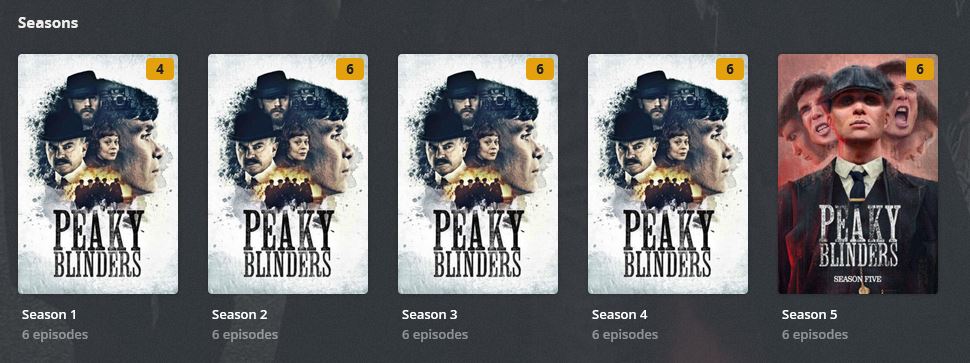
An example is Peaky Blinders. No posters for seasons 1 to 4 but curiously, there is a poster for season 5
I’ve tried to pick them manually by editing the season but no posters found
Some shows have been remade and originally, the new version had the year.
“Amazing Stories” (from 1985) and the new one “Amazing Stories (2020)”. Now both are named “Amazing Stories”.
“Perry Mason” (from 1934) and the new one “Perry Mason (2020)”. Now both are named “Perry Mason”.
“The Stand” (from 1994) and the new one, “The Stand (2020)”. Now both are named “The Stand”.
I don’t know if this naming scheme is better or worse.
You’re likely using TVDB ordering and it doesn’t have season posters for those (except for season 5): Peaky Blinders - TheTVDB.com
It’s possible they were there at some point but were removed, which is why you had some previously.
It’s a known issue:
Thanks, @drzoidberg33
That clears things up 
Wanted to add that I really appreciate the work you - and others - have put in this new agent.
Kudos!
EDIT: I think, I’ll use TMDB instead of TVDB from now on.
It’s a pleasure!
Trakt.tv has recently migrated to using TMDB as their data source and has created a useful resource to find gaps in data between TMDB and TVDB.
Check out this page: https://trakt.tv/transition/tmdb/shows
It may help determine how much impact a change in ordering would be for you.
That link is a great resource. Thanks.
Looks like a mad house. Really hard to pick a winner. Some shows look better on TMDB and others on TVDB.
So it’s definitely safe to delete the files inside the PhotoTranscoder folder?
No side effects? Apple TV posters or season thumbnails missing, etc?
EDIT: I just deleted the contents of the PhotoTranscoder folder. Reclaimed about 6 GB. On restarting Plex, the folder gets populated again albeit with a much smaller size.
One problem I encountered is that it seems to keep refreshing metadata on its own.
I migrated to the new agent yesterday, now when i check it again 24 hours later, the client still shows it’s updating metadata for many shows. Even though I’m pretty sure those shows were already updated at least once.
yes this is my issue as well…
are your files in the cloud perhaps?
Yes, that’s how the cache works. Every time you access an image, the server will transcode it to a smaller size and store that in the PhotoTranscoder so we don’t have to do the transcode process every time you ask for that same image. The more images you load the larger the cache gets.
Fix coming for that on Monday. It’s because you have unmatched episodes, it will try and rematch them after every scan.
New season of Masterchef UK (tvdb-84489) is being added as Masterchef Goes Large (which was the original title) and is separated from previous seasons because of it.
Probably 2 separate issues here:
Just two things I’ve noticed with my library:
Dragon Ball GT(1996-2003) is named correctly with plex naming standards but gets matched but always gets matched to Dragon Ball (1986-1989) and that’s after multiple full library rescans. Not sure if it’s because it’s using the original title or not even though that option isn’t checked.
Teen Titans (2003-2006) Season 5 always gets matched as Titans (2018 - present) Season 1, again after multiple full library rescans.
Super Secret Secret Squirrel (1993) [tvdb-85383] gets matched properly but the title shows as Sheep Dogs/Agent Penny/Spooks-a-Poppin’
Seems to be the IMDb title of that show (at least that’s the Show linked on the TheTVDb page for your show.
Hi, I wanted to leave a query / request that I think could be very interesting.
A few months ago I started to normalize and change the covers of my series and animation series to make it look “cross-platform?” Few months ago I went from TVDB agent to TMDB, I don’t want to get into a war over which is better or worse, I just changed agent and I contribute translations, corrections and others to TMDB.
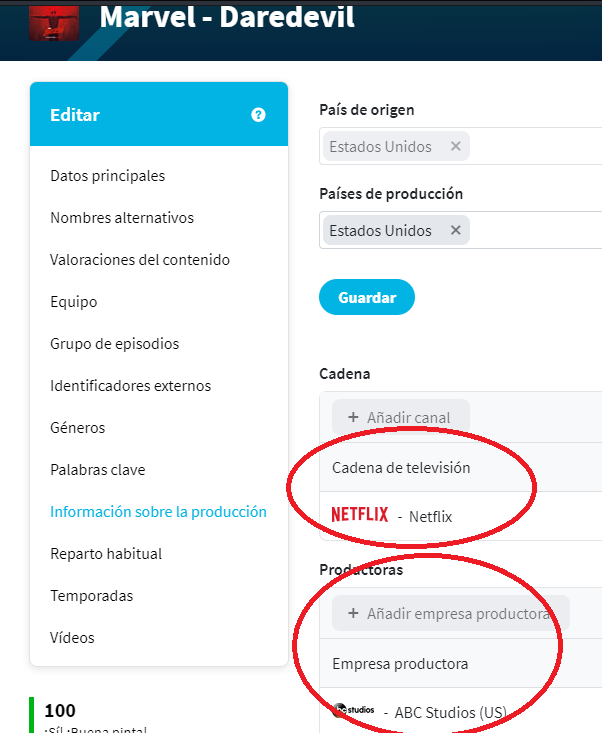
The thing is, both sources have studios and channels. I don’t know why, but Plex with TVDB took the channels as studios and with TMDB, that information is more correct because it takes the studios as studios. While I was using TVDB, I didn’t have to edit any series to do this, however whit TMDB, I think it would be necessary to make some modificationi because is more relevant in series, filter by Channels and not by studios.
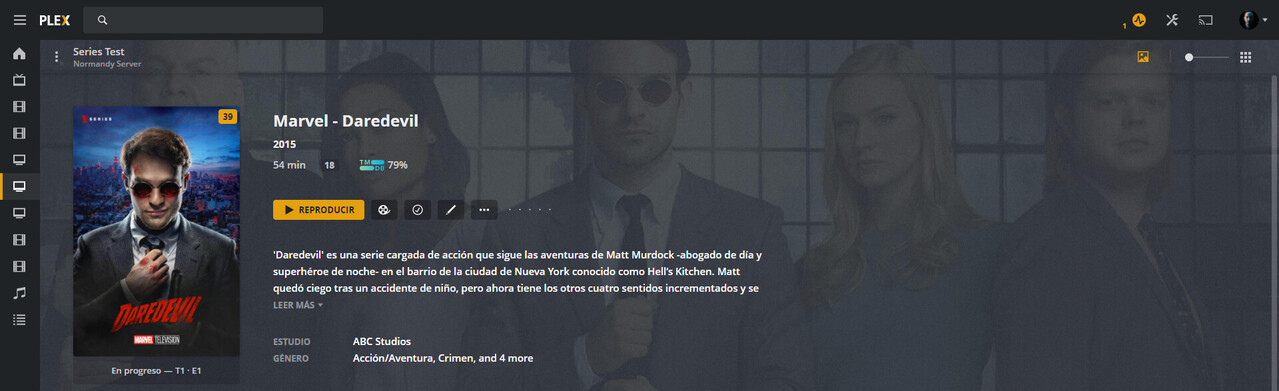
A graphic example:
This is the information that the TMDB agent takes from Daredevil, the Netflix series. As you can see, the studio is ABC Studios, it is correct, the problem is that below
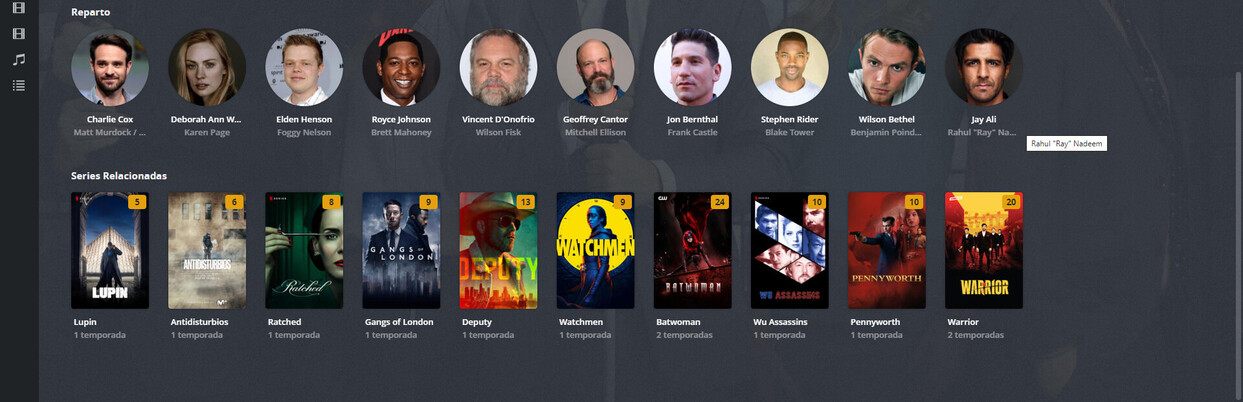
In the suggested series, there is no other series that is from ABC Studios, it is my problem because I only have one more series that is from ABC , Stumptown.
What would i like? That in the part where it says Studio, you could choose between that or the channel that appears in the TMDB info.
This image belongs to the active library of my series.
In this way, if all the metadata of the series are updated, below in related series, all the Netflix series that I have would appear