Thanks,
Just checked this and a couple of other shows that had this issue
All metadata has come through now
Please can you check these shows again and see if it’s resolved and let me know. Just refresh the show metadata and see if that fixes it, if not please let me know which shows those are.
“Marvel Studios: Legends” was not picking up episode images or cast metadata previously but is picking it up now so looks like fix is working there.
It’s fixed and has better posters. Thanks.
Debug logging turned on. Will post logs after scanner does it again.
The first show is fixed now but i still dont get metadata on episodes of this one. seems to only get the episode number but no title or description. G:\Video\TV Shows\VICE News Tonight\VICE.News.Tonight.2021.03.18.mkv
Please remember that there will still be a delay from when the information is updated on TVDB/TMDB to when it’s available in the Plex agent.
That episode is very recent so keep that in mind. If you don’t see it update after another day or two then please let me know.
That was just an example, it wasn’t getting metadata for any of last week’s episodes. But I just did a refresh and today it was able to get the metadata for the entire week. It seems like the cache is not updated daily.
Slow scanning has happened at least twice since last night. I know because I get an alert that the CPU on the PMS has been over 95% for the last 20 mins…
Logs attached: Plex Media Server Logs_2021-03-21_12-33-39.zip (6.8 MB)
Another thing about the scanning process that is really annoying is that it ignores a manual Cancel Scanning request. There is a notification of the cancel request in the Alerts log stream, but the scan just continues on its merry way. It would be really useful if the scan stopped when u request it to do so, especially in cases like this when there is nothing new to scan, and it is taking 100% CPU.
Thanks, these logs do clear things up a bit.
What I can see happening is we’re detecting changes to a lot of your TV folders and because you have scan automatically and partial scans enabled we queue up a scan for each folder that has changed. This explains why it appears you can’t cancel a scan, because you are actually cancelling the running one but then there are many more that are queued up and the next one just starts.
This however should not explain high CPU usage as it doesn’t look many of these TV folder changes are actually adding media files (maybe you’re adding subtitles?).
One thing that did stand out was some requests for hubs that are taking way too long, this might be related to this existing bug:
But you would also need some the on deck settings to be set too high to cause this, can you check what these are in Settings → Library?
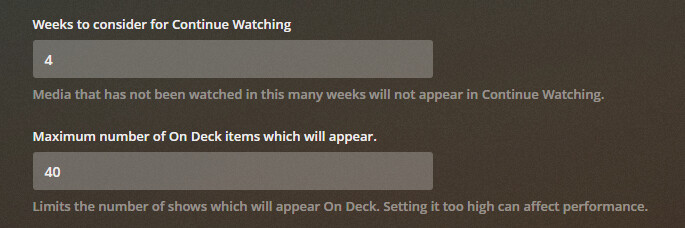
I suspect that you might have a high number set for the second option, but please check and let me know.
Here’s my settings:

There are no changes happening to the TV folders that I am aware of.
All the TV Show folders are on Windows Server SMB shares. There are 3 individual shares, all on the same server.
Can’t find any settings for Subtitles, but do have Find Extras and Intro Detection enabled:


Thanks, working like a charm now.
There is definitely something changing inside the folders, you can see lines like this in the logs:
Mar 21, 2021 11:27:29.138 [2956] INFO - Library section 3 (TV Shows) will be updated because of a change in "\\Doris4\tv\The Vicar of Dibley\Season 1\The Vicar of Dibley - S01E01 - Arrival.mkv"
Mar 21, 2021 11:27:29.236 [3912] INFO - Library section 3 (TV Shows) will be updated because of a change in "\\Doris4\tv\The Vicar of Dibley\Specials\The Vicar of Dibley - S00E01 - The Easter Bunny.m4v"
Mar 21, 2021 11:27:29.237 [2956] DEBUG - It took 62.500000 ms to retrieve 10 items.
Mar 21, 2021 11:27:29.244 [12576] INFO - Library section 3 (TV Shows) will be updated because of a change in "\\Doris4\tv\The Vicar of Dibley\Season 2\The Vicar of Dibley - S02E01 - Engagement.mkv"
Mar 21, 2021 11:27:29.317 [12576] INFO - Library section 3 (TV Shows) will be updated because of a change in "\\Doris4\tv\The Vicar of Dibley\Season 3\The Vicar of Dibley - S03E01 - Autumn.mkv"
Mar 21, 2021 11:27:29.661 [13288] INFO - Library section 3 (TV Shows) will be updated because of a change in "\\Doris4\tv\The Vicar of Dibley\tvshow.nfo"
As for the high CPU I’m still not entirely sure, but it might just be a sympton of these continuous scans. There is a fix for the On Deck bug coming in an upcoming release which may also help.
There aren’t settings for subtitles, just drop them along side the files and they’ll be picked up - just make sure they’re named correctly: https://support.plex.tv/articles/200471133-adding-local-subtitles-to-your-media/#toc-3
I’ve noticed that you can’t currently filter by Network in smart playlists, I hope this is something that will be fixed soon as it makes rewatching in release order a little difficult haha
would you mind elaborating how filtering by network helps with watching media in release order?!
Sure, previously the (old) agent would populate “Studio” with the Network which could be used in the filters for smart playlists, but since the new agent has its own Network field, the filters need updated to include an option to use it.
Example (Arrow-Verse)
- You could filter the “Studio” by “NBC” + “The CW”
- Filter the “Collection” by “DC Collection” (I made this collection myself) which consists of all of the DC Movies and TV Shows I have.
- Then add a filter for “Unplayed Episodes” as “True”
- Finally, use the sort option to sort the results by release date and save as a new smart playlist (ofc).
This would then populate the playlist dynamically with all unplayed episodes from the Arrow Universe, in chronological order. It’s super handy for crossovers and such. I also apply the same method for other things like the DC Universe and The Vampire Diaries / The Originals. You can also share this playlist with people and it will work dynamically for them based on their own watch history etc, cool huh?
Only thing that happens regularly is a daily backup script that runs across these folders, backing up any non-video files (metadata) that have changed to a remote server. I’ll stop that now and see if the scanning stops.
Not sure if this is the right place to report this, but “Doom Patrol” (plex://show/5d9c08ffe264b7001fc4d479) has its TVDB ID set to 371780 while it should really be 355622. 371780 is “VICE News Reports”.
Edit: While I’m at it, I’ve encountered a few faulty IMDB IDs for movies as well…
- Good Boys (plex://movie/5d777048fb0d55001f5eca94): tt7343762 → tt6977338
- Soul (plex://movie/5d77702d594b2b001e746263): tt6821116 → tt2948372
- Zack Snyder’s Justice League (plex://movie/5ea7e10926c8340042921960): tt4121026 → tt12361974
PMS has crashed twice today. Updated logs attached. It happened while using the Web interface from a remote location.
This is getting silly. PMS has crashed another 2 times this afternoon.
New Logs: Plex Media Server Logs_2021-03-22_19-02-07.zip (1.4 MB)
