Not sure if this is a bug, a minor annoyance on my part, or a “How come it does that?” question.
The series, “Superman & Lois” has the title “Superman and Lois.” within Plex Both the TVBD and the Movie Database use the ampersand in the title (IMDB doesn’t) The files and folders I have use the ampersand as well. There is no embedded metadata in the files except audio and subtitle language.
It could well be that the old agents did the same thing, I never noticed before. It doesn’t affect search, except one way brings up episodes first in the result, and the other way brings up series first.
You could attempt to submit an edit to IMDb for this (Alternate Titles with the display title attribute) although I’m not sure how particular they are. You could always just edit the title in Plex if it bugs you
I asked about this previously above. Basically titles come from IMDB with the new agent. The only way to fix is to get IMDB to fix it on their site or edit manually in plex (which is what I done)!
Hmm, it looks like your system is running out of memory which is slightly odd. Could you stop PMS then open up Task Manager and check what your memory looks like then start PMS again and monitor it to see what happens?
Also please check if your system disk has free space available, this can cause memory issues if there is no swap space available.
Thanks guys. I looked through the thread for a similar question, but I guess I skimmed a little quicker than I should have. I’m not gonna worry about it, because the title means the same thing either way.
As per our discussion on MyBroadband:
I changed the agent on my server Sunday morning. There is more info available after the metadata refresh. There are also many more posters to choose from on the series that I did spot-checks on.
Only problem was that the “on deck” list of episodes was cleared.
A bit more info: Initially I tested on 2 TV series that were on deck. With both of them, the next episode disappeared from on deck after metadata was refreshed. The video files for these 2 series were still intact and I could see that the metadata had been updated. Trailers are also available that was not previously available. I then tested on a 3rd series and the on-deck thumbnail for that series also disappeared after updating the metadata.
I do have a fairly recent backup of the database, so I bit the bullet and updated metadata for all series. The “on deck” thumbnails were all wiped. I did not restart the server, but the thumbnails were missing both on the Home screen and the TV Shows screen.
These thumbnails are repopulating as we watch episodes, so the information is being pulled to the on deck segments of Home and TV Shows. I did restart the server this morning, but only the recent (after metadata update) thumbnails are showing “on deck”. The thumbnails from before the metadata refresh were not recovered.
Unfortunately I see that debug logging wasn’t enabled so there isn’t too much useful information in the logs.
If you don’t mind sending me a copy of your database that would probably help me more in this case. You can grab it from Settings → Troubleshooting → Download database. Then just DM it to me (hopefully it’s not too big to upload to the forum).
One other request: The updated “Fix match” pop-up screen is now much more user-friendly than before. However, the wealth of information now displayed is way too much for the size of the pop-up screen.
It would be great if the Fix Match pop-up screen’s size could be increased. Even better, make screen-size user-controlled by enabling dragging of the edges. Preferably the user-defined pop-up screen size should be remembered.
I read in another forum post that user-defined actor images will be removed once the new TV agent is ready for prime. Does this mean only for TV shows or also for movies? TMDB has ongoing struggles with properly actor images, as site users battle to have their favourite but not necessarily a good image of a given actor on top. Some moderators also promote the images they themselves uploaded. TheTVDB’s actor images are also of low quality. So this would be most welcoming news.
Looking at the database I don’t see anything stand out as being an issue. All the play history seems to be correctly mapped so I’m not sure why you wouldn’t be seeing anything in On Deck.
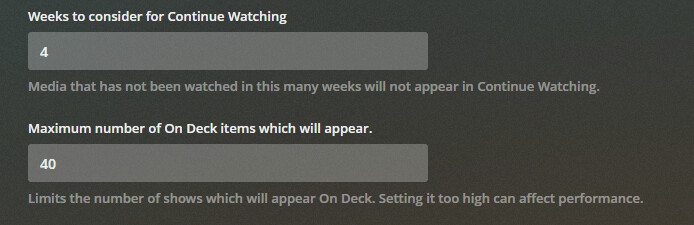
The only thing I can recommend is check your On Deck window settings and play around with them to see if it makes any change.
The settings I’m referring to are these in Settings → Library
Actor images in Plex has always had a little conflict, where movies and tv shows would override each others actor images depending on which agent was refreshed the latest.
This post: Is there a way to change actor images? Third party tools?, talks about removing user-defined actor images, which I think would be a good idea, if Plex themselves provided the actor images as metadata for the agents, rather than having people upload images to TMDB and constantly changing them.
Ah okay, yes I know what you’re talking about now.
If you’re using the Plex Movie and Plex TV Series agents then this shouldn’t happen any more as we use the same actor images across both so you won’t get TV specific character images showing up in movies anymore.
This is something we would need to source from somewhere and choosing a proprietary source for this and not allow users to contribute would definitely not be appreciated by some people who actively contribute to sites like TMDB. Right now we don’t have plans to change this as we still need a mechanism to allow users to upload missing cast images if they want to.