Yes, TVDB episode ordering.
This show has some bad data and it’s returning duplicates for episodes. I’ve filed a bug. Thanks for the report.
Bit of an edge case but said I’d report it. Library set to TMDB and the series Regular Show set to use TVDB ordering.
Season 03 & 04 have Terror Tales of the Park set of episodes. On TMDB they have these as separated into two but on TVDB they are combined.
I think plex is getting these mixed up in the back-end as the titles are kinda off. Notice the (2) and (1) references.


I think S03E04 is taking the metadata from S03E05 from TMDB as that title and summary match.
has anyone run into converting a library to the new scanner, racking up a massive amount of disk space? (yes i have/always have generate thumbnails off) : ) : (
i have MASSIVE libraries… and like 54gbs of space got eaten up by converting to the new scanner and running a refresh metadata all… (again generate thumbnails is off on all my libraries at all times : ) : (
refreshing the metadata on the last library crashed the server (first time my server has crashed in years! : ) : (
could the refresh metadata for the new tv scanner combined with the crash left a bunch of files or something? (had 70gigs free on the home drive before the refresh, 16gigs left when plex crashed)
EDIT- just went and did calculate sizes on the plex dir… and i think i found the culprit…
the plex PhotoTranscoder dir contains the gobbled up hard drive space… a whopping 36gbs hahaha… what is that dir? leftover from the refresh metadata?? can i delete the stuff in there?)
EDIT 2- actually searching this… seems thats a common size for that dir… i have no idea what my metadata dir size was before the refresh tv library metadata with the new scanner… but now its 120 gigs… which seems like a lot… swear it was nowhere near that before these new tv library scans… does the new tv scanner agent metadata just take up 10 times more space?
EDIT 3- server just crashed again : (
i was too scared to try and refresh the metadata, but i did do a normal scan of the library scan that keeps making the server crash… would it had tried to keep going with the refresh metadata all after the crash/restarting of the server?? going to switch back to the old agent… and hope that fixes things…
I use the following dir structure with the New Movie Agent
/Movies/A/Movies dir starting with letter A /Movies/B/...
And I only have to point to the the directory Movies and everything is recursively scanned.
The New TV Shows Agent is behaving like the old version of Movies scanners and itself. I have to add all the letters to my library.
I was hoping the new version would have this nice feature. May we have it?
I’m seeing something similar after adding a duplicate tv library to test the agent. Something is hoarding a ton of storage space and it seems the server is constantly scanning both libraries and refreshing metadata over and over. Causing the cpu to max out and potentially crashing the server.
I have my Plex server directory on an external ssd but something is still chewing up the internal drive. It kept caching something until the system drive only had 34mb of space left.
How will “Network” be tied to a show? At the show, season, or episode level? Because some shows switch networks during their runs like Futurama, Brooklyn 99, It’s Always Sunny in Philadelphia, etc. I know TVDB now ties it to each episode.
@jaquestati the PhotoTranscoder can go out of control unless managed outside of plex in my experience. For what seems like 2yrs now I have been deleting the contents of PhotoTranscoder via a cronjob weekly as if I don’t do this it grows unbounded. Stop and restart plex between deletes of this content. From what I understand it stores cached thumbnails for specific plex clients. Anyhow, deletion is completely safe IMO.
On metadata, once you switch over to the new agent and refresh of its data is complete make sure to run optimize and clean bundles. Clean bundles might take a few minutes to complete as it will delete all the old metadata from the old agent. See this comment from the alpha/preview thread.
When you change agents and new posters and other assets are downloaded these use more space and don’t remove the existing ones. As @dokuro mentions you need to Clean Bundles to free up space for those unused assets (this will also run as a scheduled task automatically if you have it enabled).
Some people may also see that their metadata folder for TV uses less space then it did before once the old data is cleared.
Crashes are potentially unrelated to increased storage. Could you please provide your server logs, that’s the only way I’ll be able to locate where the problem is happening.
Unfortunately no. You’ll have to have your show folders at the base path of the locations you specify.
For me it’s not metadata that is out of control. Optimizing, cleaning bundles, etc doesn’t free the storage. My metadata is stored on a different drive than what just filled up after I noticed the scanning out of control. Seems the culprit might be the phototranscoder or something else in the server cache as mentioned above. Multiple restarts and still haven’t recovered the storage space.
You can manually delete the files inside PhotoTranscoder folder if you want.
Any other things safe to clear from the server cache directory?
This is what I nuke weekly …
/var/lib/plexmediaserver/Library/Application\ Support/Plex\ Media\ Server/Plug-in\ Support/Caches/*
/var/lib/plexmediaserver/Library/Application\ Support/Plex\ Media\ Server/Plug-in\ Support/Data/*
/var/lib/plexmediaserver/Library/Application\ Support/Plex\ Media\ Server/Plug-in\ Support/Metadata\ Combination/*
/var/lib/plexmediaserver/Library/Application\ Support/Plex\ Media\ Server/Cache/PhotoTranscoder/*
and have never run into any problems. Just make sure plex is stopped before doing it. Also works well when doing backups.
No, rather stay away from the other folders. We also use the system /tmp path for certain things but that should be cleared after a system restart anyway.
Gotcha. I’ll check /tmp to be sure, but I did restart pms and the system a couple of times already. Thanks for the quick info!
QQ: are tags now considered part of the consolidated metadata from plex. So does not matter which ordering is used ? Reason I ask is that I have noticed directed by and written by have been removed from some shows after upgrade to the new agent.
Using Marcella S01E05 as one example, TVDB has both director and writer defined but TMDB does not. In plex then both tags are blank.
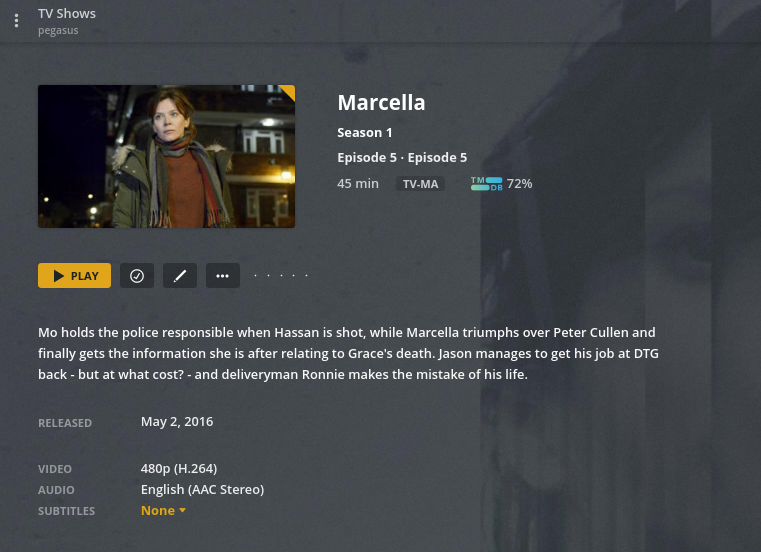
Checking on PMP client I see written by is now grey which means it once existed and no longer does.
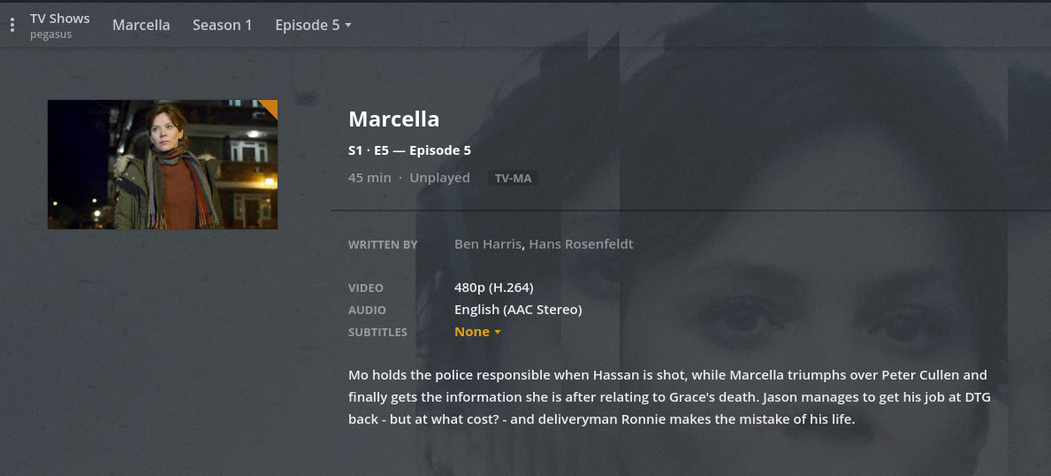
It shouldn’t matter in most cases but I’ll look into this specific case and see if there is maybe an issue.
Okay – I can give LOADS of other examples if you want.
