Hello everyone, I really hope this is the right area to post this question in.
I am wondering is there away to add box set media to one folder and you have to enter that specific folder to get the set of movies?
Example… I have Jurassic Park Ultimate Trilogy, it has 5 movie, - Jurassic Park I, Jurassic Park II - The Lost World, Jurassic Park III, Jurassic Park IV - Jurassic World, Jurassic Park V - Fallen Kingdom.
I have them in a single folder with all the movies in that folder.
My question is on plex, is there away to have a single folder displayed on plex (Jurassic Park Ultimate Trilogy) and you have to click on that folder to get all the movies inside that folder.
Again what I am looking to do is to have 1 single folder with all related movies in that folder, instead of have all on plex main screen as per screenshot.
When you use collections, you can choose to show or hide the movies contained within the collection when viewing your library. To do so, edit your movie library’s preferences and configure the Advanced setting “Collections.” There are options to show or hide items which are in collections, or to disable collections altogether.
The naming guidelines for movies are described here:
Very basically, they state:
Name your files exactly as they are named in whatever agent database you’re using; remove special characters such as “:” (just a space in their place).
If you have, or plan to have, special features, place your movies in sub-directories using the exact name of the movie, as described above. The movie agents are more forgiving of nested folder structures (you collections/box sets directories), but the documentation doesn’t really say that that’s supported.
Include the release year in parentheses at the end of the title in cases where there may be ambiguity, such as here with multiple movies with “Jurassic Park” in the title.
Examples:
Movies\  <--- Library points here, name not important
     Jurassic World The Fallen Kingdom (2018)\
          Jurassic World The Fallen Kingdom (2018).mkv
     The Lost World Jurassic Park (1997)
          The Lost World Jurassic Park (1997).mkv
You can probably still keep Movies Box Collections\Jurassic Park Ultimate Collection\ your path as well but, again, it’s not documented as supporting that deep a nested path.
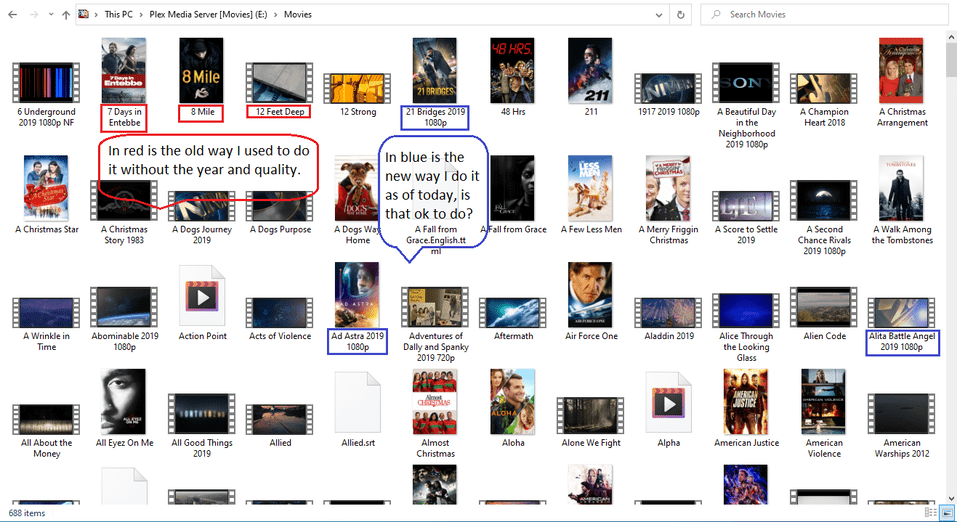
Yes, I believe I understand what you are say, I will be providing screenshots to show you how I have it setup. That I believe is correct if not I will correct everything that is wrong..
Sorry for all the screenshot but it would be easier to show you then explain to you, I hope these are ok.
If you include the year, it must be in parentheses. If you include quality information, it must be in square brackets so that it won’t be treated as part of the movie title.
Is there any software available to do the adding “()” & “” when doing multi files or do you have to do it one at a time for everyone that you are putting the date and quality on.
I do use 2 different types of software but they never put that in the title, I do it manually.
Also keep in mind when you’re organizing your media that if you have companion files (extras, subtitles, et al…), the movie file and the extras should be in a sub-directory of the same name as itself. From your screenshot, you have subtitles for Allied. Subtitles should also include the language code. So it should be: