I’m gonna need to see the full logs from your Fire TV and from PMS after reproducing the problem.
Sure. Here’s a fresh set of logs, just now:
Plex Media Server Logs_2021-01-15_18-36-30.zip (3.6 MB)
FireStick.log (1.3 MB)
The file I played is:
This Is Us (2016) - S01E08 - Pilgrim Rick [WEBRip-1080p][8bit][x264][EAC3 5.1]-KINGS.mkv
And the timestamp is: 1/15/2021, started playback at 6:31PM, ended playback at 6:33PM.
The full 2-minute or so playback, it was buffering, and the PMS dashboard shows that it is transcoding from 1080p to 1080p.
If it matters, here’s the culprit srt that’s causing the transcode (I renamed the srt to txt to allow me to upload it here):
This Is Us (2016) - S01E08 - Pilgrim Rick [WEBRip-1080p][8bit][x264][EAC3 5.1]-KINGS.en.srt.txt (60.9 KB)
And again, why can my PMS not handle 1 very easy 1080p transcode considering that it’s HW transcode. My J5005 CPU is more than capable of doing that and couple that with the fact that an HW transcode can do even better than normal software transcode.
Can you send me the XML for that file? Investigate Media Information and Formats | Plex Support
The app appears to be having trouble identifying the bitrate for the audio stream so it can’t configure it properly.
I don’t think it’s the subtitle causing the problem. I attached it to another video and it played fine with the subtitles.
If you know how to remux files, I would try removing the audio and see if it still has the issue.
Here you go: https://www.dropbox.com/s/daosz20hrtheo1k/3419.xml?dl=0
Unfortunately, I never tried remuxing files. I can try and search how to though. Here are some points worth to point out though:
- The issue only happens on the Fire Stick 4K, not on the Nvidia Shield TV Pro.
- In the Fire Stick, if I change the subs to either None, PGS, or non-external SRT, everything works. If it’s not a problem with the external SRT, why this behavior?
- This issue happens on all episodes I’ve watched for this series/season so far. So from S01E01-S01E11, so far.
Your video doesn’t have another subtitle track. How are you picking something else?
I’m talking about in general, for episodes 1 to 11. For this specific epsiode (8), here’s what I have:
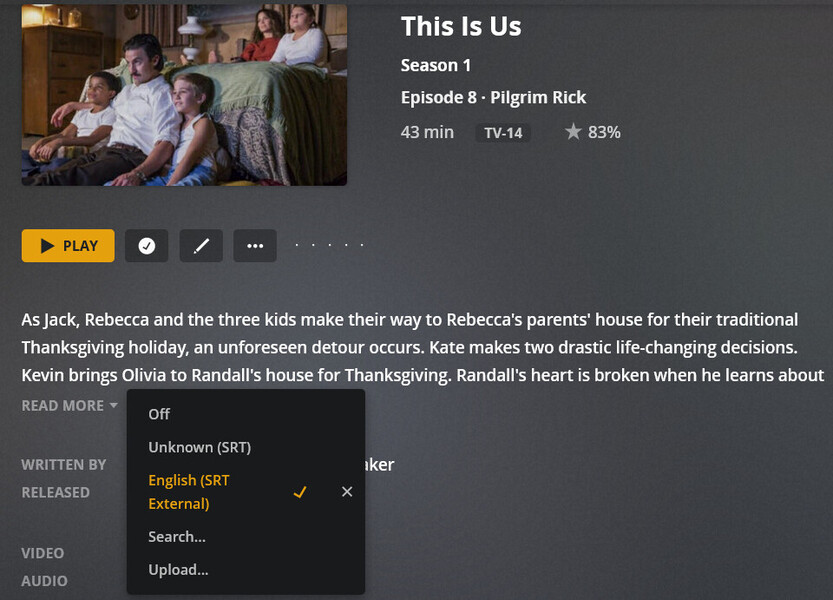
So why does it have an “unknown (SRT)” and an “external SRT”? From what I understand, unknown (SRT) means an embedded SRT where the language is undefined.
Also, I played the same file with external SRT just now and it direct played just fine. So it really looks like the problem come and go and is not consistent.
The XML file will show all subtitle associated with a file. The one you provided only shows a single external srt file. I don’t know why you see another option there. I have seen cases where a 3rd party subtitle agent will add a subtitle, then if you move your media, somehow the link to the old subtitle exists and a client may try to use it. This will fail and cause issues.
Although that is not related to your buffering issue. The above is fixed by Plex Dancing the file.
If the issue comes and goes, it could be something going on with your network. If you have anything to monitor that, I would check and see if something else is going on. You should also check if you have any type of stream optimization features enabled on your router. This can affect playback too.
Ok, that makes sense. I was using Subzero as a subtitle agent not long ago and have seen a similar issue in the past. I then since switched to Bazarr as it doesn’t rely on Plex agents to work.
I’m using an enterprise open-source router/firewall (pfsense) and there is no stream optimization of any kind with it. How can it be a network issue if the Plex client is somehow “confused” if it should hw transcode or not?
Also, if it ever decides to transcode, why is it buffering? A 1080p trancode is not too resource-intensive.
In my other home where there are three other Fire Stick streaming off of another PMS (also a Debian box with the same PMS beta version) and have no issues because all of the users there do not use subtitles.
Amd if it was a network issue, I will have the same problem with my Nvidia shield pro in the same network, which I don’t.
Another thing that I discovered just now is if I play the affected files with NO subtitles, they direct play fine perfectly and while it is playing I turn on the external SRT subtitles and the direct play continues. I highly doubt this is a network issue. I’m still convinced that this is a Fire Stick-isolated issue here. Don’t you agree?
I just did the Plex Dance on both my TV and Movie libraries and I still get the same subtitle options for S01E08. Any ideas why?

Also, I’m not sure if you missed this but the XML that I sent you clearly shows the “unknown (SRT)” subtitle option:
<Stream id="74840" streamType="3" default="1" codec="srt" index="2" bitrate="0" requiredBandwidths="1,1,1,1,1,1,1,1" displayTitle="Unknown (SRT)" extendedDisplayTitle="Unknown (SRT)"> </Stream>
<Stream id="78761" key="/library/streams/78761" streamType="3" selected="1" codec="srt" language="English" languageCode="eng" format="srt" displayTitle="English (SRT External)" extendedDisplayTitle="English (SRT External)"> </Stream>
What did you mean when you told me that the “unknown (SRT)” subtitle option is not in the XML?
Yeah, I missed that somehow. Looking back, there is an embedded srt file there.
What do you mean the whole library? You Plex Dance individual items. You don’t use the same steps for an entire library, it won’t work.
The network issue was a guess. Different devices handle errors differently so it’s hard to compare with a working NVidia Shield… I still think it’s the audio track causing issues.
Another thing I just noticed when I wen back to look at your XML is that the audio track is index 0 and the video track is index 1. Typically, these are opposite and video is 0. I don’t know if this makes a difference, but the app on the Amazon Fire TV may be having trouble dealing with this.
Remuxing the file with the video and audio in the normal order may fix your issue.
Ok, now I’m confused about the Plex Dance. Ever since I did that in the past, it was for a whole library. There’s even this article about it that talks about moving everything from the library folder to a temporary folder: The Plex Dance ™
What do you mean the Plex Dance is for individual items?
Yeah, if it was a network issue, I would see it happen more often and not only during initial negotiation between client and server. Do you have any ideas about why it’s buffering during transcoding though?
Well, I experienced the same issue with this file:
6502.xml.txt (3.9 KB)
The video is index 0 for this and audio is index 1, so that’s not it. Also, this file cannot be played even with the embedded SRT subs on it. The only thing that works is to start the playback with None and then pick a subtitle during the playback.
Any other ideas?
It looks like it’s happening across the board (all shows) now. This has got to be some bug with PMS. I had no issues in the recent few weeks with subtitles. I have PMS set to auto-update so an update might’ve destroyed something, right?
move all files for the media item
That is referring to the specific movie/show you are trying to fix (i.e. posters, subtitles, etc). If you follow the steps for the Plex Dance for an entire movie.tv show library, it won’t work. The Dance requires moving the items out of the folder. If you do that for the entire library, PMS will see the folder as empty/inaccessible. PMS does not update anything when the library folder is seen as empty/unavailable. So you end updating nothing when you do an entire library.
If you need to do an entire library, leave at least 1 item so it won’t appear to be empty.
Do you have the option to “Adjust Automatically” enabled under the video quality settings? There’s a bug where subtitles don’t work right with this setting enabled.
Ahh, I see what you mean. I didn’t realize that that was the case. I thought those steps were always for the whole library. That’s probably why when I’m going through the steps, I don’t even see any metadata being erased out of the library. I can try again.
Yes, I do have “adjust automatically” enabled but I tried disabling that yesterday and it didn’t seem to make a difference. I’ll try again later. What particularly is the bug? Is it documented somewhere and is it a pretty new bug?
With that setting enabled and a subtitle selected, you can’t start playback. Switching during playback works just like you described. This bug has been around for a little while. The auto adjust setting is being updated so it should be fixed in the future.
If this was an issue though, shouldn’t it also affect the Shield? I never had this issue since I started using Plex a few years ago.
Yes, this bug also applies on the Shield. This bug only shows up if the stream is being transcoded. The Shield maybe direct playing the file due to better codec support so you wouldn’t have seen this. In the Shield, change you quality settings to something low to force the transcode and enable this setting and see if you get the same problem.
Ok but the behavior in the Fire Stick is the other way around. The subtitles cause the stream to transcode. In the Shield, there is no transcoding happening whether the subtitled are on or off, so no bug.
Do the Fire Stick logs show that this issue is 100% because of the bug you pertain to?
