[BUG] Can no longer play any movie without age rating

Server Version#: 1.41.4.9463
Player Version#: 4.145.1

Whenever I try playing a movie without age rating on one of my players which I have configured to play trailers before the main movie.

This error message (or similar ones on other players like FireTV v2 or 3) is popping up, no main movie is starting:

The reason is that the local trailer file for one of my movies is missing. I had it once put into the movie folder of a certain movie, but it turned out to be a “wrong” trailer (for another movie), so I deleted it from the movie folder.

Plex is still showing it on the movie detail page:

Coincidally, the age rating of that movie is “PG” (one of the few in my German library).

Looking for trailers, I found out that the “bad” trailer entry of this movie is the only one of any “PG” rated movie. Following a Plex internal logic, this single (and now missing) trailer is tried to be played whenever a movie without age rating is played.

This throws an error (cannot be played) and then, no main movie is played.

Here is a list of weird bugs I found in this case:

a) metadata bug… the local trailer file is missing, but Plex is not deleting the trailer for this movie.
b) Plex is always trying to play the same trailer without checking first, if the file exists.
c) Plex is not following its own playlist with this error occurring (two trailers, then main movie), but stopping it - resulting in no movie being played (regardless of used client).
d) Plex is trying to be smart when asked to play local trailers before a movie that does not have an age rating - resulting in choosing only US age ratings in a German library (consisting almost completely of German age ratings like “FSK…” and “de/…”.

A couple of work-arounds:

  • configuring players to not play local trailers before a movie
  • configuring the server to not use local extras
  • using a player that’s configured to not play any trailers for a minute, then continuing on any other player…

Is there a way to initiate local trailer scan including deleting non-existant trailers?
Refreshing metadata did not help, analyzing the movie did not help, correct movie identification did not help.

Please help - and please correct those bugs, too.

Here’s how a developer could try and replicate the problem:

a) metadata bug… the local trailer file is missing, but Plex is not deleting the trailer for this movie.

Not sure, in this case, I added the movie, later added a local movie trailer “…-trailer.mkv”. After some weeks, I added another path to the library, duplicated the movie directory - and after it successfully was added as a duplicate, I removed the original folder in the original library path. Finally, I in the new path, I deleted the local trailer only. Resulting in trailer still bein in Plex but cannot be played.

b) Plex is always trying to play the same trailer without checking first, if the file exists.

No test necessary. This is bad practice.

c) Plex is not following its own playlist with this error occurring (two trailers, then main movie), but stopping it - resulting in no movie being played (regardless of used client).

Again, bad practice… if it creates a sequence of movies (as usual with trailers), it should not be stopped by any playback error.

d) Plex is trying to be smart when asked to play local trailers before a movie that does not have an age rating - resulting in choosing only US age ratings in a German library (consisting almost completely of German age ratings like “FSK…” and “de/…”.

Here you go.

  • Create a German language library, add a couple of movies with German age ratings “de/12” or whatever.
  • Make sure, each of these movies has a local trailer in its folder which gets acknowledged by Plex as new trailer “…-trailer.mp4” or similar.
  • Add a number of other movies (two at least) that don’t have local trailers.
  • From these new additions, please remove the age rating of one completely, and add a local trailer file to it.
  • From the same new additions, please change another movie’s age rating to “PG” and add a local trailer file to that movie, too.
  • Configure your system to allow local trailers, but disallow any trailers for upcoming or blu-ray releases.
  • Configure your player to play two trailers before playing a movie.
  • Play any movie with a German age rating… different other trailers from movies with similar age ratings will be played
  • Play the movie that has an empty age rating field. You will find that always the same “PG” rating movie’s trailer will be played. Remember: this is a German library which seldomly has “PG” rated movies.
  • Now, delete the trailer from the “PG” movie, let Plex find that. Now, play the same movie with its empty age rating field. No trailer will be played at all, even if you have all kinds of German movies with all kinds of German age ratings.
  • Now, us a corrupt (unplayable file) as on of the movie’s trailer, delete all other local trailers. You will not being able to watch a movie any longer without removing the feature of watching ratings alltogether.

Missing files for local extras are supposed to be cleared automatically when you enter the movie’s preplay page.
If that doesn’t work, it should happen when you manually trigger Refresh Metadata on the movie.
If that still doesn’t work, you need to investigate further:

  1. is the Plex database damaged?
  2. is the movie perhaps matched with a no longer supported metadata agent? Inspect the plex media info XML and look at the content of the first XML property named guid="...
  3. Are there any media sources which are listed in the properties of the library, in the tab “Add Folders”, either missing, or unaccessible, or completely empty?

Yes, this usually works, but on this it does not work.

How would I know? I used the DBrepair tool a few months ago to “clean it” and it worked flawlessly.

Interesting… I indeed have empty folders in my list of library source folders. I will fill them ASAP and report.
But how would this influence only this one movie trailer and others not?

No more empty source folders… all folders contain at least one recognized movie in that library.

But it is still not working on the same movie “Jeff Jackson: Süß ist der Tod”. Extra file is deleted but shown in Plex.

You’re on QNAP. I wonder if this has any effect:
Rename both the folder and the movie file name to
Jeff Jackson: Suess ist der Tod (2021) - {tmdb-809349}

(provided that you are using the modern movie agent)

Okay, before renaming it, I tried to load a fake trailer into that movie folder… and was able to replace the missing trailer with the newer fake but existing trailer (it was the local trailer from another movie renamed).

Half an hour later, I deleted the fake trailer. But it had the same result. Plex is showing the fake trailer although the file is already deleted.

Then, I renamed the folder (in-place) and the movie is playable from Plex (so it acknowledged the change), but the reference to the fake trailer is still there.

So, deleting that trailer is obviously the problem… replacing it works :slight_smile:

Isn’t there just a way to remove unwanted extras from Plex database manually?

I mean, the trailer feature definitely needs a rehaul (including a UI way of doing that), but I just want to get rid of this unwanted entry.

Plex Dancing the movie did help.

Now, on to the ca. 850 movies in my German library where Plex chose to provide an English trailer - including many blockbuster movies. How do I fix this without Plex dancing every single one of these.

I know that Plex sometimes chooses English ones if no German one is available. Fun Fact: If I add a new library and put some of these movies in there, I get German trailers for these - so I know it must have been a bug at some point in history.

I can get you movie titles if anyone cares…

Please show me the Plex media info XML of one such movie before you plex dance it.

Here is one movie:
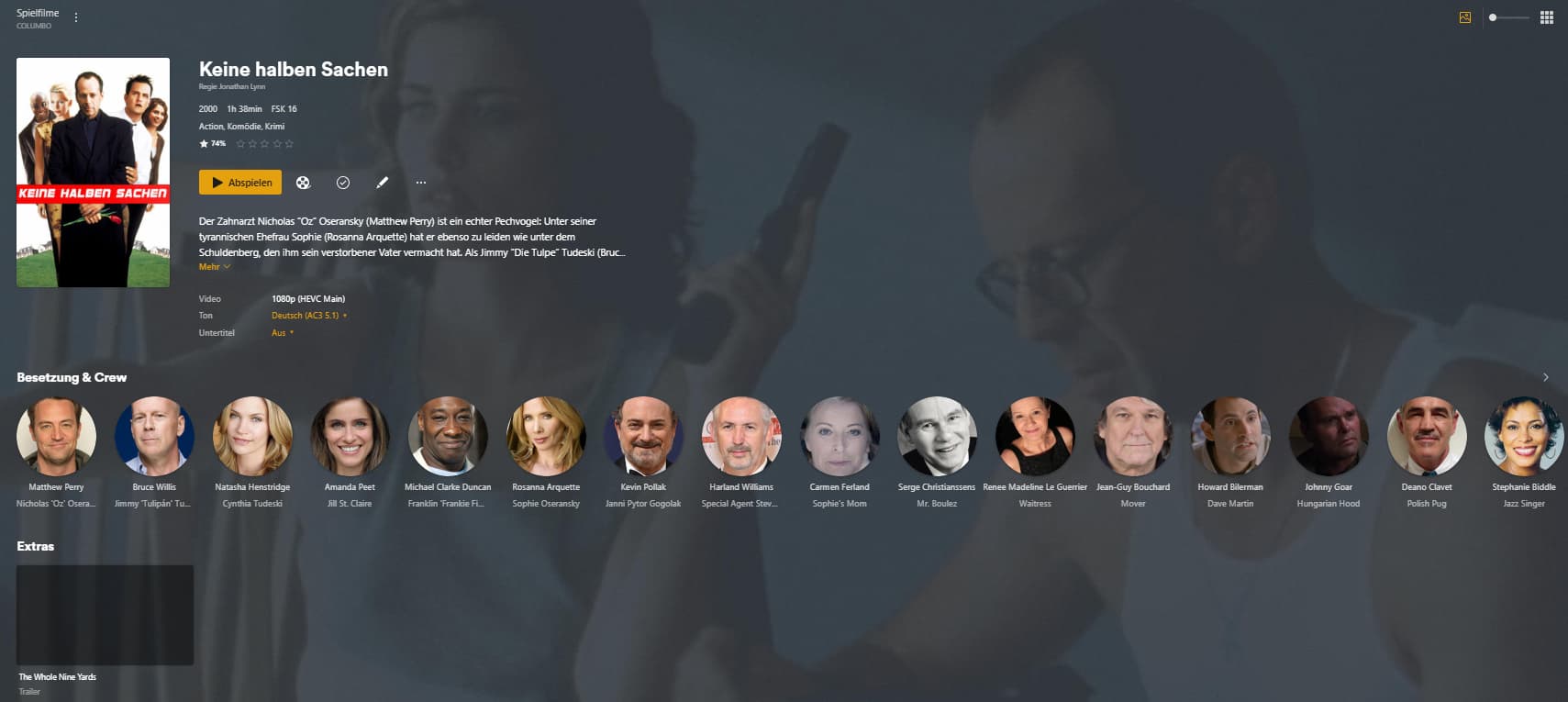
“Keine halben Sachen”.
I have it in one of my libraries called “Spielfilme”. It shows an English trailer.

If I just add this to another movie library on the same PMS of mine (called “ungesehene Filme”), it does not get a trailer at all. Which is what I would like to have (if no German trailer is available).

But of course, I would like to have this in the other library where Plex gifted me with an English trailer.

I have hundreds of these… in my humble view, I need an easier way to get rid of trailers that I don’t want and/or a way of “online searching” for new trailers (including not having ones if I had something before).

Here comes the XML info on the trailer:

<Extras size="1">
<Video ratingKey="66150" key="/library/metadata/66150" guid="iva://api.internetvideoarchive.com/2.0/DataService/VideoAssets(517112)?lang=en&bitrates=80,212,450,750,1500,8000&duration=140&adaptive=1&dts=0" type="clip" title="The Whole Nine Yards" titleSort="Whole Nine Yards" summary="" index="1" year="2015" thumb="/library/metadata/66150/thumb/1566147801" subtype="trailer" duration="140000" originallyAvailableAt="2015-04-06" addedAt="1566147801" extraType="1">
<Media id="80296" duration="140000" bitrate="1500" width="1280" height="720" aspectRatio="1.78" audioCodec="aac" videoCodec="h264" videoResolution="720" container="mp4" premium="1" hasVoiceActivity="0">
<Part id="83760" duration="140000" container="mp4" key="/services/iva/assets/517112/video.mp4?bitrate=1500" optimizedForStreaming="1">
<Stream id="198556" streamType="1" codec="h264" index="0" bitrate="1500" height="720" width="1280" displayTitle="720p" extendedDisplayTitle="720p (H.264)"> </Stream>
<Stream id="198557" streamType="2" selected="1" codec="aac" index="1" channels="2" language="Englisch" languageTag="en" languageCode="eng" displayTitle="Englisch (AAC Stereo)" extendedDisplayTitle="Englisch (AAC Stereo)"> </Stream>
</Part>
</Media>
<Media id="80297" duration="140000" bitrate="750" width="640" height="480" aspectRatio="1.33" audioCodec="aac" videoCodec="h264" videoResolution="480" container="mp4" premium="1" hasVoiceActivity="0">
<Part id="83761" duration="140000" container="mp4" key="/services/iva/assets/517112/video.mp4?bitrate=750" optimizedForStreaming="1">
<Stream id="198558" streamType="1" codec="h264" index="0" bitrate="750" height="480" width="640" displayTitle="480p" extendedDisplayTitle="480p (H.264)"> </Stream>
<Stream id="198559" streamType="2" selected="1" codec="aac" index="1" channels="2" language="Englisch" languageTag="en" languageCode="eng" displayTitle="Englisch (AAC Stereo)" extendedDisplayTitle="Englisch (AAC Stereo)"> </Stream>
</Part>
</Media>
<Media id="80298" duration="140000" bitrate="450" width="640" height="480" aspectRatio="1.33" audioCodec="aac" videoCodec="h264" videoResolution="480" container="mp4" premium="1" hasVoiceActivity="0">
<Part id="83762" duration="140000" container="mp4" key="/services/iva/assets/517112/video.mp4?bitrate=450" optimizedForStreaming="1">
<Stream id="198560" streamType="1" codec="h264" index="0" bitrate="450" height="480" width="640" displayTitle="480p" extendedDisplayTitle="480p (H.264)"> </Stream>
<Stream id="198561" streamType="2" selected="1" codec="aac" index="1" channels="2" language="Englisch" languageTag="en" languageCode="eng" displayTitle="Englisch (AAC Stereo)" extendedDisplayTitle="Englisch (AAC Stereo)"> </Stream>
</Part>
</Media>
<Image alt="The Whole Nine Yards" type="coverPoster" url="/library/metadata/66150/thumb/1566147801"/>
</Video>
</Extras>

I also checked the time stamp of when this was added and the UNIX timestamp converts to:

Wed Aug 19 2015 11:00:25 GMT+0000

The “updateAt” timstamp converts to:

Mon Jan 10 2022 22:30:22 GMT+0000

The primaryExtraKey of the Video XML object:
primaryExtraKey=“/library/metadata/66150”

Does that help or do you need the complete media container? And if so, is there a way to send this privately?

These are only the data about the extras.
I need to see the data about the main movie.

Sure, is there a way to send this to you privately?

Sent via DM to you.

As I thought:
guid="com.plexapp.agents.imdb://tt0xxxxxxx?lang=de"

This is the obsolete, legacy agent. With all its quirks, restrictions and bugs which are never going to be fixed anymore.
Performing the Plex Dance has finally made the movie to get matched with the modern agent.

Well, that’s not true. It has the same GUID in the other library.

Then show please the guid again after the Plex Dance.

As you requested, I did not do a Plex dance of that “Keine halben Sachen” movie. I just added the movie file to another library of mine where it has the following guid:

guid=“com.plexapp.agents.imdb://tt0190138?lang=de”

The original movie which I Plex danced was “Jeff Jackson: Süß ist der Tod” (the one with the trailer file deleted but still present in Plex). It has the same type of guid.

guid=“com.plexapp.agents.imdb://tt14376526?lang=de”

This is not a library or agent bug. It’s a general trailer handling bug. Try to think with me alongside this path, please.

So that means that you are still using the old obsolete, “no longer getting fixed” agent in all your libraries.
Yes, the trailer handling is also “legacy code” in these.

Have you compared it to a test library using the modern agent?
(please create the library from the beginning with the default, modern agent. don’t convert the library from old to new.)

Well, I have this library in which one movie had a problem not deleting a missing local library from its metadata - while thousands of others in the same library work as expected.
How do I simulate this?

Now, I am asking how to get rid of English trailers in a library of mine with Plex not offering a way to delete “online trailers” - no matter which library or agent is being used. I mean, the trailers are there… how do I get rid of this.

The “legacy agent” is not putting these English trailers to my library (I have proven this). It populates German trailers or none. But at one point in history, these English trailers were added to my movies. I need to find a way to get rid of these.

How is creating a new library helping me with that? If I create a new library, there are no unexpected English trailers in there, I guess. Unfortunately, I manually curated almost all of my movies with covers and labels (hundreds of them). I will loose all of that when creating a new library.

Coming back to my problem: I have a library and I need to get rid of hundreds of individual trailers which Plex added to my movies at one point in time. Is there a way to do it without starting from scratch?